
People use ChatGPT, Copilot, website chat widgets and digital assistants every day. Yet the line between a chatbot and an AI agent still feels blurry. OpenAI reported in July 2026 that more than five million people use Codex weekly, showing how quickly task-based AI is moving into everyday work.
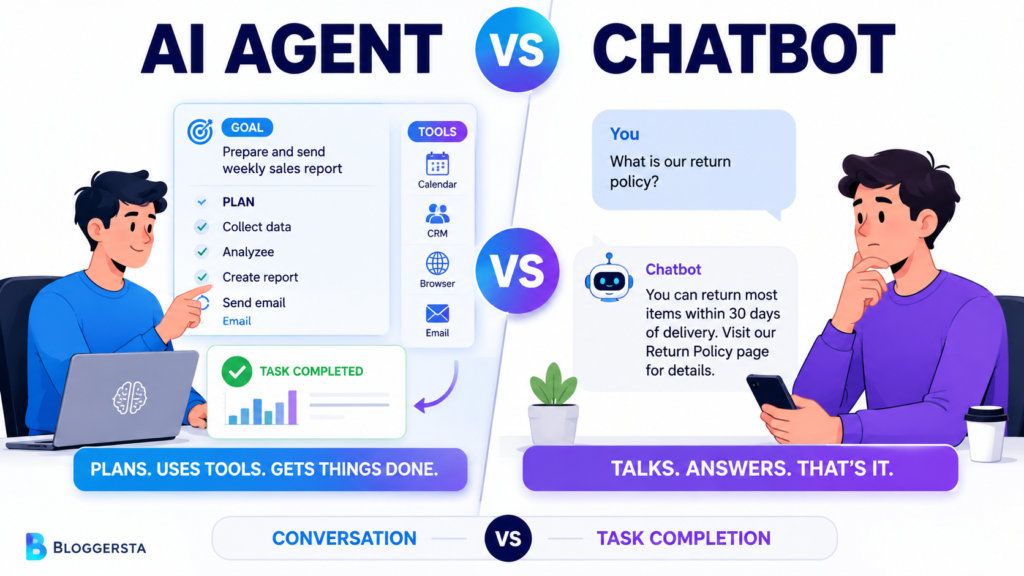
So, what separates an AI agent vs chatbot? Chatbots focus mainly on communication, while agents focus on outcomes. A chatbot can suggest hotels for your vacation. An agent may compare prices, check your calendar, calculate the budget and pause for approval before booking. Both may use a large language model but their planning, tools, actions and independence differ.
| Quick Answer: AI Agent vs Chatbot The main difference between an AI agent and a chatbot is action. A chatbot answers questions and shares information through conversation. An AI agent receives a goal, creates a plan, uses connected tools, performs approved actions and reviews the results. A chatbot supports the user, while an agent moves a multi-step workflow toward completion. Chatbot = conversation AI agent = goal + plan + tools + action Put simply, chatbots talk. AI agents do. |
What is the Difference Between AI and Chatbots?
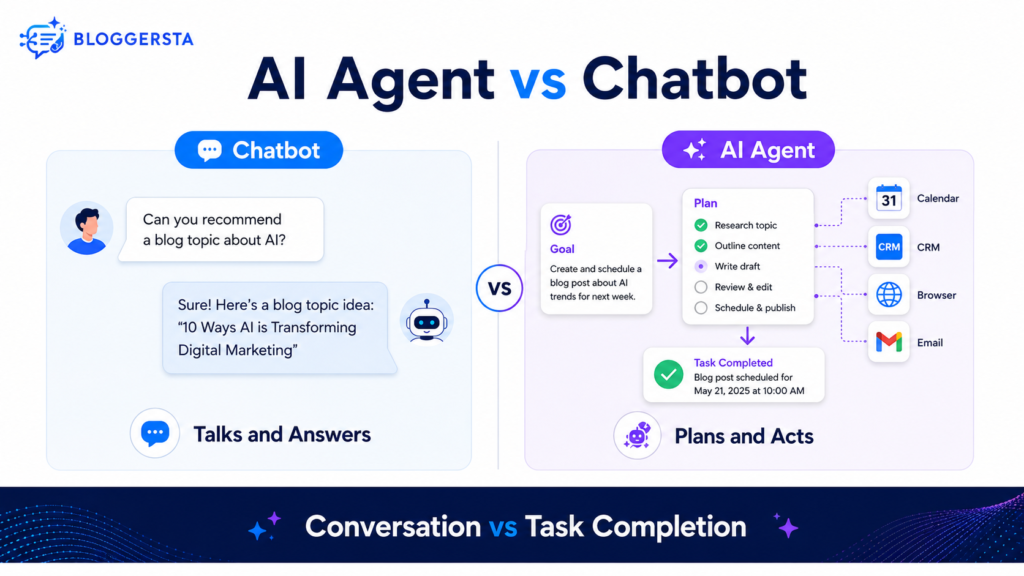
AI is the wider field of technology that allows machines to analyze information, create content, recognize patterns and perform tasks. A chatbot is one application of AI designed mainly for conversation.
However, not every chatbot uses advanced artificial intelligence. Some basic systems follow menus, keywords or fixed decision trees. Modern chatbots may use natural language processing, machine learning, generative AI or a large language model.
| Technology | Main Purpose |
| Artificial intelligence | Broad field covering intelligent systems |
| Chatbot | Communicates through text or voice |
| AI agent | Pursues goals and performs actions |
| AI assistant | Helps users make decisions or complete work |
AI includes machine learning, computer vision, robotics, generative AI, autonomous systems and conversational AI. A chatbot represents only one possible interface.
What is an AI Chatbot?
An artificial intelligence chatbot is a conversational system that reads a user’s message and returns a relevant response. It may communicate through a website, mobile application, messaging platform or voice interface.
Its basic process looks like this:
User Message → Language Processing → Response → Next User Message
Businesses often use chatbots for:
- Customer support
- FAQ responses
- Product guidance
- Lead collection
- Information retrieval
- Appointment assistance
- Text generation
A customer support chatbot might answer, “What is your return policy?” It can find the relevant information and present it clearly. However, it may not independently check the customer’s order, confirm eligibility, create the return and arrange shipping.
IBM describes chatbots as programs that simulate written or spoken human conversations. It also notes that some are simple menu-based systems, while modern versions use AI and natural language processing.
A chatbot can be smart without being autonomous.
What is an AI Agent?
An AI agent is a software system that works toward a goal by reasoning, planning, using tools, taking actions and reviewing results.
Suppose a business owner gives this instruction:
“Create and send my weekly sales report.”
An agent may decide that it needs to collect sales figures, compare weekly performance, create a chart, write a summary and prepare an email. It could then access approved tools and complete those steps.
An agent usually relies on five core parts:
- Goal: the desired outcome
- Reasoning: deciding what must happen
- Planning: dividing the job into subtasks
- Tool integration: connecting with browsers, APIs, calendars, databases, email or CRM platforms
- Feedback: checking results and changing the plan when needed
Goal + Planning + Tools + Action + Feedback = AI Agent
Google identifies models, grounding, tools, data architecture orchestration and runtime as major building blocks of modern AI agents. Tools connect the model’s reasoning with real systems through functions and API connections.
These goal-driven abilities become clearer when you understand how agentic AI works.
AI Agent vs Chatbot: Key Differences
A chatbot resembles a receptionist who answers questions. An AI agent acts more like an assistant who receives a goal and handles the required steps.
| Feature | AI Chatbot | AI Agent |
| Main purpose | Conversation and support | Task and goal completion |
| Starting point | User message | High-level objective |
| Workflow | Turn-by-turn replies | Multi-step workflow |
| Planning | Limited or user-directed | Creates a task plan |
| Tool use | Optional or limited | Central to many tasks |
| External actions | Usually minimal | Acts through approved tools |
| Memory | Often chat context | May maintain task state |
| Adaptation | Waits for another prompt | Reviews results and adjusts |
| Human role | Directs each exchange | Sets goals and approves actions |
| Example | FAQ assistant | Sales-report agent |
Still, the categories can overlap. A chatbot may provide the interface for an agent. You might type a request inside a familiar chat window, while the underlying AI chatbot agent plans and performs work behind the scenes.
IBM explains that nonagentic chatbots usually need continuing user input. Agentic systems may create subtasks, select tools, retain context and revise their plans.
How AI Agents Work Differently from Chatbots
Consider the weekly sales report again. A chatbot could explain the process or summarize numbers you paste into the conversation. An agent can manage more of the actual workflow.
1. Receive the Goal
The user says, “Prepare my weekly sales report.”
2. Understand the Context
The agent identifies the reporting dates, sales accounts, required metrics and approved recipients.
3. Create a Plan
It divides the work into data collection, comparison, analysis, document creation and delivery.
4. Use Connected Tools
The agent accesses an approved CRM, spreadsheet, dashboard or email service.
5. Take Action
It creates the report, builds charts and prepares the email.
6. Review and Request Approval
The agent checks totals, flags missing data and pauses before sending.
Goal → Plan → Tools → Action → Review
A chatbot can guide you through every step. However, you would usually perform the external actions yourself.
AI Agent Examples vs Chatbot Examples
AI agent examples generally involve task execution, while chatbot examples focus on communication.
| Situation | Chatbot Response | AI Agent Workflow |
| Travel | Suggests hotels | Compares options and builds an itinerary |
| Customer support | Explains a return policy | Checks the order and starts a return |
| Marketing | Suggests campaign ideas | Researches, drafts and schedules tasks |
| Coding | Explains an error | Inspects files, edits code and runs tests |
| Sales | Answers product questions | Qualifies leads and updates the CRM |
| Research | Summarizes supplied text | Searches sources and creates a cited report |
Business Agents
Business agents may qualify leads, update CRM records, prepare reports and schedule sales follow-ups. Microsoft says Copilot agents can retrieve information, summarize data, send emails and update records.
Research Agents
A research agent can search several sources, compare evidence, identify gaps and prepare a structured report. It may also use retrieval-augmented generation to access current or private knowledge before answering.
Coding Agents
Coding agents can inspect project files, write code, run commands, check test results and revise failed changes.
Readers searching for AI agent chatbot GitHub resources can explore the official GitHub AI-agents topic page, which groups open-source libraries, workflow builders, coding tools and multi-agent projects.
Chatbot vs ChatGPT: is ChatGPT a Bot or AI?
ChatGPT is an AI product presented through a conversational interface. It works like a chatbot during normal conversations, while some features can perform agentic work.
ChatGPT as a Chatbot
ChatGPT behaves like a chatbot when you:
- Ask questions
- Request explanations
- Generate text
- Brainstorm ideas
- Rewrite content
- Summarize information
In those situations, the interaction remains prompt-and-response.
ChatGPT as an AI Agent
ChatGPT becomes agentic when it can plan longer tasks, browse websites, use enabled applications, work with files or perform approved actions.
OpenAI’s ChatGPT agent mode can browse and take actions, while workspace owners can control available apps, roles, websites and permissions. OpenAI also offers workspace agents that teams can build for repeatable tasks, connect to tools, run on schedules and trigger through an API.
So, is ChatGPT a chatbot or AI agent? It can provide either experience, depending on the chosen feature, available tools and task.
New users can begin with this step-by-step ChatGPT guide before exploring advanced agent workflows.
AI Agent vs AI Assistant
An AI assistant helps the user, while an AI agent works toward a defined outcome.
| AI Assistant | AI Agent |
| Responds to requests | Pursues a goal |
| Suggests actions | May perform approved actions |
| Usually reactive | More proactive |
| Supports the workflow | Manages parts of the workflow |
| Needs regular direction | Continues after initial instructions |
An AI assistant might recommend five meeting times. An agent may check calendars, identify a suitable slot, send invitations and update the schedule after receiving approval.
IBM explains that assistants typically depend on defined prompts, while agents can choose tools, divide problems into subtasks and plan their next steps.
Modern products often combine an AI assistant, chatbot and agent inside one interface.
Also Read: What is Agentic AI? A Simple Guide
Are AI Agents Just Bots?
No. AI agents are not simply traditional bots, although people sometimes use “bot” as a broad informal label.
Traditional bots often:
- Follow predefined rules
- Trigger fixed responses
- Complete narrow tasks
- Lack planning and reflection
AI agents may:
- Interpret a broader objective
- Plan several subtasks
- Select suitable tools
- Adapt after failures
- Act across connected platforms
Not every bot uses AI and not every AI-powered chatbot possesses agency. The deciding question is whether the system can move a task forward within defined permissions.
Popular AI Chatbot Agent Apps and Platforms
An AI Chatbot agent app may focus on research, customer service, coding, scheduling or business automation.
| Platform | Primary Use | Relevant Capability |
| ChatGPT agent | Web and application tasks | Browsing and approved actions |
| ChatGPT Workspace Agents | Repeatable team workflows | Tools, apps, schedules and API triggers |
| Microsoft Copilot Agents | Workplace processes | Information retrieval and business actions |
| Salesforce Agentforce | CRM and customer workflows | Business data and customer-service actions |
| Google Agent Development Kit | Custom agent development | Planning, tools and multi-agent workflows |
Salesforce describes Agentforce as a platform for designing and coordinating agents that connect with business data, applications and workflows.
Google’s Agent Development Kit supports building agents that use LLM reasoning and multiple tools to complete goal-based tasks.
Product access, pricing and included features can vary by plan and administrator settings.
How Businesses Use AI Agents and Chatbots
Customer-support teams may use chatbots to answer common questions and collect initial details. Agents can search account records, update tickets or begin approved return workflows.
Sales teams may use chatbots for product questions. Agents can qualify leads, schedule follow-ups and add notes to a CRM.
Marketing teams can use chatbots for ideas and drafts. Agents may research competitors organize campaign steps and monitor connected data.
Operations teams can use chatbots to guide employees toward forms or policies. Agents can gather records, prepare summaries and route tasks between systems.
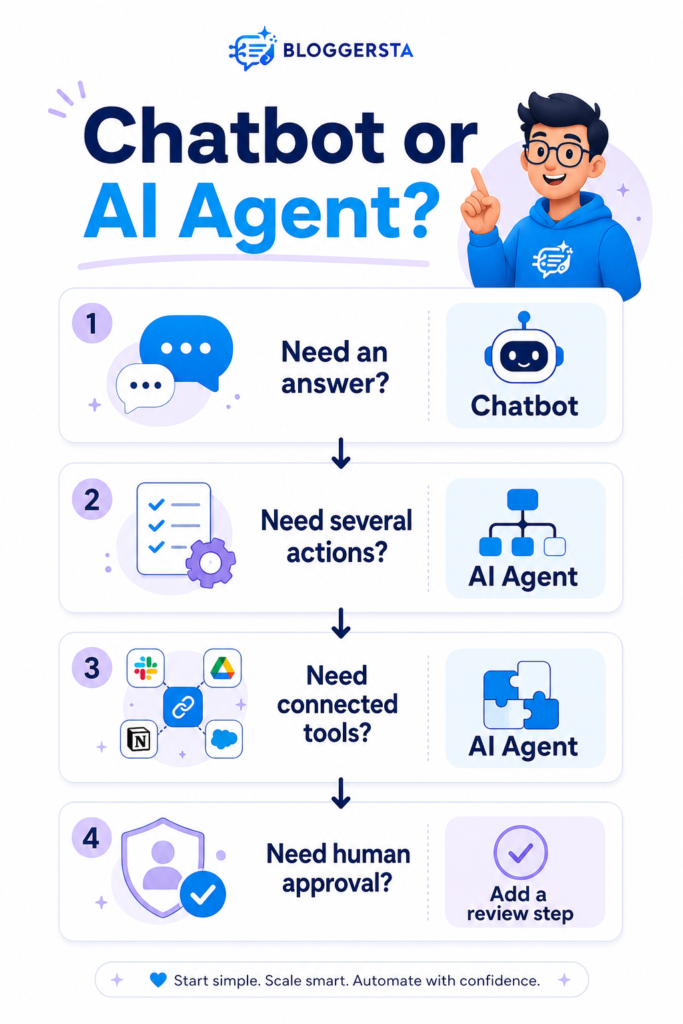
Use this practical rule:
Choose a chatbot when conversation solves the problem. Choose an agent when the job requires coordinated actions.
Payments, legal decisions, private records and account changes should retain human supervision.
Benefits and Limitations
| Area | Chatbot | AI Agent |
| Main benefit | Fast communication | Multi-step automation |
| Setup | Usually simpler | Often more complex |
| Risk | Lower when read-only | Higher when actions are enabled |
| Cost | Easier to predict | Can rise with longer tasks |
| Supervision | Conversation review | Permissions, logs and approvals |
| Failure impact | Incorrect answer | Incorrect answer and possible action |
Agents can reduce repetitive work, connect several tools and handle longer workflows. However, they may choose the wrong action, expose private information, encounter tool failures or compound one mistake across several steps.
Clear goals still matter, just as better prompt engineering improves normal chatbot responses. More autonomy requires stronger human oversight.
Frequently Asked Questions
What is the Difference Between AI and Chatbots?
AI is the broader field covering intelligent technologies. A chatbot is one application designed to communicate with users through text or voice.
Are AI Agents Just Bots?
No. Traditional bots usually follow fixed instructions. AI agents can interpret goals, plan steps, select tools, take actions and adapt after reviewing results.
is ChatGPT a Bot or AI?
ChatGPT is an AI system with a conversational interface. Standard interactions resemble a chatbot, while agent mode and workspace agents can perform longer, tool-based workflows.
What is an AI Agent Example?
A sales agent can review new leads, collect company information, assign priority scores, update a CRM and prepare follow-up messages for human approval.
What is the Difference Between a Chatbot and an AI Agent?
A chatbot focuses on communication. An AI agent focuses on completing an objective through planning, tool use, approved actions and feedback.
Final Thoughts
The AI agent vs chatbot comparison comes down to purpose. Chatbots mainly communicate, answer questions and guide users. AI agents receive goals, plan steps, use connected tools, perform approved actions and review their progress. That does not make chatbots outdated. They remain useful for support, information and simple conversations.
Agents suit workflows involving several systems, decisions or actions. Before choosing either option, define the job clearly.
Use a chatbot when conversation solves the problem. Use an agent when the workflow requires action. Start with limited permissions, test carefully and keep people involved in sensitive decisions.