
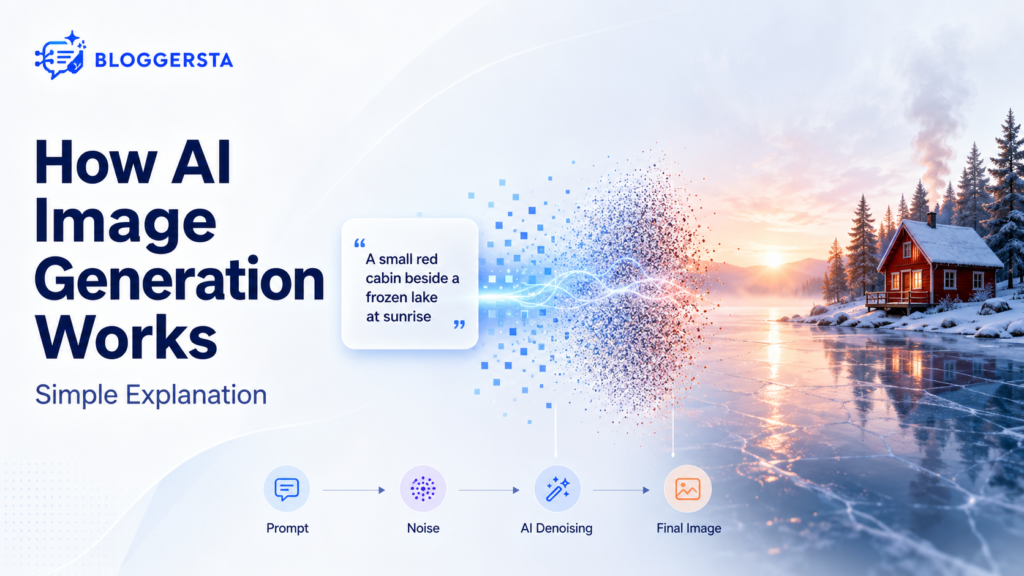
AI image tools can turn one sentence into a polished visual within seconds. Canva found that 82% of surveyed marketing and creative leaders had used generative AI to create unique images. So, how does AI image generation actually turn ordinary words into pictures?
The software doesn’t understand a red cabin or winter sunrise exactly as you do. Instead, it connects language with visual patterns learned during training. Think of the process like developing a photograph from television static. Shapes gradually appear as the system removes unwanted noise. Here’s how diffusion models, prompts, reference images, credits, and image editing fit together.
Quick Answer
AI image generation uses a trained neural network to create pictures from written instructions or reference images. Most modern generators convert your prompt into numerical data, begin with random noise, and refine that noise through repeated steps. The system predicts visual patterns rather than searching for one finished image. Now, let’s unpack that process without the complicated math.
What is AI Image Generation?
AI image generation is the process of creating or changing pictures through generative artificial intelligence. A user provides a text prompt, uploaded photo, rough sketch, or selected image area. The model then produces a visual that attempts to match those instructions.
It can start from:
- A written description
- A reference photograph
- A hand-drawn sketch
- An existing design
- A selected object or background
- Style and composition directions
A simple formula looks like this:
Prompt or Reference + Trained Model + Denoising Steps = Generated Image
The output is probabilistic. You may run the same prompt twice and receive different faces, lighting, object positions, or backgrounds.
Clear instructions usually produce clearer visuals. Our beginner’s guide to prompt engineering explains how prompts guide AI results.
How does AI Image Generation Actually Work?
Modern image generators complete several hidden stages after you press Generate. Not every platform uses the exact same design, though diffusion-based systems remain common.
Step 1: The Model Learns Visual Patterns
During training, a neural network studies large collections of images and related text. It learns mathematical links between words and visual qualities such as shapes, textures, colors, lighting, depth, and object relationships.
The system may learn that “frozen lake” often connects with pale reflections, ice textures, snow, and cold-toned light. It doesn’t understand winter through physical experience. It recognizes patterns within data.
Step 2: The Prompt Becomes Numerical Data
Suppose you enter:
A small red cabin beside a frozen lake at sunrise, soft winter fog, cinematic photography.
A text encoder converts those words into numerical representations called embeddings. These numbers carry information about the subject, setting, lighting, mood, and style.
Google’s Imagen research uses a large language model to encode text, followed by diffusion models that produce and enlarge the image.
Step 3: Generation Starts with Random Noise
A diffusion model often begins with an image resembling television static. There is no cabin, lake, or sunrise yet.
The starting noise gives the model room to build different compositions. That randomness explains why identical prompts may return different results.
Step 4: The Model Removes Noise Repeatedly
The system works through multiple denoising steps. During each step, it predicts which visual information fits your prompt and which parts should change.
At first, broad colors and shapes appear. Later steps add edges, reflections, shadows, textures, and smaller details. The cabin becomes clearer. The lake gains depth. Fog settles around the trees.
Step 5: The Final Image is Decoded
Many systems work inside a compressed mathematical space called latent space. Once denoising finishes, a decoder converts that representation into pixels you can see.
The platform may also apply sharpening, safety checks, or image upscaling.
Prompt → Text Embedding → Random Noise → Denoising → Final Image
AI Image Generator from Text vs from Image
An AI image generator from text starts with written instructions. An AI image generator from image begins with a reference picture and changes it according to your prompt.
| Method | Starting Input | Common Use |
| Text-to-image | Written prompt | Creating a new scene |
| Image-to-image | Prompt and reference image | Changing style or composition |
| Inpainting | Image and selected area | Replacing one object |
| Outpainting | Existing image edges | Extending the canvas |
| AI image editor | Image and editing request | Adding, removing, or changing details |
During image-to-image generation, the platform adds noise to the reference and rebuilds it. A higher strength setting usually produces a result that moves farther from the original.
For example, you could upload a daytime cabin photo and request a snowy nighttime version. The reference guides composition, while the prompt guides the changes.
What Makes a Highly Effective Text Prompt?
A useful prompt gives the generator enough direction without burying the main idea. Longer isn’t always better. Every detail should control a meaningful visual choice.
Use this five-part formula:
Subject + Setting + Action + Lighting + Style
- Subject: The main person, product, animal, or object
- Setting: The room, street, forest, studio, or background
- Action: What the subject is doing
- Lighting: Soft daylight, golden hour, studio light, or dramatic shadows
- Style: Editorial photography, watercolor, vector illustration, or 35mm film
Weak prompt:
A woman drinking coffee.
Improved prompt:
A freelance designer drinking coffee beside a large studio window, reviewing sketches, soft morning light, natural skin texture, editorial lifestyle photography.
You can also add camera angle, mood, aspect ratio, color palette, and background simplicity.
Avoid conflicting directions. Asking for something “minimal, crowded, empty, and highly detailed” sends the model in several directions at once.
Why do AI Images Look Distorted or Plastic?
AI images often look strange because the prompt, model, settings, or requested scene gives the generator weak or conflicting direction.
Common causes include:
- Vague descriptions
- Too many people or actions
- Competing lighting instructions
- Difficult hand or body positions
- Low starting resolution
- Heavy smoothing during upscaling
- Guidance settings pushed too high
- Poor reference-image quality
In diffusion systems that expose guidance controls, a higher guidance scale makes the output follow the text more closely. Push it too far, though, and image quality may drop. Negative prompts can tell supported models what to avoid, such as blur, extra fingers, or unwanted text.
Start with a simple scene. Add one subject, one action, and one lighting direction. Once the composition works, introduce smaller details.
Free AI Image Generator Online Options
The best AI image generator depends on your project. A social post, realistic product scene, poster, and edited photograph require different controls.
| Tool | Best Fit | Useful Feature |
| Canva | Marketing and social designs | Places generated visuals inside editable layouts |
| Adobe Firefly | Professional image editing | Works closely with Adobe creative apps |
| Leonardo AI | Controlled image creation | Supports references, editing, guidance, and upscaling |
| Picsart | Comparing styles and models | Offers many models and built-in art styles |
| DeepAI | Quick browser experiments | Simple text creation and editing tools |
Canva’s free plan currently includes an AI allowance, while its text-to-image tools place generated visuals directly into Canva designs.
Adobe Firefly provides limited free access and connects image creation with features such as Generative Fill. Adobe says its current Firefly models train on licensed and public-domain material.
Leonardo supports text-to-image, image-to-image, reference guidance, prompt-based editing, background removal, and upscaling. Picsart offers multiple image models, reference uploads, editing controls, and limited free generations.
DeepAI provides a browser-based text generator with style choices and basic editing. Some higher-quality options require its paid plan.
Tool access and free limits checked: July 2026. Review each pricing page before publishing because plans can change.
Creators may also find our guides to AI tools for graphic designers and AI thumbnail makers for YouTube helpful.
Will Experimenting with Prompts Drain All My Credits?
Testing several normal prompts usually won’t drain every credit, but each service counts usage differently.
Credit costs often rise when you:
- Generate several variations together
- Use premium image models
- Request larger output sizes
- Upscale to 4K or higher
- Perform repeated generative edits
- Create video or audio
- Use third-party models
Adobe, for example, separates standard and premium generative features. Standard image tasks may use fewer credits, while advanced image models and video features use more.
Draft your prompt first. Generate one or two test images at normal resolution, then upscale the strongest result.
Who Legally Owns AI-Generated Images?
Ownership depends on copyright law, human creative input, and the platform’s terms.
In the United States, the Copyright Office says generative AI output may receive protection when a human determines enough expressive elements. Human-created arrangements or meaningful modifications may qualify, but prompts alone do not automatically establish copyright.
Keep these issues separate:
- Copyright protection: Decided under applicable law
- Commercial permission: Stated in the platform’s terms
- Platform ownership: Different across services
- Third-party rights: Logos, characters, celebrities, and protected designs may create problems
Adobe says non-beta Firefly output may be used in commercial projects and that Adobe does not train current Firefly models on Creative Cloud users’ personal content.
Note: This section offers general information, not legal advice.
How to Choose the Best AI Image Generator
Test tools through one real project instead of random prompts. Use the same subject and style across each platform, then compare:
- Prompt accuracy
- Realism or illustration quality
- Text rendering
- Reference-image support
- Editing controls
- Available aspect ratios
- Export resolution
- Privacy terms
- Commercial permissions
- Free limits and credit costs
Choose Canva for ready-to-publish layouts. Firefly suits Adobe editing workflows. Leonardo offers deeper visual control, while Picsart makes model comparison easy. DeepAI works for quick browser tests.
There is no single winner for everyone. The right tool is the one that produces usable results without slowing your normal process.
FAQs
Does AI Copy Existing Images?
Most modern generators learn mathematical relationships from training material rather than simply cutting and pasting entire images. However, training methods, memorization risks, and intellectual-property disputes differ between providers.
Can the Same Prompt Produce Different Images?
Yes. Many systems begin with random noise, so one prompt may produce different faces, compositions, lighting, and details. Some platforms offer seed controls that make results more repeatable.
Can AI Image Generators Create Readable Text?
Newer tools handle words better than early systems, but spelling and placement errors still occur. Check every letter before using generated posters, advertisements, packaging, or logos.
Final Thoughts
AI image generation turns human instructions into mathematical guidance, then builds a picture through repeated prediction and denoising. Text-to-image tools begin with descriptions, while image-to-image systems reshape an existing visual. Better prompts name the subject, setting, action, lighting, and style without creating conflicts.
Free platforms make testing easier, though credits, commercial terms, and copyright rules still matter. Pick one simple scene and generate three versions using slightly different prompts. Compare what changed, keep the strongest details, and refine one instruction at a time. That small experiment will make the technology easier to understand and use with confidence.