
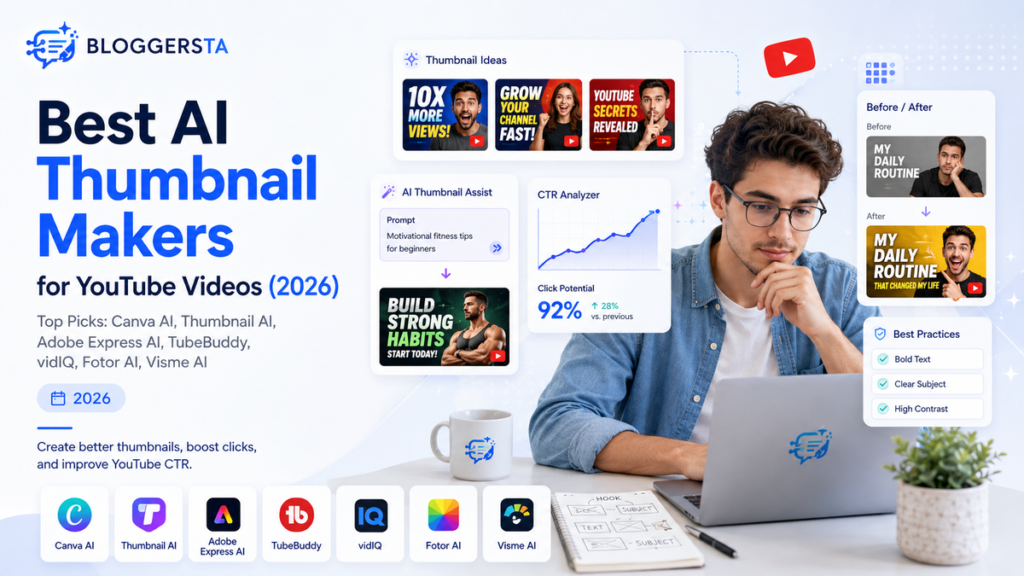
A great YouTube video can still fail if nobody clicks it. The thumbnail is often the first thing viewers notice before reading the title. With millions of videos competing for attention, creators are turning to AI thumbnail makers to design faster, test ideas, and improve clicks. So, which AI thumbnail tools actually help?
| Quick Answer The best AI thumbnail makers for YouTube videos in 2026 are Canva AI, Thumbnail AI, Adobe Express AI, TubeBuddy AI Thumbnail Analyzer, vidIQ AI, Fotor AI Thumbnail Maker, and Visme AI. These tools help creators generate thumbnail ideas, create designs, improve click-through rate (CTR), and build better YouTube video packaging without needing advanced graphic design skills. |
Why YouTube Creators Need AI Thumbnail Makers
Competition on YouTube has never been this fierce. Viewers make split-second decisions about what to watch. Your amazing video needs strong packaging to stand out in crowded feeds. Manual design eats up hours you could spend creating content instead.
AI changes the game completely. These tools generate fresh concepts you might never think of. They suggest smart layouts based on what actually gets clicks. Colors and text placement get optimized automatically. Your design process speeds up from hours to minutes.
- Faster design: Create thumbnail concepts in minutes instead of hours
- Better ideas: AI can suggest layouts, hooks, and visual styles
- Improved consistency: Maintain the same branding across videos
What to Look for in an AI Thumbnail Maker
Creators should not choose tools only because they generate pretty images. The right AI thumbnail maker does more than slap text on a picture. You need features that actually move the needle for your channel growth.
AI image generation matters because unique visuals stop the scroll. Templates save time when you need YouTube-ready sizes fast. Customization lets you control text, colors, and branding so every thumbnail feels like you. CTR features help improve actual click performance instead of just looking nice.
Ease of use determines whether you will actually use the tool daily. Pricing plays a huge role for smaller creators testing the waters. The free version should provide enough value before you commit to paid plans. Balance all these factors before making your choice.
Also Read: Best AI Tools for YouTube Channel Growth
Best AI Thumbnail Makers for YouTube Videos
Every creator has different needs. A gaming channel may need bold visuals with explosive colors. An educational channel may need clean professional thumbnails that build trust. The best AI thumbnail maker depends on your content style and workflow.juma+2
1. Canva AI — Best Overall AI Thumbnail Maker for YouTube
Canva AI dominates the thumbnail space for good reason. Magic Media brings prompt-based AI image generation right inside the tool you already know. Hundreds of YouTube thumbnail templates wait for your customization. Drag-and-drop editing makes changes feel effortless even for complete beginners.
A cooking creator can generate food-focused thumbnail ideas in seconds. Add bold text overlays that pop against vibrant backgrounds. Create multiple versions before publishing to test which performs better. Brand kits keep your colors and fonts consistent across every video.canva+1
Best for: Beginners, creators, and marketers who need fast results
Use case: Create thumbnails, banners, and channel graphics in one place
Strong point: Easy design workflow with thousands of templates
Watch out for: Popular templates may look common without customization
2. Thumbnail AI — Best Dedicated AI YouTube Thumbnail Generator
Thumbnail AI does one thing and does it well. This tool focuses entirely on YouTube thumbnail creation without distraction. AI-generated concepts come pre-optimized for clicks based on platform data. Click-focused layouts put your most important elements front and center.
Creators who only need thumbnail generation will love the speed. Generate YouTube thumbnail concepts quickly without wrestling with complex design software. The interface stays simple so you can focus on your message. Upload your photo or let AI build something from scratch.posteverywhere+1
Best for: Creators who only need thumbnail generation
Use case: Generate YouTube thumbnail concepts quickly
Strong point: Focused on YouTube thumbnails with proven layouts
Watch out for: Less useful for complete branding needs beyond thumbnails
3. Adobe Express AI — Best for Professional YouTube Thumbnail Design
Adobe Express AI brings professional power to thumbnail creation. The Adobe ecosystem gives you access to Firefly AI for stunning image generation. Professional templates come from designers who understand what works on YouTube. AI editing tools provide better control over every detail.
A business channel can create clean thumbnails with consistent fonts and brand colors. Remove backgrounds with one click while preserving fine hair details. Auto resize designs for Instagram, YouTube, and TikTok from a single project. Text effects and animations add polish that free tools struggle to match.
Best for: Professional creators and businesses
Use case: Branded thumbnails and marketing visuals
Strong point: Professional-level editing tools with AI assistance
Watch out for: Beginners may need time to explore all features
4. TubeBuddy AI Thumbnail Analyzer — Best for Improving CTR
A beautiful thumbnail is useless if viewers ignore it. TubeBuddy focuses more on improving performance rather than only creating designs. The Thumbnail Analyzer tests your designs before you publish. Heatmaps show exactly where eyes land on your thumbnail.
Upload your thumbnail and receive a predictive score compared to your current design. Import alternative thumbnails to see which one wins. A/B testing runs automatically across your first impressions. connect thumbnails with YouTube growth strategy for real results.
Best for: Growth-focused creators who track metrics
Use case: Analyze thumbnail effectiveness before publishing
Strong point: Connects thumbnails with YouTube growth strategy
Watch out for: Not a complete design platform on its own
5. vidIQ AI Thumbnail Tools — Best for YouTube Growth Insights
vidIQ AI Thumbnail Tools combine design with deep YouTube data. AI ideas come from analyzing what actually performs in your niche. YouTube SEO connection means your thumbnails support your search strategy. Content research reveals trending topics before you create.
Search-focused YouTube channels benefit most from this approach. Generate ideas and improve video packaging with data-backed insights. The Thumbnail Maker designs high-CTR thumbnails with AI templates. One-click editing customizes professional designs for your brand.
Best for: Search-focused YouTube channels
Use case: Generate ideas and improve video packaging
Strong point: Combines thumbnails with growth data
Watch out for: Better for optimization than detailed design work
6. Fotor AI Thumbnail Maker — Best Free AI Thumbnail Generator
Fotor AI Thumbnail Maker delivers serious value without costing a dime. Free AI features generate visuals from simple text prompts. Templates cover every niche from gaming to education. Quick editing lets you tweak colors and text in seconds.
Beginners and small creators get everything they need here. Create simple AI thumbnails quickly without design experience. Just tell the AI your channel theme and style preferences. Generate multiple variations at once to choose the best option. Download without watermarks for commercial use.fotor+1
Best for: Beginners and small creators on tight budgets
Use case: Create simple AI thumbnails quickly
Strong point: Affordable and easy with no watermarks
Watch out for: Advanced creators may need more control options
7. Visme AI — Best for Branded YouTube Thumbnails
Visme AI shines when visual branding matters most. Professional layouts come from presentation-quality design standards. Search shapes, icons, and photos to bring your design vision to life. Brand kits apply your logo, colors, and fonts automatically.
Businesses and educational creators benefit from consistent visual storytelling. Create branded thumbnails that look cohesive across your entire library. Dozens of professional templates speed up your workflow. Millions of free searchable images expand your creative options.
- Best for: Businesses and educational creators
- Use case: Create consistent branded thumbnails
- Strong point: Strong visual storytelling with professional polish
- Watch out for: More design-focused than YouTube-focused features
Also Read: AI Tools for Content Creators
Quick Comparison Table
Choosing between these tools gets easier when you see them side by side. Each platform serves different creator needs and budgets. Match your goals with the right tool for best results.adobe+5
| Tool | Best For | Main Feature | Best Fit |
| Canva AI | Overall thumbnail creation | Templates + AI design | Most creators |
| Thumbnail AI | AI thumbnail generation | Fast concepts | YouTubers |
| Adobe Express AI | Professional design | Advanced editing | Brands |
| TubeBuddy AI | CTR improvement | Testing insights | Growth channels |
| vidIQ AI | YouTube optimization | SEO insights | Search creators |
| Fotor AI | Free thumbnails | Simple AI designs | Beginners |
| Visme AI | Branding | Professional visuals | Businesses |
How to Choose the Right AI Thumbnail Maker
Choose based on your bottleneck, not what looks coolest. Your specific challenges determine which tool delivers the most value. Match your goals with features that actually solve your problems.superside+1
Choose Canva if you need fast designs and templates for daily uploads. Choose TubeBuddy if CTR improvement is your main goal and you track metrics. Choose vidIQ if YouTube SEO matters most for your search-driven content.
Choose Adobe if branding quality matters for your business or agency. Choose Fotor if you need free options while testing what works.
Can AI Create Better YouTube Thumbnails?
AI can help create ideas, layouts, and visuals but it does not replace human creativity. Good thumbnails need curiosity that makes people pause mid-scroll. Your message must come through clear even at phone-screen size. Strong emotions drive clicks more than pretty designs alone.
Simple design often beats complex artwork every time. AI is a creative assistant, not a replacement for understanding your audience. Your viewers trust you for reasons beyond flashy graphics. Use AI to amplify your instincts, not override them completely.
Final Recommendation
Canva AI takes the crown as the best overall choice for most creators. TubeBuddy wins for CTR-focused channels that live by their analytics. vidIQ serves SEO-focused creators who chase search traffic daily. Adobe Express delivers professional quality for brands and agencies. Fotor offers the best free option for beginners starting out.
Test three thumbnail variations for your next upload. Monitor CTR closely and improve based on actual viewer response. The best AI thumbnail maker is the one that helps you create better packaging consistently. Start with one tool, master it, then expand your stack as needed.
FAQs
What Is the Best AI Thumbnail Maker for YouTube Videos?
Canva AI, Adobe Express, and Thumbnail AI rank as top choices for different reasons. Canva wins for overall ease and template variety. Adobe Express delivers professional polish for brands. Thumbnail AI focuses purely on YouTube thumbnail speed. The best option depends on your design needs, budget, and experience level.
Can AI Create YouTube Thumbnails Automatically?
AI can generate thumbnail ideas, layouts, images, and text suggestions in seconds. Human editing is still needed for strong branding and audience understanding. Your channel personality matters more than perfect graphics. Use AI to speed up creation, not replace your creative judgment entirely.
What Is the Best Free AI Thumbnail Maker?
Canva AI and Fotor AI stand out as beginner-friendly free options. Canva offers Magic Media generation with thousands of templates. Fotor provides AI thumbnail creation without watermarks. Free plans have limitations on exports and premium features. Upgrade when your channel grows and needs more power.
Do AI Thumbnails Improve YouTube CTR?
AI can improve thumbnail quality, but CTR depends on topic, title, audience, and testing. A well-designed thumbnail helps, but your content must deliver on the promise. Test different variations to see what resonates with your viewers. AI tools like TubeBuddy help analyze what actually works.
Which AI Tool Do YouTubers Use for Thumbnails?
Canva, Adobe Express, TubeBuddy, vidIQ, and Fotor rank as commonly used tools. Choice depends on workflow and what creators value most. Designers prefer Adobe for control. Growth hackers love TubeBuddy for analytics. Beginners start with Canva or Fotor for simplicity.