

Creating a video used to mean actors, cameras, editing software, and hours. In this workflow, text-to-video AI lets you create video content by describing it in natural language. The system can then convert that description into moving images, narration, captioning, or a complete social video. So, what is text-to-video AI, and how does it actually work?
Quick Answer
Text-to-video AI is a system that generates video from text. You give a prompt, script, article, or description. You provide a quick script, article, or description. The AI reads the text, finds images or scenes that match it, and produces a video from the text.
If you’re interested in the wider category, you can also explore our guide to AI video editors for TikToks and Reels.
What Is Text-to-Video AI?
Text-to-video AI refers to a type of generative AI capable of creating video content from written text.
Input can be a simple sentence, a detailed scene description, a complete script or even a URL of a webpage. The system processes that information and generates video content that tries to copy the description of the subject, action, style, and tone.
For example, consider the case when you write:
“A small coffee shop opens on a rainy morning. Warm lights glow through the windows while customers walk inside.”
How Does Text-to-Video AI Work?
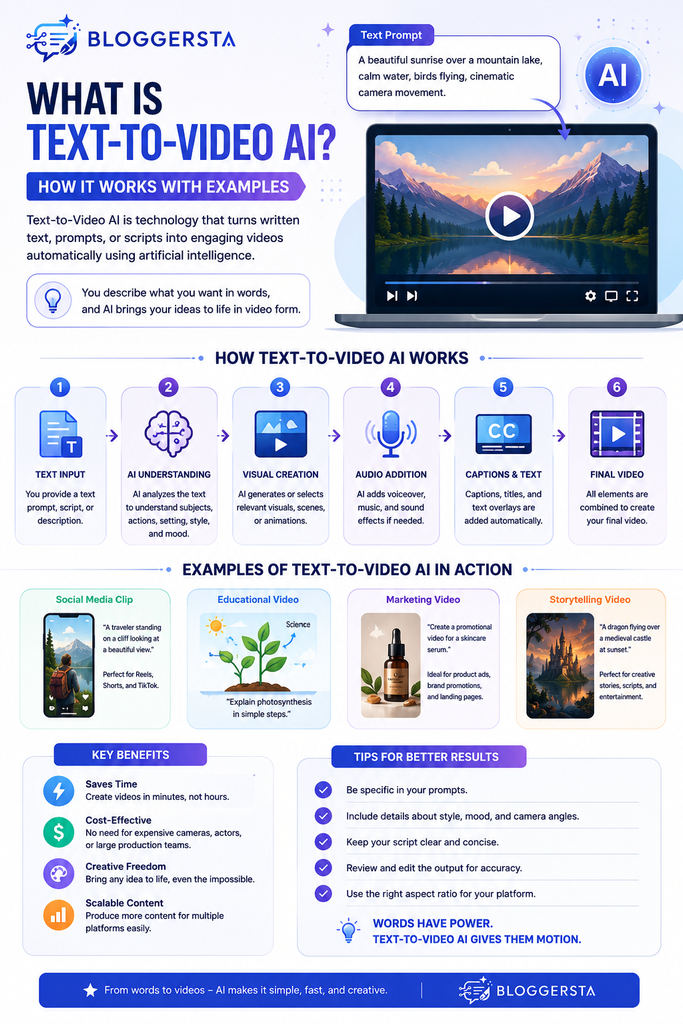
The process looks simple from the user’s side. You enter text, click generate, and receive a video.
Behind that button, however, several processes happen.
1. AI Understands Your Text
First, the system needs to understand what you wrote.
It identifies important details such as:
- Main subject
- Objects
- Actions
- Location
- Visual style
- Mood
- Camera movement
- Time of day
- Voice or narration requirements
For example, the prompt “a red sports car driving through a rainy city at night” has multiple visual cues.
The AI should be aware that the primary focus is the car. It also needs to interpret the rainy environment, nighttime lighting, movement, and urban setting.
Modern systems use language-processing and multimodal techniques to connect these textual concepts with visual information.
2. The Prompt Becomes a Structured Representation
The AI doesn’t simply read your sentence like a human.
The text is converted into numerical representations that the video-generation system can use. These representations help connect words with concepts such as objects, actions, visual characteristics, and relationships.
This is one reason detailed prompts can produce more controlled results.
Instead of writing:
“A car.”
You could write:
“A silver electric sports car driving through a modern city at night, rain on the road, cinematic lighting, low-angle camera shot.”
The second prompt gives the model far more information to work with.
3. The AI Creates or Selects Visual Content
This is where different types of text-to-video tools start behaving differently.
A generative video model can create new footage based on your prompt. It generates visual information rather than simply finding an existing clip.
Other platforms work more like automated video production systems. They analyze your script and select suitable stock footage, images, animations, or AI-generated visuals.
Pictory, for example, explains its workflow around text analysis, scene creation, visual selection or generation, narration, captions, branding, and rendering.
So when someone says “text-to-video AI,” they may actually be referring to several related workflows.
4. Motion Is Added
A video cannot simply be a collection of unrelated pictures.
The system has to generate frame-to-frame motion and retain enough continuity for the output to appear video-like.
This may include creating frames from learned representations, and forecasting future shapes of the scene with transformer or diffusion models.
If your prompt is a person walking through a forest, the model will need to keep holding the same pose throughout the series but move their stance through the forest.
This is considerably harder than generating one still image.
5. Voiceovers and Captions May Be Added
Many practical text-to-video platforms go beyond visual generation.
They can convert a script into narration, match with captions, add background music and automatically arrange scenes.
This is beneficial for social media creators and marketers who require full-length videos instead of visual clips.
For example, Revid AI can generate videos using AI voiceovers, captions, and imagery, and can take in text or URL inputs.
Try Revid AI for text-to-video creation
6. The Final Video Is Rendered
Finally, the individual scenes, visuals, audio, captions, and other elements are combined.
The system outputs the result into an interactive video file or project.
You can also choose different aspect ratios on the platform: YouTube, Instagram Reels, TikTok or others.
This last step is using the components to create something you can publish or edit.
A Simple Example of Text-to-Video AI
Let’s say you own a bakery and you want a quick Instagram Reel.
A possible beginning to the prompt is:
“Write and produce a 20-minute promotional video for a local bakery.” Display new cupcakes, a bakery’s interior, a close-up of the icing, and a customer eating a cupcake. Use cheerful music and end with a call to visit the bakery this weekend.”
A request could be interpreted by a text-to-video system and a sequence could be generated based on those instructions.
The flow of the workflow could be as follows:
- Create an easy-to-follow script
- and add captions to the visuals.
- Write a script to follow
- add caption to a visual
- and then add voiceover
- final video.
Even if the price, address, brand name, or promotion information is accurate, it may still need to be fixed before it is published.
That last step is important. Although AI can speed up the production process, it is advisable to check the final product.
What Can You Create With Text-to-Video AI?
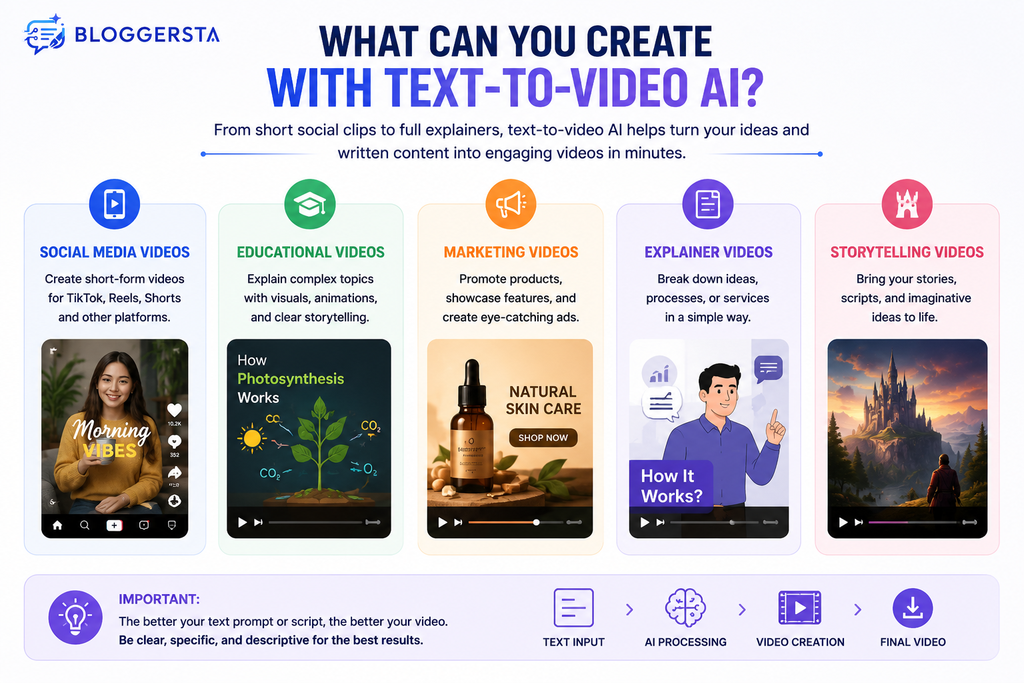
Text-to-video tools are useful across several content formats.
Social Media Videos
With short-form platforms, there is a constant need for visual content.
TikTok creators can apply the text prompts to generate ideas for TikTok videos, Instagram Reels, YouTube Shorts, and more.
You can start by describing the concept and then edit the created video for the platform you want it on.
Educational Videos
Explanations can be converted into visual lessons by teachers and course creators.
For example:
“Describe the process of photosynthesis using basic animated diagrams of the Sun, leaves, Carbon dioxide and Oxygen.”
A video produced from this can provide learners with a visual representation of a concept that may be challenging to communicate solely in text.
Marketing Videos
Businesses can develop explainer videos, promotional clips, product introduction videos, and social ads.
One marketer could write:
“Create a short product video showing a wireless keyboard being used in a modern home office. Highlight its compact design and quiet keys.”
The AI can then provide a starting point for the campaign.
Storytelling and Creative Videos
Writers can also experiment with fictional scenes.
A prompt such as:
“A young explorer walks through an abandoned city covered in snow while distant lights appear between the buildings.”
Can become the foundation for a cinematic sequence.
The technology is especially useful for visualizing ideas that would otherwise require locations, equipment, actors, or expensive effects.
Text-to-Video AI vs Traditional Video Creation
Traditional video production usually involves several separate stages.
You might need to:
- Write a script.
- Plan scenes.
- Record footage.
- Capture audio.
- Edit clips.
- Add captions.
- Add music.
- Export different versions.
Text-to-video AI can compress several of these steps into one workflow.
That doesn’t mean traditional production is obsolete.
Human filming still provides advantages when you need authentic people, real locations, physical products, or precise brand control.
The greater upside of AI is the ability to test and test again, quickly.
You don’t have to spend hours creating a single concept; you can come up with some and pick out which one you want to edit more.
AI content repurposing tools can also be complementary if you’re taking traditional content and converting it into various formats on a regular basis.
Text-to-Video AI vs Script-to-Video Tools
The words are interchangeable, but there might be a practical difference between them.
A generative text-to-video model can generate a new video based on your description.
A script-to-video platform can convert your written content into a video with pre-made footage, created graphics, avatars, voiceovers, captions, or video templates.
For instance, an article for a blog can be turned into a social video with narration without the creation of every frame.
Pictory puts a big emphasis on that kind of content transformation. It can read text and break it into scenes, pick images, narrate, write captions, and produce a video.
Explore Pictory AI for turning text into video
It is particularly helpful for bloggers and marketers who have a ton of written content.
What Makes a Good Text-to-Video Prompt?
The quality of your prompt can strongly influence the result.
A useful prompt should explain what you want to see, rather than simply naming a subject.
Try including:
- Subject: What should appear?
- Action: What is happening?
- Location: Where does it happen?
- Style: Realistic, animated, cinematic, documentary, or another style?
- Camera: Close-up, wide shot, tracking shot, or aerial view?
- Lighting: Bright daylight, soft studio lighting, sunset, or dramatic shadows?
- Mood: Calm, energetic, mysterious, professional, or playful?
- Duration: How long should the scene be?
For example, compare:
Basic prompt:
“A dog running.”
More useful prompt:
“A golden retriever running along a sandy beach at sunset, waves moving behind it, warm golden lighting, cinematic camera tracking, realistic style, slow-motion feeling.”
The second version gives the model more creative direction.
Benefits of Text-to-Video AI
Text-to-video AI offers several practical advantages.
Faster Production
You can move from an idea to a visual concept much faster than traditional production.
Lower Production Barriers
You don’t necessarily need cameras, actors, locations, or advanced editing skills for every project.
Easy Experimentation
Creators can test multiple concepts without producing everything manually.
Content Repurposing
A blog post, script, or webpage can become a short video.
This is useful for businesses already investing in written content.
More Creative Possibilities
AI can visualize fictional locations, unusual concepts, and scenes that may be difficult to film.
What Are the Limitations of Text-to-Video AI?
The technology still has weaknesses.
Inconsistent Details
Objects, faces, hands, text, and other details can sometimes change unexpectedly between frames.
Limited Control
You may describe exactly what you want and still receive a result that needs several attempts.
Short Clips
Many generative systems work particularly well with shorter sequences. Building a long, coherent story can require multiple generations and editing.
Generic Results
Simple prompts can produce videos that look similar to countless other AI-generated clips.
Human Review Is Still Necessary
AI-generated content can contain incorrect information, awkward visuals, unrealistic movements, or misleading claims.
That makes review essential for business, educational, and promotional videos.
Is Text-to-Video AI Free?
Some platforms offer free trials or limited free access. However, free access does not necessarily mean unlimited generation or unrestricted commercial use.
Limits can apply to:
- Number of generations
- Video length
- Resolution
- Credits
- Watermarks
- Export options
- Premium AI models
- Commercial-use features
When using an AI-generated video for commercial purposes, review the platform’s current licensing and export conditions.
Free access is best viewed as a means to test the flow before deciding on a paid plan.
Who Should Use Text-to-Video AI?
AI that converts text to video can be especially beneficial for:
- Content creators
- Bloggers
- Social media managers
- Small businesses
- Educators
- Marketers
- YouTubers
- Course creators
- Ecommerce brands
- Freelancers
It’s best when you need to create video content on a regular basis and don’t have the resources to create a traditional video each time.
Frequently Asked Questions
What is text-to-video AI?
Text-to-video AI is a technology that uses written instructions to create video content. It can create new video content or compile visuals, narration, captions, and more based on your text, depending on the platform.
Is text-to-video AI the same as an AI video generator?
Not always. Text-to-video is a type of AI video generation. Other image-to-video, video editing, avatars, article-to-video, and more workflows might be supported by the broader AI video platforms.
Can AI turn a blog post into a video?
Yes. Certain AI video platforms can process an article or web page, identify the main content, compose a script, choose visuals, and produce a narrated video. Revid AI and Pictory both support workflows designed around written content.
Can I use AI-generated videos for YouTube?
Yes, but you should read the material before posting. Verify the accuracy of the facts, copyright or license, platform policies, and value to viewers of the video.
Is text-to-video AI difficult to use?
Basic tools tend to be for novices. The more difficult part is to develop the prompts and check the results that are produced than to use the software itself.
Conclusion
Text-to-Video AI generates video content from text content without the need for a conventional production process. The most basic functionality is to describe a scene and the AI generates moving visuals. Where more complete platforms can be purchased, they can go further and include scripts, stock footage, generated images, voice-overs, captions, music and formatting.
This technology is not meant to supplant human creativity. It is more useful as a production assistant, helping you get from idea to usable video faster.
For bloggers, marketers, or content creators, the most effective approach is to try one little bit of content. Be precise and clear with the AI, and tweak the elements that seem generic or off-base.
Ready to explore more AI tools? Visit Bloggersta for practical guides, comparisons, and helpful resources designed to make content creation easier.
One Response