
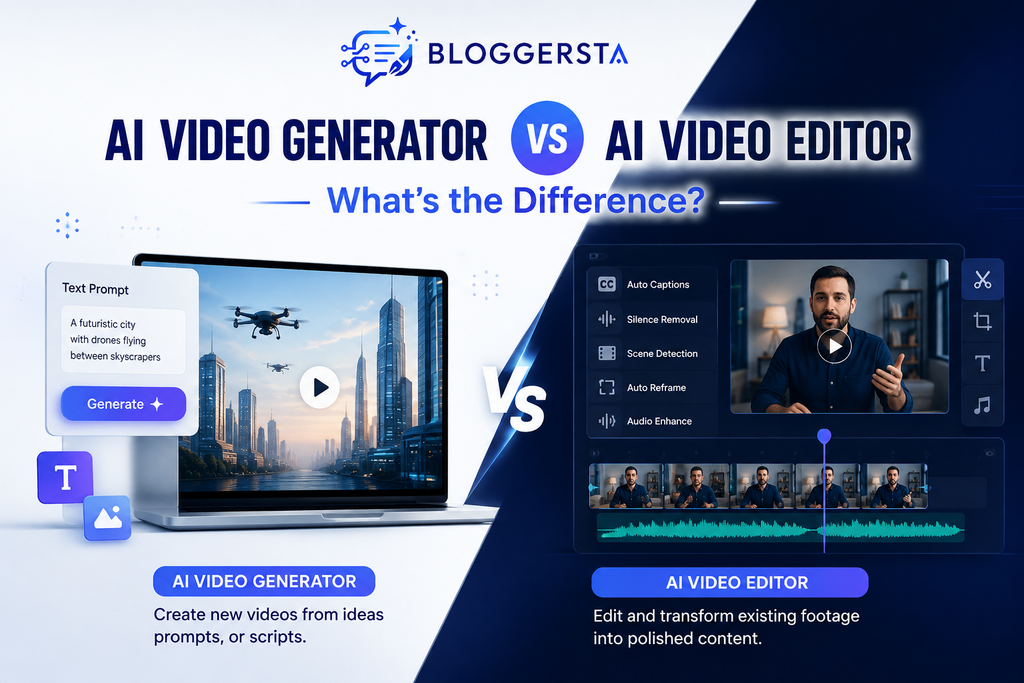
AI video generator vs AI video editor often appear under one broad category. Yet they solve different problems inside the content creation process.
Adobe Express surveyed 384 U.S. video creators and found that 71% had used AI video generation or editing tools. Among those users, 41% said they used AI video tools every week. The same research found that 56% saved more than 30 minutes per video with AI.
So, should you use an AI video generator or an AI video editor?
Quick Answer
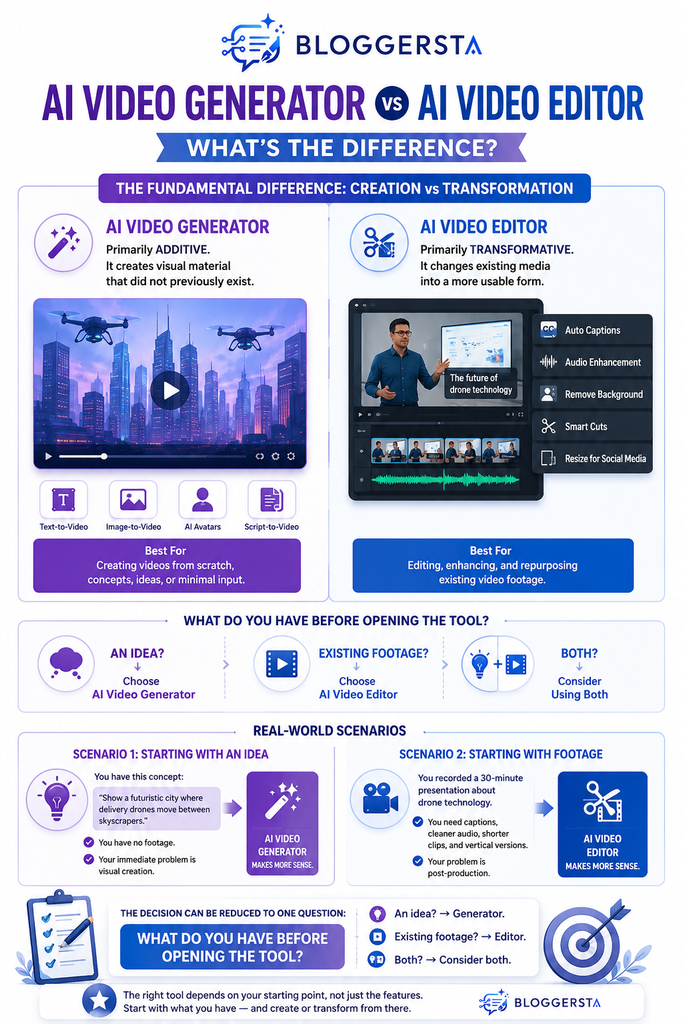
| An AI video generator creates new visual content from prompts, images, scripts, or other inputs. An AI video editor works mainly with existing footage and transforms it into polished content. Think of the distinction this way: AI video generator = creates new material. AI video editor = improves existing material. The difference sounds simple. However, it affects your entire production workflow. |
The Difference in Workflow
The most useful way to compare these tools is to examine where your project begins.
| Factor | AI Video Generator | AI Video Editor |
| Main purpose | Creates new content | Refines existing content |
| Typical input | Prompt, script, image | Video, audio, images |
| Requires footage | No | Usually |
| Text-to-video | Core feature | Sometimes |
| Timeline editing | Limited | Strong |
| AI B-roll | Strong | Sometimes |
| Captions | Sometimes | Common |
| Repurposing | Moderate | Strong |
| Best for | New visual concepts | Post-production |
The better question is therefore not which tool is better.
Ask this instead:
Where is the bottleneck in your video workflow?
That question can save you from choosing an expensive tool you barely need.
What Is an AI Video Generator?
An AI video generator creates visual content without requiring you to film every scene manually. You can provide a text prompt, image, script, or reference. The platform interprets your input and generates video based on those instructions. Depending on the tool, you can create text-to-video scenes, image-to-video animations, AI B-roll, product visuals, explainer sequences, social media videos, conceptual footage, and avatar presentations.
The key advantage is simple: the footage does not need to exist beforehand. This makes AI video generation useful when filming is expensive, impractical, or simply unnecessary. Instead of searching endlessly for suitable stock footage, creators can generate visuals that match a specific concept, campaign, or storytelling requirement.
How AI Video Generation Works
A basic workflow looks like this:
Idea → Prompt → Generation → Review → Regeneration → Final Clip
Imagine a blogger writing about sustainable travel. They need footage of an eco-friendly hotel, a mountain train, or a renewable-energy city.
Filming these scenes may be impractical.
An AI video generator can create visual representations instead. This makes generation particularly useful when the required footage does not exist.
For creators exploring broader AI workflows, Bloggersta’s guide to AI tools for content creators can also help you understand where different tools fit into a larger content system.
The Hidden Limitation of AI Generation
Many comparisons focus heavily on speed. They rarely discuss continuity.
Creating one attractive scene is relatively straightforward. Creating several scenes with consistent characters, environments, lighting, and movement can be considerably harder.
That means serious users should evaluate:
- Scene consistency
- Prompt control
- Character continuity
- Visual accuracy
- Generation limits
- Revision costs
A generated clip is often a building block, not a finished production.
This distinction matters because the first generation is rarely the final version. You may need several iterations before the scene matches your intended visual direction.
A Natural Starting Point for AI Video Generation
If your workflow starts with an idea or written concept, Revid AI is one option worth testing.
It can be useful for creators who want to move from ideas toward social-ready video content without building every scene manually.
Try Revid AI with a real project rather than judging it only from demo videos.
What Is an AI Video Editor?
An AI video editor starts with material that already exists and helps transform it into polished content. This material could include YouTube recordings, podcasts, interviews, webinars, product demonstrations, screen recordings, existing social clips, or generated footage. Rather than creating the entire video from scratch, the editor focuses on AI-assisted post-production and speeds up repetitive editing tasks.
Common AI Video Editing Features
Depending on the platform, an AI video editor may offer features such as:
- Automatic captions for quickly creating accurate subtitles.
- Transcript-based editing that lets you edit spoken content through text.
- Silence removal to eliminate unnecessary pauses from recordings.
- Filler-word detection to remove words such as “um” and “uh.”
- Audio enhancement to improve speech clarity and reduce unwanted noise.
- Scene detection to identify important visual changes automatically.
- Automatic reframing to adapt footage for different screen formats.
- Clip extraction to turn longer recordings into shorter content.
- Background removal to isolate subjects from their original surroundings.
- Video resizing to prepare content for different social platforms.
This makes AI video editors particularly useful for creators who already have footage but want faster and more efficient post-production.
If short-form editing is your main concern, Bloggersta’s guide to AI video editors for TikToks and Reels provides a useful next step.
Why Creators Often Need Both
Real-world production rarely follows perfectly separated categories.
A product marketer may already have:
- Product footage
- Customer recordings
- Screenshots
- Presenter footage
But perhaps they lack an attractive opening scene.
A generator can create that missing visual. An editor can then combine it with authentic footage.
The workflow becomes:
Existing footage → Generate missing visuals → Edit → Caption → Brand → Export
This hybrid model reveals an important insight:
Generation expands your raw materials. Editing increases their usefulness. Adobe’s creator research found that 56% of surveyed creators save more than 30 minutes per video using AI. Another 10% reported saving more than four hours from their workflow. However, those time savings can come from very different tasks. Generating missing footage saves production time. Automatic captions save editing time. Repurposing long-form footage saves distribution time. These are separate productivity gains.
AI Video Generator vs AI Video Editor: The Overlap Problem
Modern platforms increasingly blur the boundary between generation and editing.
Both categories may offer:
- AI captions
- Voiceovers
- Templates
- Stock media
- Background removal
- Social exports
- Text-based controls
This creates an important evaluation problem.
A platform can offer AI video generation without being a generation-first platform. An editor can also offer generated assets without replacing a dedicated generation tool.
Instead of judging the feature list, examine the primary workflow.
Ask:
- What does the tool expect me to upload?
- What does it generate automatically?
- How much timeline control does it provide?
- Can I replace individual scenes?
- How easy are revisions?
- Can I combine generated and original footage?
- What happens after the first AI output?
That final question is often overlooked.
The first generation may take seconds. Refining that output can take considerably longer.
When Should You Use an AI Video Generator?
Choose an AI generator when your main problem is missing visual material.
It is particularly useful when you:
- Have no footage
- Need conceptual visuals
- Create faceless content
- Need custom B-roll
- Want to test creative ideas
- Need visuals for marketing campaigns
- Cannot practically film a particular scene
- Want to convert written concepts into visual sequences
For example, a creator explaining solar energy could generate an illustrative sequence showing energy moving from solar panels into a home.
The visual does not need to represent a real location. Its purpose is explanation.
That is where AI-generated visuals can provide genuine value.
Still, review every generated scene carefully. Strange movements, incorrect objects, and continuity problems can reduce credibility.
A Useful Test Before Paying
Take one real content idea and generate a short video.
Then measure:
- Time to first usable clip
- Number of regeneration attempts
- Quality of the final output
- Editing time afterward
- Credit consumption
This gives you a more realistic picture of the platform’s value.
If you want to experiment with AI-powered video creation, Revid AI can be tested as part of this workflow.
When Should You Use an AI Video Editor?
Choose an editor when your biggest problem is too much existing material.
This is common for:
- YouTubers
- Podcasters
- Coaches
- Course creators
- Businesses
- Social media teams
- Webinar creators
Imagine recording a one-hour podcast.
You may want one YouTube video plus several Shorts. You may also need captions, improved audio, vertical framing, and branded elements.
The problem is not creating footage.
The problem is extracting more value from footage you already possess.
That is where AI-assisted editing becomes especially useful.
For example, Bloggersta’s AI video editor guide for TikToks and Reels covers tools designed around clipping, captions, reframing, and short-form production.
AI Video Generator vs AI Video Editor for Different Users
YouTubers
Creators who regularly record themselves will usually benefit more from an AI video editor. They can use generation tools for supplementary B-roll or conceptual visuals.
A practical workflow might look like:
Record → Edit → Extract Clips → Caption → Reframe → Publish
If a particular section needs visual support, generation can enter later.
Bloggers
Bloggers often begin with written content rather than footage. That makes AI video generation particularly interesting. Articles can become scripts while generated visuals support the narrative. For content creators working across formats, repurposing written material into video can reduce the gap between publishing channels.
Explore Bloggersta’s AI content and creator tool guides to build a broader workflow.
Social Media Creators
Short-form creators need speed and repeatability. Editors work well for existing recordings. Generators help when original visual material is required.
A useful workflow is:
Script → Generate → Edit → Caption → Resize → Publish
The biggest advantage comes from reducing repetitive production steps.
Small Businesses
Businesses often possess product images, recordings, screenshots, and customer footage. An AI editor can transform these assets into multiple marketing variations. A generator can fill visual gaps. This creates a useful balance between AI-generated content and authentic brand material.
For example, a software company might use real screen recordings for product demonstrations. It could then generate an abstract opening sequence to explain a complex concept.
That approach keeps the product evidence authentic while using AI where it adds visual value.
A Practical Decision Rule
Before purchasing a platform, identify your starting material.
| Your situation | Recommended starting point |
| I only have an idea | AI video generator |
| I have a script but no footage | AI video generator |
| I already recorded footage | AI video editor |
| I have hours of footage | AI video editor |
| I need custom B-roll | AI video generator |
| I need captions and trimming | AI video editor |
| I need new scenes and editing | Both |
| I produce videos at scale | Integrated workflow |
This prevents a common mistake: choosing software because its feature list looks impressive.
Choose according to the production bottleneck instead.
Quality and Human Judgment Still Matter
AI can accelerate production. It does not eliminate editorial responsibility. Generated footage can contain inconsistencies involving:
- Faces
- Hands
- Text
- Product details
- Object proportions
- Lighting
- Physics
- Character continuity
Editing introduces different risks. Automatic captioning can misinterpret technical terms. Aggressive silence removal can make speech sound unnatural. Automated clip selection can remove context that viewers actually need. The strongest workflow is therefore not that AI does everything.
It is:
AI handles repetitive work → Human reviews meaning → AI assists revisions → Human approves the final video
That approach keeps human editorial judgment at the center while reducing mechanical work.
Adobe’s broader 2026 creator research similarly found that 85% of creators believe the final creative decision should remain theirs.
Don’t Judge Cost by Subscription Price Alone
Two AI video platforms can have similar monthly prices but very different production costs. Generators may consume credits during repeated generations. Failed attempts can therefore increase your effective cost.
Editors may instead charge based on:
- Export limits
- Processing minutes
- Resolution
- Storage
- AI features
- Premium assets
A better metric is:
Cost per usable video = Monthly cost ÷ Usable videos produced
For generation tools, also consider:
Generation efficiency = Usable clips ÷ Total generated clips
If you create ten clips and use only four, the apparent speed advantage becomes less impressive. This makes usable output more important than raw generation speed.
If your workflow starts with written content, explore Bloggersta’s guide to AI tools that turn blog posts into videos.
Common Mistakes When Choosing an AI Video Tool
Before choosing an AI video tool, consider these common mistakes. They can help you select a platform that fits your workflow rather than one that simply looks impressive.
1. Choosing the Tool With the Most Features
More features do not automatically mean better results. Choose the platform that solves your most expensive production problem.
2. Assuming Generation Replaces Editing
Generated footage still needs pacing, sequencing, sound, captions, and review. A generated clip should usually be treated as a component rather than the final video.
3. Ignoring Existing Content
If you already have hours of recordings, starting from scratch can waste valuable material. Look at what you already own before generating something new.
4. Automating Everything
Automation is useful when its decisions are reliable. Human judgment remains essential for storytelling, context, and brand voice.
5. Forgetting Brand Consistency
Businesses should review typography, visuals, messaging, voice, and product accuracy before publishing. AI-generated assets should support your brand rather than make it feel inconsistent.
If your focus is short-form content, check out AI video editors for TikToks and Reels.
AI Video Generator vs AI Video Editor: Which Should You Choose?
Use this simple decision framework:
Do you have useful footage?
Yes: Do you mainly need editing?
→ Choose an AI video editor.
No: Do you need completely new visuals?
→ Choose an AI video generator.
Both: Use a hybrid AI video workflow.
Your choice should reflect the material you have and the result you need.
Revid AI and Pictory AI: Which Tool Fits Your Workflow?
Once you understand the workflow difference, individual tools become easier to evaluate.
For creators focused on AI-generated social content, automated video creation, and rapid visual production, Revid AI can be a useful platform to test.
If your workflow begins with written content or long-form material, Pictory AI is another option worth exploring for turning existing content into video.
The important point is not to choose a tool simply because it offers more AI features.
Match the platform to your starting material.
Frequently Asked Questions
What is the difference between an AI video generator and an AI video editor?
An AI video generator creates new visual material from prompts, images, scripts, or references. An AI video editor primarily transforms existing footage through tasks such as trimming, captions, audio enhancement, reframing, and repurposing.
Which is better for YouTube?
It depends on your workflow. Creators who regularly record videos generally benefit more from AI editing. Generators can provide supplementary B-roll, conceptual visuals, or scenes that would be difficult to film.
Can an AI video generator edit existing footage?
Some generators include basic editing capabilities. Dedicated editors generally provide stronger post-production controls and more precise timeline management.
Can an AI video editor generate videos?
Some modern editors include generative features. However, their primary purpose usually remains editing and transforming existing media.
Should beginners use an AI video generator or editor?
Start with your immediate need. No footage usually means generation. Existing footage usually means editing. If you need both functions, start with a platform that supports your most important workflow and add another tool only when necessary.
Can I use both tools together?
Yes. A hybrid workflow can combine generated visuals with authentic footage and AI-assisted post-production.
For example:
Generate B-roll → Import footage → Edit → Caption → Brand → Export
This can be more efficient than expecting one tool to perform every task equally well.
Are AI-generated videos ready to publish?
Not necessarily. Review generated content for continuity problems, inaccurate details, unnatural movements, incorrect text, audio issues, and brand inconsistencies before publishing.
Conclusion: Choose the Workflow Before the Tool
The AI video generator vs AI video editor debate becomes much easier once you stop comparing feature lists. A generator solves the problem of missing visual material. An editor solves the problem of existing material that needs refinement. That distinction should guide your purchase decision.
Before subscribing, test one realistic project from beginning to end. Measure production time, usable output, AI credits, editing effort, quality, and total cost. The right tool is not necessarily the one with the most features. It is the one that removes your biggest production bottleneck.
For more practical guides covering AI tools, content creation, SEO, and digital workflows, explore Bloggersta.
2 Responses