

Gemini vs ChatGPT vs Claude is not a simple three-way race. These tools overlap, sure, but they do not feel the same once real work starts. One shines in broad daily use, one fits Google-heavy workflows, and one often sounds smoother on the page. So, which one is actually worth your time?
| Quick Answer:ChatGPT is the strongest all-round pick for most people because it handles writing, coding, file work, analysis, and mixed daily tasks in one place. Gemini is strong for Google-connected search, multimodal use, and long-context work on supported models. Claude is strong for natural writing, polished explanations, and long-document handling on supported models. Choose by task, not by logo.docs.claude+2 |
This guide compares all three for writing, research, coding, long documents, context window, free plans, and daily use. It is a practical AI chatbot comparison, not a fan-club post. No single tool wins every job, and that is the honest truth.
Some links on this page may be affiliate links. If you buy through them, we may earn a small commission at no extra cost to you.
Gemini vs ChatGPT vs Claude: Quick Comparison
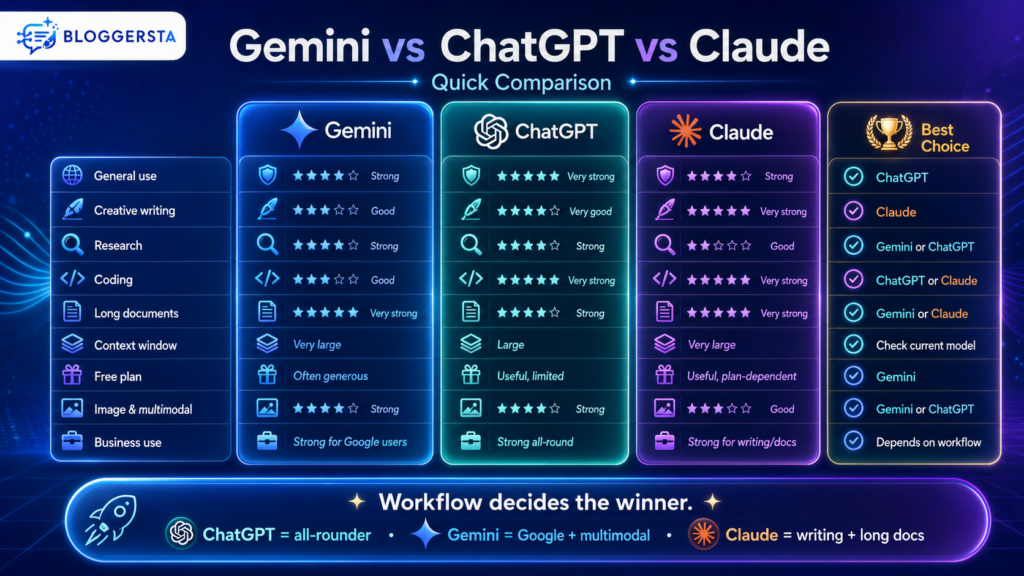
If you want the short version, here it is. ChatGPT feels like the most complete general assistant. Gemini is a strong fit for Google-connected work and multimodal search tasks on supported models. Claude stands out when the job involves long documents, careful prose, or deep reading on supported models.anthropic.mintlify+2
Put differently, ChatGPT vs Gemini vs Claude comes down to workflow. If you bounce between writing, code, files, and planning, ChatGPT feels broad and steady. If you live in Google tools, Gemini often feels closer to home. If clean prose matters most, Claude can feel like the calmest editor in the room.
Also Read: 5 Best AI Tools for Freelancers to Work Smarter
What Is ChatGPT Best For?
ChatGPT is best for people who want one best AI assistant for many jobs. It works well for reasoning, writing, coding, brainstorming, file analysis, and structured problem-solving in a single interface. That is why many people still treat it as the safest all-round pick.
OpenAI’s file tools also make ChatGPT handy for document-heavy work. Its file upload system supports synthesis, transformation, and extraction tasks, including summarizing papers, comparing documents, finding references inside PDFs, and analyzing spreadsheets. That range matters when your day is a mixed bag, not one neat task.
- Best for: General use, reasoning, coding, writing, images, and file work.
- Best user: Students, freelancers, creators, developers, and business users.
- Strong point: It handles many tasks well in one place.
- Weak point: Free users face tighter upload limits, including 3 file uploads per day in the current file FAQ.
- Best use case: Mixed work where you need one AI for many jobs.
Also Read: 7 Best AI Research Tools to Find Information Faster
What Is Gemini Best For?
Gemini is best for users who work inside Google’s world or need strong multimodal and web-connected support. Google’s developer docs show free and paid Gemini tiers, Google Search grounding on supported models, and very large context support on some models. That makes Gemini attractive for research, long files, and search-connected tasks.
It also fits people who already use Google tools all day. The handoff feels more natural there. Think of Gemini like a helpful coworker who already knows where the office files are. It is not magic, but it often saves a few clicks and a bit of friction.
- Best for: Google-connected research, multimodal prompts, and long-context work.
- Best user: Google Workspace users, students, researchers, and creators.
- Strong point: Deep connection with Google tools and search features on supported models.
- Weak point: Output style may still need editing for tone and polish.
- Best use case: Research and document work connected to Google tools.
What Is Claude Best For?
Claude is best for users who care about natural writing, careful explanations, long documents, and code understanding. Anthropic’s pricing docs highlight very large context support on supported models, including 1M-token access in certain cases, which helps explain why Claude is often mentioned for long reading and large code reviews.docs.claude+1
Claude often feels less jumpy on long material. It tends to read patiently, explain calmly, and write with a bit more grace. If ChatGPT feels like a multitool, Claude sometimes feels like a careful editor with a pencil behind one ear.
- Best for: Natural writing, editing, long documents, and code review.
- Best user: Writers, researchers, editors, developers, and knowledge workers.
- Strong point: Clean, thoughtful, and readable responses.
- Weak point: Live web and tool access can depend on plan, model, and setup.anthropic.mintlify+1
- Best use case: Writing, editing, and reviewing long material.
Also Read: Best Claude AI Alternatives You Should Try in 2026
Which AI Is Best for Creative and Natural Writing?
For pure prose, Claude is often the strongest option. It usually sounds smoother, more controlled, and less stiff. That makes it a serious candidate for the best AI chatbot for writing, especially when you care about tone, editing, and long-form flow.
That said, ChatGPT is close behind. It becomes more useful when writing is tied to research, images, tables, files, or planning. So the real ChatGPT vs Claude question is not “Which writes better?” It is “What else must the tool do before and after the draft?”
- Choose Claude for: Natural prose, editing, summaries, and tone control.
- Choose ChatGPT for: Writing plus research, planning, images, or data work.
- Choose Gemini for: Drafts linked to Google Docs or Google-based workflows.
- Writing tip: Give examples of your style before asking for final copy.
- Caution: Edit all AI writing so it still sounds like you.
Which AI Is Best for Real-Time Web Research?
For fresh information, Gemini and ChatGPT are the main two to watch. Google’s docs show grounding with Google Search on supported Gemini models, with free and paid query allowances depending on the model tier. That makes Gemini a strong option for fast, web-connected lookups and current-topic work.
ChatGPT can also help with web-connected tasks, but it often feels better once the research moves beyond “find it” into “explain it.” So if you are chasing the best AI chatbot for research, this is the split: Gemini is often stronger for search-first discovery, while ChatGPT is often better for research plus explanation.
- Choose Gemini for: Google-connected research and fast current information.
- Choose ChatGPT for: Web research plus analysis, writing, and planning.metronome+1
- Choose Claude for: Reviewing and explaining sources you provide.
- Research tip: Open original sources before citing anything.
- Caution: Web-connected AI can still miss context or pull weak sources.
Which AI Is Best for Coding and Data Analysis?
When the work turns technical, ChatGPT and Claude are usually the front-runners. ChatGPT is especially useful for debugging, scripts, step-by-step reasoning, and file-based analysis because OpenAI’s file tools are built for extraction, comparison, and spreadsheet work. That makes it a strong candidate for the best AI chatbot for coding for many everyday users.
Claude is also a serious option, especially for long code review and larger technical reading. Claude vs Gemini is a fair contest for long-context tasks, but Claude often feels steadier with lengthy explanations, while Gemini can be more appealing when coding work touches Google-connected workflows or large supported contexts.docs.claude+2
- Choose ChatGPT for: Debugging, data analysis, scripts, and step-by-step logic.
- Choose Claude for: Long code review, refactoring, and clean explanations.anthropic.mintlify+1
- Choose Gemini for: Coding tied to Google tools or long-context tests.
- Coding tip: Run tests before trusting AI-generated code.
- Caution: Never paste private code into any tool without checking data rules.
Which AI Has the Largest Context Window?
All three platforms talk about large context, but this is where people trip over their own shoelaces. The exact limit depends on the model, plan, product, and sometimes the API rather than the chat app. Google lists very large contexts on supported Gemini models, including 1M-token support on some current models. Anthropic’s docs also describe 1M-token Claude access on supported models and plans.docs.claude+2
So there is no clean forever-winner here. Gemini vs ChatGPT and Gemini vs Claude vs ChatGPT both change depending on which version you are actually using. That is why context claims should always be checked right before publishing.
Context size is helpful, but it is not the whole ball game. A huge window with a muddy prompt still gives muddy results. Clear instructions, clean files, and smaller focused tasks still matter.
Which AI Has the Best Free Version?
For many people, Gemini feels like the best free AI chatbot right now because Google offers free access on multiple Gemini models and includes free usage on supported search-grounded models in the developer stack. That gives free users a surprisingly solid place to start.
ChatGPT and Claude still offer useful free access, but limits show up faster when tasks get heavier. OpenAI’s file FAQ, for example, says free users are limited to 3 file uploads per day, while paid plans expand project and upload capacity. So if your day includes many documents, the free tier can feel tight.
- Try Gemini first if: You want a strong free AI with Google-connected features.
- Try ChatGPT first if: You want the strongest all-round free assistant before paying.
- Try Claude first if: You want natural writing and long-form editing support.
- Free-plan tip: Test each tool with the same task before paying.
- Caution: Free limits can change at any time.
Best AI by Use Case
Sometimes the fastest answer is a simple one. Here is the cheat sheet.
| Use Case | Best Choice | Why It Fits |
| All-round AI assistant | ChatGPT | Strong across writing, coding, files, and analysis jetir+1 |
| Creative writing | Claude | Natural tone and strong editing support |
| Live web research | Gemini or ChatGPT | Both support web-connected workflows, but in different ways parenteye+1 |
| Academic explanation | ChatGPT or Claude | Strong summaries and structured explanations |
| Coding | ChatGPT or Claude | Strong debugging, reasoning, and code review jetir+1 |
| Long documents | Gemini or Claude | Strong for large source material on supported models parenteye+1 |
| Free use | Gemini | Often generous for users who want free access parenteye |
| Google Workspace tasks | Gemini | Better fit for Google-connected workflows parenteye |
| Data analysis | ChatGPT | Strong for analysis, tables, files, and code jetir |
| Marketing content | Claude or ChatGPT | Strong writing and editing support |
Final Verdict: Which AI Is Actually Best?
If you need one answer, here it is. ChatGPT is the strongest overall pick for most users because it covers the widest range of tasks well, especially files, analysis, writing, and mixed daily work. Gemini is the better fit when Google-connected research, multimodal prompts, and supported long-context workflows matter most. Claude is the better fit when your priority is polished writing, careful editing, and long-document review on supported models.metronome+4
So, in Gemini vs ChatGPT vs Claude, there is no universal king. There is only the right tool for the job in front of you. Use ChatGPT as your main assistant, Gemini when search and Google tools matter, and Claude when writing quality or long-document review matters most.
FAQs
Which AI chatbot Is Best for Creative and Natural Writing?
Claude is often the strongest pick for polished, natural-sounding prose. ChatGPT is also very strong, especially when the writing task includes research, planning, files, or mixed content work.
Is ChatGPT or Gemini Better for Real-Time Web Research?
Gemini has an edge for Google-connected search on supported models, while ChatGPT is strong when the task needs follow-up explanation, reasoning, or writing support.metronome+1
Which AI Handles Coding and Complex Data Analysis Best?
ChatGPT and Claude are usually the strongest choices here. ChatGPT is great for debugging and data tasks, while Claude is strong for long code review and careful technical explanation.docs.claude+1
What Is the Difference Between the Context Windows of Gemini, ChatGPT, and Claude?
All three offer large context on supported models, but the exact size depends on the app, API, model, and plan. Always check current official docs before publishing hard numbers.anthropic.mintlify+2
Which AI Platform Offers the Best Free Version?
Gemini often feels the most generous for free use because Google offers free access on several supported models and some free grounded search allowances in the developer stack. ChatGPT and Claude are useful too, but their heavy-use features can feel more restricted.