

Freelancers do far more than billable work. They manage projects, write proposals, send invoices, track expenses, post online, and edit deliverables. The right AI tools for freelancers can reduce that load and help you move faster without making your business feel messy.
| Quick Answer The best AI tools for freelancers are ClickUp Brain for project management, Bonsai for proposals and contracts, FlyFin for tax and expense support, FeedHive for social content and client visibility, and Descript for video and audio editing. Use them to reduce admin work, improve client communication, and deliver work faster without losing control over quality. |
This guide covers project management, contracts, bookkeeping, client growth, and content editing. The goal is not to throw random apps at you. It is to match real freelance problems with practical tools that save time.
What Are AI Tools for Freelancers?
AI tools for freelancers are apps that help independent workers manage repeat work faster. They can support planning, writing, project updates, client communication, expense tracking, content creation, and media editing without removing the freelancer from the process.
That matters because freelance work is usually split between delivery and admin. One hour may go into client work, while the next goes into proposals, invoices, or follow-ups. Good AI tools help with that hidden work so you can spend more time on billable tasks.
They are most useful when they handle one clear problem well. A project tool should help you stay on top of tasks. A proposal tool should make paperwork easier. A content tool should help you publish faster without sounding robotic.
- Project support: Helps with tasks, deadlines, updates, and client comments.
- Client support: Helps write proposals, contracts, emails, and updates.
- Money support: Helps track invoices, expenses, deductions, and taxes.
- Marketing support: Helps create posts, content ideas, and social schedules.
- Delivery support: Helps edit videos, audio, scripts, and client assets.
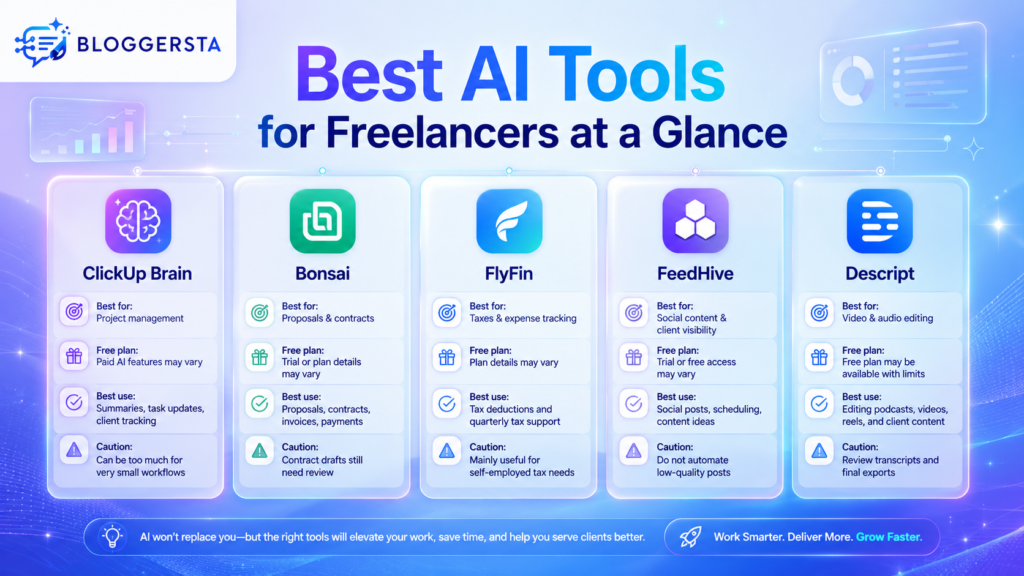
Best AI Tools for Freelancers at a Glance
If you want quick direction, start with this table. It compares the best AI tools for freelancers by main use case, plan access, and caution point so you can spot the right fit faster.
| Tool | Best For | Free Plan | Best Freelance Use | Main Caution |
| ClickUp Brain | Project management | Paid AI features may vary | Summaries, task updates, client project tracking | Can be too much for very small workflows |
| Bonsai | Proposals and contracts | Trial or plan details may vary | Client proposals, contracts, invoices, payments | Contract drafts still need review |
| FlyFin | Taxes and expense tracking | Plan details may vary | Tax deductions and quarterly tax support | Mainly useful for self-employed tax needs |
| FeedHive | Social content and client visibility | Trial or free access may vary | Social posts, scheduling, and content ideas | Do not automate low-quality posts |
| Descript | Video and audio editing | Free plan may be available with limits | Editing podcasts, videos, reels, and client content | Review transcripts and final exports |
1. ClickUp Brain — Best AI Tool for Freelance Project Management
5 Best AI Tools for Freelancers to Work Smarter
Freelancers do far more than billable work. They manage projects, write proposals, send invoices, track expenses, post online, and edit deliverables. The right AI tools for freelancers can reduce that load and help you move faster without making your business feel messy.
| Quick Answer The best AI tools for freelancers are ClickUp Brain for project management, Bonsai for proposals and contracts, FlyFin for tax and expense support, FeedHive for social content and client visibility, and Descript for video and audio editing. Use them to reduce admin work, improve client communication, and deliver work faster without losing control over quality. |
This guide covers project management, contracts, bookkeeping, client growth, and content editing. The goal is not to throw random apps at you. It is to match real freelance problems with practical tools that save time.
What Are AI Tools for Freelancers?
AI tools for freelancers are apps that help independent workers manage repeat work faster. They can support planning, writing, project updates, client communication, expense tracking, content creation, and media editing without removing the freelancer from the process.
That matters because freelance work is usually split between delivery and admin. One hour may go into client work, while the next goes into proposals, invoices, or follow-ups. Good AI tools help with that hidden work so you can spend more time on billable tasks.
They are most useful when they handle one clear problem well. A project tool should help you stay on top of tasks. A proposal tool should make paperwork easier. A content tool should help you publish faster without sounding robotic.
- Project support: Helps with tasks, deadlines, updates, and client comments.
- Client support: Helps write proposals, contracts, emails, and updates.
- Money support: Helps track invoices, expenses, deductions, and taxes.
- Marketing support: Helps create posts, content ideas, and social schedules.
- Delivery support: Helps edit videos, audio, scripts, and client assets.
Also Read: Best Character AI Alternative in 2026 — No Filters, Better Memory, and More Freedom
Best AI Tools for Freelancers at a Glance
If you want quick direction, start with this table. It compares the best AI tools for freelancers by main use case, plan access, and caution point so you can spot the right fit faster.
| Tool | Best For | Free Plan | Best Freelance Use | Main Caution |
| ClickUp Brain | Project management | Paid AI features may vary | Summaries, task updates, client project tracking | Can be too much for very small workflows |
| Bonsai | Proposals and contracts | Trial or plan details may vary | Client proposals, contracts, invoices, payments | Contract drafts still need review |
| FlyFin | Taxes and expense tracking | Plan details may vary | Tax deductions and quarterly tax support | Mainly useful for self-employed tax needs |
| FeedHive | Social content and client visibility | Trial or free access may vary | Social posts, scheduling, and content ideas | Do not automate low-quality posts |
| Descript | Video and audio editing | Free plan may be available with limits | Editing podcasts, videos, reels, and client content | Review transcripts and final exports |
1. ClickUp Brain — Best AI Tool for Freelance Project Management
ClickUp Brain is one of the most useful AI tools for freelance project management when you handle several clients at once. It can summarize task activity, write project updates, generate standups, and help you catch up on long work threads inside your workspace.
That makes it helpful when your week is split across design tasks, writing deadlines, client revisions, and follow-up messages. Instead of opening every task one by one, you can use AI summaries to understand what changed and what needs attention first.
ClickUp also works well because the AI sits close to the actual work. It is not just a chatbot on the side. It can pull from tasks, docs, updates, and automations already inside the system. For freelancers juggling retainers or active client pipelines, that can save real mental energy.
- Best for: Managing freelance projects, client tasks, and deadlines.
- Best user: Freelancers with multiple active clients or retainers.
- Free option: ClickUp has free project tools, but AI features may require a paid plan.
- Freelance tip: Use AI summaries before weekly client updates.
- Caution: Keep the workspace simple if you only manage one or two clients.
2. Bonsai — Best AI Tool for Freelance Proposals and Contracts
Bonsai is a strong tool for freelancers who want proposals, contracts, invoices, payments, and onboarding in one place. It is built around the early and middle parts of freelance work, where professional paperwork often decides whether a project moves forward smoothly.
That matters because many freelancers lose time copying old proposals, writing payment terms from scratch, or switching between a contract tool and an invoicing tool. Bonsai brings those steps together, which makes the process cleaner for both freelancer and client.
It also supports invoices and payments, which makes it relevant if you are searching for AI tools for freelance invoices as well as client agreements. Still, templates and drafts are only starting points. You must still check scope, rates, deadlines, revision terms, and legal language before sending anything.
- Best for: Proposals, contracts, invoices, and client onboarding.
- Best user: Writers, designers, consultants, developers, marketers, and agencies.
- Free option: Trial or plan details should be checked before publishing.
- Freelance tip: Use templates for first drafts, then edit scope and payment terms yourself.
- Caution: AI contract drafts are not a replacement for legal advice.
3. FlyFin — Best AI Tool for Freelance Taxes and Expenses
FlyFin is useful for freelancers and independent contractors who struggle with tax tracking, deductions, and expense discipline. It is built around self-employed tax workflows and positions AI as a way to find deductions and reduce manual tax work.
This is especially helpful for freelancers who leave bookkeeping until the last minute. Instead of sorting through receipts and bank records late in the year, you can use a more guided setup to connect records earlier and identify expense patterns that matter for tax season.
FlyFin also matters because money admin is where many freelancers fall behind. You may be good at design, writing, consulting, or editing, but still hate deductions and quarterly planning. A tool like this helps reduce friction, though it should never replace local tax advice.
- Best for: Self-employed taxes, deductions, and expense review.
- Best user: Freelancers, consultants, creators, and contractors.
- Free option: Current plan details should be checked before publishing.
- Freelance tip: Connect income and expense records early, not only during tax season.
- Caution: Tax rules vary by country, state, and business type.
Also Read: Best AI Tools for Students in 2026
4. FeedHive — Best AI Tool for Freelancers Who Want More Clients
FeedHive is a smart pick for freelancers who want to stay visible online without writing every post from scratch. It focuses on AI-assisted content creation, scheduling, automation, and publishing workflows for social media.
That makes it useful for freelancers who attract work through LinkedIn, X, or personal brand content. If you rely on outbound DMs alone, lead flow can feel shaky. FeedHive helps you build a steadier publishing rhythm so people see your work, ideas, and expertise more often.
This matters because AI tools to find freelance clients do not always “find” them directly. In many cases, they help you become easier to find. FeedHive can support that by turning rough ideas into scheduled posts, but the best content still needs your real stories, proof, and voice.
- Best for: Social media content, scheduling, and personal brand growth.
- Best user: Freelancers who get clients through LinkedIn, X, or content marketing.
- Free option: Trial or free access may vary.
- Freelance tip: Use AI for ideas, then add your own client stories and results.
- Caution: Do not publish generic AI posts without editing.
5. Descript — Best AI Tool for Freelance Video and Audio Editing
Descript is one of the most practical AI tools for freelance video editing because it lets you edit audio and video by editing text. That means you can trim, caption, clean audio, and shape rough cuts using the transcript rather than only a traditional timeline.
This makes it useful for freelance creators, podcast editors, social media managers, coaches, and marketers who need speed as much as polish. If your work includes reels, interview clips, podcasts, or client explainers, Descript can make the first pass much faster.
It also helps with repurposing. A long interview can become shorter edits, captions, or multiple content pieces. That does not remove the need for final review, but it can reduce repetitive editing time significantly.
- Best for: Video editing, podcast editing, captions, and content repurposing.
- Best user: Freelance creators, editors, coaches, and social media managers.
- Free option: A free plan may be available with limits.
- Freelance tip: Use it for first-pass edits, then review the final media manually.
- Caution: Check transcripts carefully before sending client work.
Best AI Tools for Freelancers by Use Case
Different freelance jobs create different bottlenecks. This table matches each work problem to a tool that handles it best, including a few extra options beyond the main five.
| Freelance Task | Best Tool | Why It Helps |
| Project management | ClickUp Brain | Summarizes tasks, comments, updates, and project activity |
| Proposals and contracts | Bonsai | Helps prepare client documents in one place |
| Taxes and expenses | FlyFin | Finds deductions and supports self-employed tax planning |
| Client attraction | FeedHive | Helps create and schedule social posts |
| Video and audio editing | Descript | Lets freelancers edit media through text |
| Short-form clips | Opus Clip | Turns long videos into short clips |
| LinkedIn growth | Taplio | Helps with LinkedIn ideas, scheduling, and visibility |
| Accounting and invoices | QuickBooks | Tracks expenses, invoices, and business reports |
Also Read: Top 5 AI Story Generators for Fiction Writers (2026 Ultimate Guide)
How Freelancers Can Use AI Without Losing Quality
AI can make freelance work faster, but it should not replace judgment. Clients do not pay only for words, files, or edits. They pay for clarity, problem-solving, communication, and delivery. AI should support your process, not become your process.
That means every AI draft still needs your review. Check numbers, dates, scope, rates, deliverables, and timelines before anything reaches a client. The same goes for legal and tax documents. Templates are useful, but they are not final truth.
You should also protect client privacy. Do not upload private files, strategy decks, or sensitive data into tools unless you understand the policy and trust the setup. Speed is helpful, but trust is harder to rebuild once it breaks.
- Safe use: Drafting a project update from your own notes.
- Risky use: Sending AI-written proposals without checking scope.
- Safe use: Using AI to summarize meeting notes.
- Risky use: Uploading private client files into unknown tools.
- Better habit: Edit every AI output before it reaches a client.
Free AI Tools for Freelancers Worth Trying First
If you are testing ai for freelancers without spending much, start with free tools or limited plans that solve one useful problem at a time. That lets you build a lean stack before you commit to paid subscriptions.
- ChatGPT: Good for brainstorming, email drafts, proposal ideas, and client replies.
- Canva Magic Studio: Good for social graphics, presentations, and client visuals.
- Descript: Good for testing text-based editing with limits.
- FeedHive: Good for testing AI social content workflows if trial access is available.
- ClickUp: Good for basic task and project management before adding AI.
- Perplexity AI: Good for quick research with source links.
- Google Gemini: Good for general AI help and document support.
Free plans and AI limits change often, so check current pricing before you publish, subscribe, or build your full workflow around one tool.
How to Choose the Right AI Tool for Freelance Work
The best choice depends on where you lose the most time. Start with the bottleneck, not the trend, and pick the tool that solves that one workflow clearly.
- For managing tasks: Choose ClickUp Brain.
- For proposals and contracts: Choose Bonsai.
- For taxes and deductions: Choose FlyFin.
- For social content: Choose FeedHive.
- For video and audio editing: Choose Descript.
- For short clips: Add Opus Clip.
- For LinkedIn growth: Add Taplio.
- For invoices and reports: Add QuickBooks.
Final Recommendation
The best AI tools for freelancers depend on where work gets stuck. If project work feels messy, start with ClickUp Brain. If client paperwork slows deals, try Bonsai. If tax season creates stress, look at FlyFin. If growth is the problem, test FeedHive. If editing takes too long, Descript is a strong place to begin.
Start with one tool for your biggest bottleneck, test it on real client work, and keep it only if it saves time without hurting quality.
FAQs
What is the best AI tool for freelance project management?
ClickUp Brain is a strong choice for freelancers managing several clients because it can summarize comment threads, help with updates, and make project tracking easier inside one workspace. Asana also offers AI features for work management teams.
Can freelancers use AI to write client proposals and contracts?
Yes, freelancers can use Bonsai and writing assistants to draft proposals and contract templates. Still, you should add your own scope, rates, deliverables, deadlines, and revision terms, then review the final document carefully.
How can AI help freelancers manage their bookkeeping and invoices?
AI can help track expenses, categorize money activity, review deductions, send invoices, and support tax prep. Tools like FlyFin and QuickBooks are useful for freelancers who want better money tracking and cleaner records.
Is there an AI tool to help freelancers find clients?
Yes. FeedHive and Taplio can help freelancers publish content, schedule posts, and stay visible on LinkedIn or other channels. That visibility can support inbound leads, especially for freelancers who market through content.
What is the best AI video editing tool for freelance creators?
Descript is one of the best AI tools for freelance video editing because it lets users edit media by editing text. Opus Clip is also useful when you want to turn longer videos into shorter clips for social platforms.
That makes it helpful when your week is split across design tasks, writing deadlines, client revisions, and follow-up messages. Instead of opening every task one by one, you can use AI summaries to understand what changed and what needs attention first.
ClickUp also works well because the AI sits close to the actual work. It is not just a chatbot on the side. It can pull from tasks, docs, updates, and automations already inside the system. For freelancers juggling retainers or active client pipelines, that can save real mental energy.
- Best for: Managing freelance projects, client tasks, and deadlines.
- Best user: Freelancers with multiple active clients or retainers.
- Free option: ClickUp has free project tools, but AI features may require a paid plan.
- Freelance tip: Use AI summaries before weekly client updates.
- Caution: Keep the workspace simple if you only manage one or two clients.
2. Bonsai — Best AI Tool for Freelance Proposals and Contracts
Bonsai is a strong tool for freelancers who want proposals, contracts, invoices, payments, and onboarding in one place. It is built around the early and middle parts of freelance work, where professional paperwork often decides whether a project moves forward smoothly.
That matters because many freelancers lose time copying old proposals, writing payment terms from scratch, or switching between a contract tool and an invoicing tool. Bonsai brings those steps together, which makes the process cleaner for both freelancer and client.
It also supports invoices and payments, which makes it relevant if you are searching for AI tools for freelance invoices as well as client agreements. Still, templates and drafts are only starting points. You must still check scope, rates, deadlines, revision terms, and legal language before sending anything.
- Best for: Proposals, contracts, invoices, and client onboarding.
- Best user: Writers, designers, consultants, developers, marketers, and agencies.
- Free option: Trial or plan details should be checked before publishing.
- Freelance tip: Use templates for first drafts, then edit scope and payment terms yourself.
- Caution: AI contract drafts are not a replacement for legal advice.
3. FlyFin — Best AI Tool for Freelance Taxes and Expenses
FlyFin is useful for freelancers and independent contractors who struggle with tax tracking, deductions, and expense discipline. It is built around self-employed tax workflows and positions AI as a way to find deductions and reduce manual tax work.
This is especially helpful for freelancers who leave bookkeeping until the last minute. Instead of sorting through receipts and bank records late in the year, you can use a more guided setup to connect records earlier and identify expense patterns that matter for tax season.
FlyFin also matters because money admin is where many freelancers fall behind. You may be good at design, writing, consulting, or editing, but still hate deductions and quarterly planning. A tool like this helps reduce friction, though it should never replace local tax advice.
- Best for: Self-employed taxes, deductions, and expense review.
- Best user: Freelancers, consultants, creators, and contractors.
- Free option: Current plan details should be checked before publishing.
- Freelance tip: Connect income and expense records early, not only during tax season.
- Caution: Tax rules vary by country, state, and business type.
4. FeedHive — Best AI Tool for Freelancers Who Want More Clients
FeedHive is a smart pick for freelancers who want to stay visible online without writing every post from scratch. It focuses on AI-assisted content creation, scheduling, automation, and publishing workflows for social media.
That makes it useful for freelancers who attract work through LinkedIn, X, or personal brand content. If you rely on outbound DMs alone, lead flow can feel shaky. FeedHive helps you build a steadier publishing rhythm so people see your work, ideas, and expertise more often.
This matters because AI tools to find freelance clients do not always “find” them directly. In many cases, they help you become easier to find. FeedHive can support that by turning rough ideas into scheduled posts, but the best content still needs your real stories, proof, and voice.
- Best for: Social media content, scheduling, and personal brand growth.
- Best user: Freelancers who get clients through LinkedIn, X, or content marketing.
- Free option: Trial or free access may vary.
- Freelance tip: Use AI for ideas, then add your own client stories and results.
- Caution: Do not publish generic AI posts without editing.
5. Descript — Best AI Tool for Freelance Video and Audio Editing
Descript is one of the most practical AI tools for freelance video editing because it lets you edit audio and video by editing text. That means you can trim, caption, clean audio, and shape rough cuts using the transcript rather than only a traditional timeline.
This makes it useful for freelance creators, podcast editors, social media managers, coaches, and marketers who need speed as much as polish. If your work includes reels, interview clips, podcasts, or client explainers, Descript can make the first pass much faster.
It also helps with repurposing. A long interview can become shorter edits, captions, or multiple content pieces. That does not remove the need for final review, but it can reduce repetitive editing time significantly.
- Best for: Video editing, podcast editing, captions, and content repurposing.
- Best user: Freelance creators, editors, coaches, and social media managers.
- Free option: A free plan may be available with limits.
- Freelance tip: Use it for first-pass edits, then review the final media manually.
- Caution: Check transcripts carefully before sending client work.
Best AI Tools for Freelancers by Use Case
Different freelance jobs create different bottlenecks. This table matches each work problem to a tool that handles it best, including a few extra options beyond the main five.
| Freelance Task | Best Tool | Why It Helps |
| Project management | ClickUp Brain | Summarizes tasks, comments, updates, and project activity |
| Proposals and contracts | Bonsai | Helps prepare client documents in one place |
| Taxes and expenses | FlyFin | Finds deductions and supports self-employed tax planning |
| Client attraction | FeedHive | Helps create and schedule social posts |
| Video and audio editing | Descript | Lets freelancers edit media through text |
| Short-form clips | Opus Clip | Turns long videos into short clips |
| LinkedIn growth | Taplio | Helps with LinkedIn ideas, scheduling, and visibility |
| Accounting and invoices | QuickBooks | Tracks expenses, invoices, and business reports |
How Freelancers Can Use AI Without Losing Quality
AI can make freelance work faster, but it should not replace judgment. Clients do not pay only for words, files, or edits. They pay for clarity, problem-solving, communication, and delivery. AI should support your process, not become your process.
That means every AI draft still needs your review. Check numbers, dates, scope, rates, deliverables, and timelines before anything reaches a client. The same goes for legal and tax documents. Templates are useful, but they are not final truth.
You should also protect client privacy. Do not upload private files, strategy decks, or sensitive data into tools unless you understand the policy and trust the setup. Speed is helpful, but trust is harder to rebuild once it breaks.
- Safe use: Drafting a project update from your own notes.
- Risky use: Sending AI-written proposals without checking scope.
- Safe use: Using AI to summarize meeting notes.
- Risky use: Uploading private client files into unknown tools.
- Better habit: Edit every AI output before it reaches a client.
Free AI Tools for Freelancers Worth Trying First
If you are testing ai for freelancers without spending much, start with free tools or limited plans that solve one useful problem at a time. That lets you build a lean stack before you commit to paid subscriptions.
- ChatGPT: Good for brainstorming, email drafts, proposal ideas, and client replies.
- Canva Magic Studio: Good for social graphics, presentations, and client visuals.
- Descript: Good for testing text-based editing with limits.
- FeedHive: Good for testing AI social content workflows if trial access is available.
- ClickUp: Good for basic task and project management before adding AI.
- Perplexity AI: Good for quick research with source links.
- Google Gemini: Good for general AI help and document support.
Free plans and AI limits change often, so check current pricing before you publish, subscribe, or build your full workflow around one tool.
How to Choose the Right AI Tool for Freelance Work
The best choice depends on where you lose the most time. Start with the bottleneck, not the trend, and pick the tool that solves that one workflow clearly.
- For managing tasks: Choose ClickUp Brain.
- For proposals and contracts: Choose Bonsai.
- For taxes and deductions: Choose FlyFin.
- For social content: Choose FeedHive.
- For video and audio editing: Choose Descript.
- For short clips: Add Opus Clip.
- For LinkedIn growth: Add Taplio.
- For invoices and reports: Add QuickBooks.
Final Recommendation
The best AI tools for freelancers depend on where work gets stuck. If project work feels messy, start with ClickUp Brain. If client paperwork slows deals, try Bonsai. If tax season creates stress, look at FlyFin. If growth is the problem, test FeedHive. If editing takes too long, Descript is a strong place to begin.
Start with one tool for your biggest bottleneck, test it on real client work, and keep it only if it saves time without hurting quality.
FAQs
What is the best AI tool for freelance project management?
ClickUp Brain is a strong choice for freelancers managing several clients because it can summarize comment threads, help with updates, and make project tracking easier inside one workspace. Asana also offers AI features for work management teams.
Can freelancers use AI to write client proposals and contracts?
Yes, freelancers can use Bonsai and writing assistants to draft proposals and contract templates. Still, you should add your own scope, rates, deliverables, deadlines, and revision terms, then review the final document carefully.
How can AI help freelancers manage their bookkeeping and invoices?
AI can help track expenses, categorize money activity, review deductions, send invoices, and support tax prep. Tools like FlyFin and QuickBooks are useful for freelancers who want better money tracking and cleaner records.
Is there an AI tool to help freelancers find clients?
Yes. FeedHive and Taplio can help freelancers publish content, schedule posts, and stay visible on LinkedIn or other channels. That visibility can support inbound leads, especially for freelancers who market through content.
What is the best AI video editing tool for freelance creators?
Descript is one of the best AI tools for freelance video editing because it lets users edit media by editing text. Opus Clip is also useful when you want to turn longer videos into shorter clips for social platforms.