

If you pick the right AI research tools, you can cut hours from searching, scanning PDFs, and building literature reviews, while still keeping control over your sources and citations. But you must be wondering which AI research tools you should use?
| Quick Answer The most useful AI research tools today include Consensus for evidence‑based answers from academic papers, Elicit for literature reviews, Perplexity AI for fast web research with sources, SciSpace for reading papers, ResearchRabbit for citation mapping, Google NotebookLM for source‑based notes, and ChatPDF for PDF summaries. Use these ai tools for research discovery and screening, then verify every important claim in the original documents. |
What Are AI Research Tools?
AI research tools are apps that help you search, summarize, organize, and understand information faster than manual work alone. They sit between a normal search engine and a general chatbot, and they usually focus on research tasks like paper discovery, PDF reading, and citation handling.
Many of these tools connect their answers directly to research papers, web pages, or citation graphs instead of replying from a closed black box. That connection makes it easier for you to open the source, check methods, and decide whether the evidence actually fits your question.
- Search support: Finds papers, articles, and web sources faster.
- Reading support: Summarizes PDFs, reports, and research papers.
- Source support: Shows citations, links, or connected papers.
- Planning support: Helps build reading lists and literature review notes.
Best AI Research Tools at a Glance
Before we dive deeper, this comparison table shows how each ai research tool fits different research jobs.
| Tool | Best For | Free Plan | Best Use Case | Main Caution |
| Consensus | Academic research answers | Yes, with limits | Evidence‑based answers from published papers | Check paper details before citing |
| Elicit | Literature reviews | Yes, with limits | Finding and screening research papers | Do not rely only on summaries |
| Perplexity AI | Fast web research | Yes | Source‑based answers from the live web | Open and verify each source |
| SciSpace | Understanding research papers | Yes, with limits | Explaining papers, tables, and methods | Check technical meaning against the original |
| ResearchRabbit | Citation mapping | Yes | Finding related papers and author networks | Not a full reading replacement |
| Google NotebookLM | Notes and source‑based research | Yes | Summaries from your own uploaded sources | Quality depends on uploaded sources |
| ChatPDF | PDF summaries | Yes, with limits | Asking questions about long PDFs | Confirm key claims in the PDF |
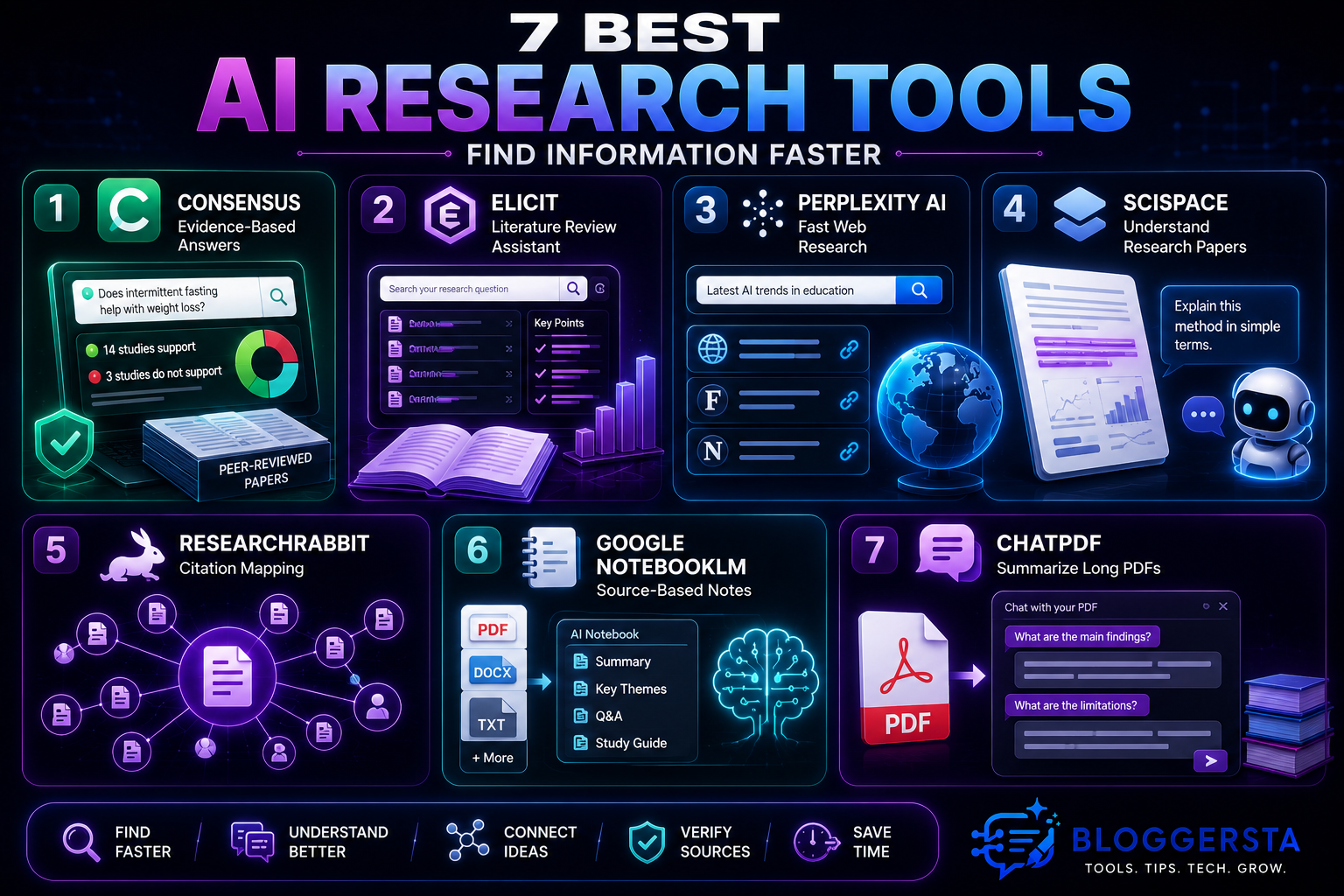
1. Consensus — Best AI Research Tool for Evidence‑Based Answers
Consensus is a search‑focused AI research tool that answers questions using peer‑reviewed papers instead of general web pages. It is helpful when you want to know what current research says about a focused question in health, psychology, education, business, or social science.
The platform draws on hundreds of millions of research papers, including licensed full‑text content from major publishers. It can summarize how many studies support or challenge a claim, then show links so you can read the original work yourself.
- Best for: Academic questions that need evidence from published studies.
- Best user: Students, researchers, content writers, and professionals who care about evidence.
- Free option: A free plan may be available with usage limits; check current details.
- Student tip: Use it to find claims, then open the paper before citing it.
- Caution: Do not treat the AI summary as the full study.
2. Elicit — Best AI Tool for Literature Reviews
Elicit focuses on literature review workflows rather than general chat. It searches research databases, shows you paper titles and abstracts, and helps you screen and organize studies for a topic. That makes it especially useful when you need to move from a vague question to a structured reading list.
You can ask a question, then Elicit suggests relevant papers, highlights key points, and lets you build tables of methods, populations, or outcomes. This helps you see patterns and gaps faster than manually scanning every abstract.
- Best for: Literature review planning and paper screening.
- Best user: University students, dissertation writers, and active researchers.
- Free option: Free access exists but may have limits on features or volume.
- Student tip: Use Elicit to shortlist papers before deep reading.
- Caution: Read the full paper before using any finding in your assignment.
3. Perplexity AI — Best AI Research Tool for Fast Web Research
Perplexity AI works like a research‑oriented search engine that answers queries and shows inline citations at the same time. It is useful when you want quick background and current sources for topics such as technology, market trends, policy, or general knowledge.
Unlike a normal chatbot, Perplexity lists the pages it used, so you can click through and inspect the evidence directly. That makes it a strong starting point for web‑based research, though you still need to judge each page’s quality and relevance yourself.
- Best for: Quick research with source links.
- Best user: Students, bloggers, marketers, and general researchers.
- Free option: A free standard plan is available; higher tiers add extra features.
- Student tip: Open every cited page before trusting the answer.
- Caution: Cited answers can still miss context or rely on weaker sources.
4. SciSpace — Best AI Tool for Reading Research Papers
SciSpace is designed to help you understand complex papers rather than just find them. It offers an AI assistant that explains sections of a paper, tables, figures, and technical terms in simpler language.
You can use it as a kind of reading companion. Highlight a paragraph and ask what it means, or ask the tool to summarize methods or results before you dive into every detail. This can lower the intimidation factor when you meet your first dense journal article.
- Best for: Understanding complex research papers.
- Best user: Students and early researchers reading journal articles for the first time.
- Free option: A free tier exists with limits; deeper features may require payment.
- Student tip: Ask it to explain methods and results in simple language.
- Caution: Do not skip the original paper when you write your work.
5. ResearchRabbit — Best AI Tool for Citation Mapping
ResearchRabbit helps you explore how papers connect to each other through citations and authors rather than just through keyword matches. It can build visual maps that show clusters of related work, influential authors, and threads of research over time.
This is particularly helpful once you already have a few “seed” papers that you trust. You feed those into ResearchRabbit and then follow citation paths outward to find more relevant studies.
- Best for: Discovering related papers and exploring citation networks.
- Best user: Researchers building a literature map for a project or thesis.
- Free option: Often used as a free discovery tool; check current access terms.
- Student tip: Start with three to five strong papers, then explore connected work.
- Caution: Citation maps show connections, not paper quality.
6. Google NotebookLM — Best AI Research Tool for Source‑Based Notes
NotebookLM is helpful when you already have PDFs, notes, or web saves and want AI help grounded only in those sources. Instead of searching the whole internet, it builds a small “notebook” around your uploads.
That makes it powerful for course packs, lecture notes, interview transcripts, and internal reports. You can ask questions, request summaries, or build study guides that stay tied to the content you provided.
- Best for: Summarizing and questioning your own sources.
- Best user: Students, researchers, and writers with many documents on one topic.
- Free option: Free access is available at the time of writing.
- Student tip: Upload only trusted sources for better answers.
- Caution: Weak or biased source material will lead to weak answers.
7. ChatPDF — Best AI Tool for Summarizing Long PDFs
ChatPDF focuses on one thing. It lets you upload a PDF and then chat with it, asking questions and getting summaries. This suits long reports, research papers, policy documents, manuals, and study guides.
The tool answers directly from the uploaded file, which means you can quickly pull out main arguments, sections, and supporting details. You still need to inspect key passages, yet it can save time when you first approach a very long document.
- Best for: Fast PDF summaries and document question‑and‑answer.
- Best user: Students, researchers, and office users handling long documents.
- Free option: Free usage exists with limits on file size or questions.
- Student tip: Ask for the main argument, methods, results, and limitations.
- Caution: Check page references and original wording before quoting.
Best AI Research Tools by Use Case
Different research tasks call for different research ai tools. Matching the task to the tool gives a smoother workflow and lowers the chance of using the wrong app for the job.
| Research Task | Best Tool | Why It Helps |
| Academic question | Consensus | Gives research‑backed answers from papers |
| Literature review | Elicit | Finds and screens research papers |
| Fast web research | Perplexity AI | Gives answers with source links |
| Reading papers | SciSpace | Explains difficult academic text |
| Finding related papers | ResearchRabbit | Builds citation and author maps |
| Summarizing notes | NotebookLM | Works from your uploaded sources |
| Summarizing PDFs | ChatPDF | Lets you ask questions about documents |
Free AI Research Tools Worth Trying First
If you want to test ai tools for research without paying, start with free tiers and see how they handle your real work.
- Perplexity AI: Best free starting point for source‑based web research.
- Google NotebookLM: Best free choice for uploaded notes and PDFs.
- ResearchRabbit: Best free choice for citation discovery and mapping.
- ChatPDF: Best free choice for quick PDF summaries and questions.
- Consensus: Good free starting point for academic answers, subject to limits.
- Elicit: Good free starting point for literature screening, subject to limits.
- SciSpace: Good free starting point for paper explanation, subject to limits.
Free plans and features change regularly, so check each tool’s current pricing and usage limits before you rely on it for major projects.
How to Use AI Research Tools Without Fake Citations
AI can help you move through search and reading faster, but it should never replace basic source checking. Some systems can still invent references when pushed outside their training data, and even source‑linked tools can misread a study.
Students and professionals should open original papers, at least read the abstract and methods, and check results and limitations before they quote or interpret a finding. You should avoid citing an AI answer itself; instead, cite the article, paper, policy report, or dataset that actually contains the evidence.
Treat AI summaries as a screening layer rather than final proof. They can highlight promising leads, yet you remain responsible for judging quality, sample size, limits, and fit for your specific question.
- Safe use: Ask AI to find papers and summarize them.
- Risky use: Copying AI‑generated references without checking them.
- Better habit: Open each source and save the original link or DOI.
- Research tip: Keep notes showing which sources you actually read.
- Writing tip: Use AI summaries for screening, not final citation work.
How to Choose the Right AI Research Tool
Choosing among the best ai tools for research becomes easier when you focus on your main research task. Start from the outcome you need, then pick the tool that handles that part of the workflow most directly.
- For evidence‑based academic answers: Use Consensus.
- For literature reviews: Use Elicit.
- For fast web research: Use Perplexity AI.
- For reading complex papers: Use SciSpace.
- For finding related papers: Use ResearchRabbit.
- For working with your own notes: Use Google NotebookLM.
- For long PDF summaries: Use ChatPDF.
Final Recommendation
The most useful ai research tools share one idea. They help you find and understand information faster, yet still leave judgment and citation decisions with you. For academic work, start with Consensus, Elicit, and ResearchRabbit for question answering, literature reviews, and citation mapping. For web research, Perplexity AI gives fast answers with source links.
For heavy reading and documents, combine NotebookLM, SciSpace, and ChatPDF to summarize notes, explain methods, and break long PDFs into manageable pieces. Use these ai research tools to find and screen information more quickly, but always confirm important facts, citations, and claims in the original sources before you rely on them.
FAQs
What is the best AI tool for academic research?
Consensus and Elicit are often the strongest starting points for academic research. They search large collections of peer‑reviewed papers, extract key findings, and present evidence‑based answers with links to the original studies.
Is there a free AI research assistant?
Yes. Perplexity AI and SciSpace both offer useful free support, especially when combined with Google Scholar or library databases. Perplexity acts like an AI search assistant that scans the live web and shows inline citations.
Can AI find and read peer‑reviewed papers for me?
AI cannot replace your own reading, but tools like Elicit and ResearchRabbit can find and organize peer‑reviewed papers quickly. They map related studies, summarize key points, and help you screen literature before you commit to full reading.
How do I use AI for literature reviews without hallucination?
Use specialized academic search tools such as Consensus and Elicit rather than general chatbots when you work with research questions. These systems are designed around published literature, which lowers the risk of fake citations and unsupported claims.
What AI tool can summarize long research documents?
ChatPDF and Google NotebookLM both work well for long documents. You can upload a PDF, ask for summaries, get outlines of main arguments, and then ask targeted questions before you dive into every page.
One Response