
Students now use AI for notes, essays, research, slides and revision. Yet the best ai tools for students are not always the loudest or safest options. This guide shows which tools fit each task. It also covers free plans, common risks and honest student use.
| Quick Answer The most useful mix for students includes ChatGPT for explanations, NotebookLM for note-based study guides, Grammarly for proofreading, Perplexity for source-led research, Elicit for paper discovery, Quizlet for revision and Gamma or Canva for slides. Use AI as study support, not as work to submit unchanged. |
What Are AI Tools for Students?
AI tools for students are apps that help with study tasks you already do. They can explain hard topics, sort notes, clean up writing, build quiz questions and turn rough ideas into usable first drafts.
That makes them useful when you feel stuck, rushed or buried under reading. Still, they work best when you guide them well and check every answer against your course material.
- Study support: summaries, explanations, quiz questions and revision help.
- Writing support: outlines, grammar checks, structure help and citation support.
- Productivity support: planning, slides, note sorting and task organization.
Best AI Tools for Students at a Glance
If you want a quick shortlist, start here. This table shows what each tool does well, whether a free option exists right now, how students can use it and where you should stay careful. Free plans change often, so treat this as a practical guide and recheck pricing before you rely on any one tool.
| Tool | Best For | Free Plan | Best Student Use | Caution |
| ChatGPT | Study help and brainstorming | Yes, with limited access and usage caps | Explaining topics, essay planning, quiz practice | Do not copy full answers |
| Google NotebookLM | Notes and PDF study | Yes and it works with uploaded sources | Study guides from your own notes and PDFs | Check source accuracy |
| Grammarly | Proofreading | Yes | Grammar, clarity, tone | Don’t let it replace your voice |
| Perplexity AI | Research with sources | Yes, with a free standard plan | Finding starting points and references | Verify each source |
| Elicit | Academic paper discovery | Free tier available, with plan limits | Literature review and paper summaries | Read original papers too |
| Jenni AI | Essay planning and citations | Limited free tier reported | Citations and essay structure | Avoid auto-writing full essays |
| Quizlet | Flashcards and exam prep | Yes, though some study modes are limited | Active recall and tests | Review generated cards |
| Gamma | Presentations | Yes, with a free plan | Fast slide drafts | Edit facts and design |
| Canva Magic Studio | Visual presentations | Yes, with limits on some AI features | Student slides and graphics | Avoid crowded slides |
| Microsoft Copilot | General study help | Check current plan | Explaining concepts, quizzes, document support | Verify answers |
| Claude | Long document support | Check current plan | Summaries and concept explanations | Check your school policy |
Best AI Tools for Students by Category
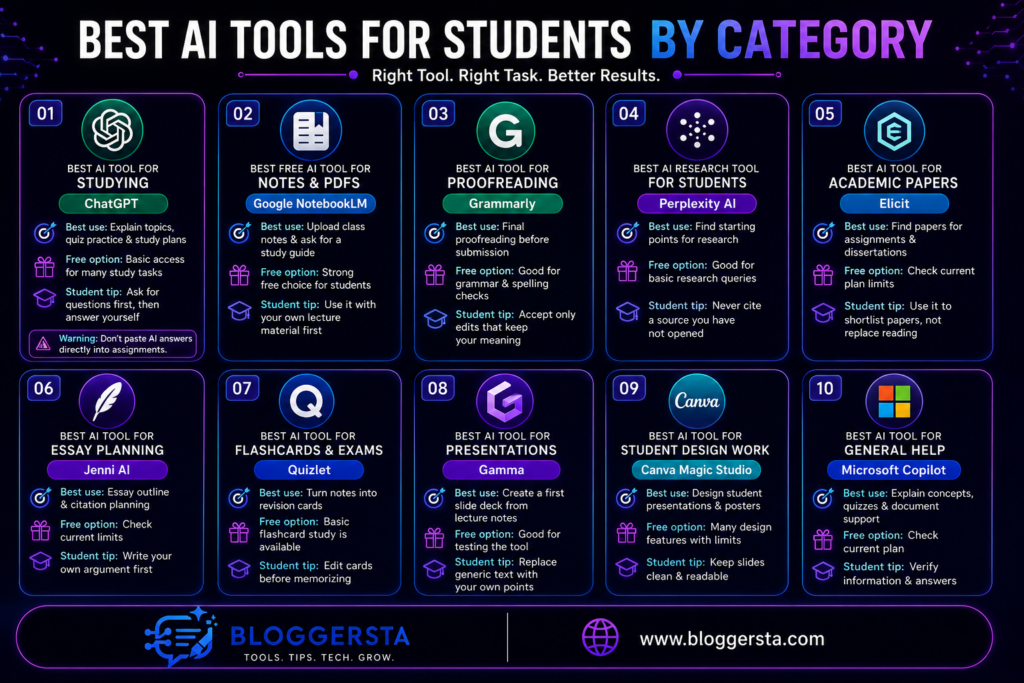
The best ai tools for students are easier to pick when you match them to the job. Don’t ask one tool to do everything. Use one for explanations, another for research, another for writing cleanup and another for revision. That way, you get better results and lower the risk of lazy mistakes.
Best AI Tool for Studying: ChatGPT
ChatGPT is often the easiest starting point for study support. The free plan is still available, though it comes with limits on messages and some tools. That is enough for many daily student tasks.
It works well when you need a hard topic explained in plain language. You can also ask it for practice questions, quick quizzes or a simple study plan. In many cases, it feels like a patient tutor who doesn’t get tired.
- Best use: Ask it to explain a topic at your grade level.
- Free option: Basic access is enough for many study tasks.
- Student tip: Ask for questions first, then answer them yourself.
- Warning: Students should not paste AI answers directly into assignments.
Best Free AI Tool for Notes and PDFs: Google NotebookLM
NotebookLM is one of the strongest free ai tools for students who study from notes. It lets you upload sources like PDFs, websites, videos and class material. Google also presents it as a learning tool that can build study guides and quizzes from your own content.
That makes it very useful for lecture notes, reading packs and exam revision. Instead of asking general questions, you can ask questions about your own files. That usually gives more grounded answers and fewer wild guesses.
- Best use: Upload class notes and ask for a study guide.
- Free option: Strong free choice for students.
- Student tip: Use it with your own lecture material first.
Best AI Tool for Proofreading: Grammarly
Grammarly is still one of the safest writing helpers for students. Grammarly says its free plan remains available and the free version covers grammar, spelling and some tone support.
That makes it useful near the end of the writing process. It won’t do your thinking for you but it can catch clumsy lines, missing words and unclear phrasing before submission. Used well, it helps your real voice come through more cleanly.
- Best use: Final proofreading before submission.
- Free option: Good for grammar and spelling checks.
- Student tip: Accept only edits that keep your meaning.
Also Read: Galaxy.ai Vs ChatGPT: Real Difference and Which One Should You Use?Galaxy.ai vs ChatGPT: Which Is Better?
Best AI Research Tool for Students: Perplexity AI
Perplexity is helpful when you need a fast research starting point. Its free standard plan includes basic searches, limited file uploads and a small amount of higher-level search use.
The main advantage is clear source links. That means you can move from a quick answer to the original article, paper or website much faster. Still, never cite a page you haven’t opened yourself. A source list is a map, not proof.
- Best use: Finding starting points for research.
- Free option: Good for basic research queries.
- Student tip: Never cite a source you have not opened.
Best AI Tool for Academic Papers: Elicit
Elicit is built for paper-based research rather than everyday homework chat. Its free tier lets users search a large paper database, summarize up to four full-text papers and extract limited data from PDFs each month.
That makes it useful for literature reviews, dissertations and serious course research. It can help you narrow a huge pile of reading into a smaller, smarter shortlist. Still, you need to read the original studies before you make claims in your own writing.
- Best use: Finding papers for assignments and dissertations.
- Free option: Check current plan limits before relying on it.
- Student tip: Use it to shortlist papers, not replace reading.
Best AI Tool for Essay Planning: Jenni AI
Jenni AI is more useful for structure than for thinking. Recent reports show a limited free tier, including small daily AI writing use and citation support.
That makes it a decent planning partner for outlines, heading order and citation flow. It is less useful when students expect it to build a strong argument from nothing. Your thesis, evidence and voice still need to come from you.
- Best use: Essay outline and citation planning.
- Free option: Check current limits before you depend on it.
- Student tip: Write your own argument first.
Best AI Tool for Flashcards and Exams: Quizlet
Quizlet remains a strong exam tool because flashcards stay free. Some extra study modes are more limited than before, so you should know that before building your full revision plan.
It works well for active recall, quick review and self-testing before an exam. You can turn notes into cards, test yourself often and repeat weak areas. That style of study sticks better than rereading the same page five times.
- Best use: Turn notes into revision cards.
- Free option: Basic flashcard study is available.
- Student tip: Edit cards before memorizing them.
Best AI Tool for Presentations: Gamma
Gamma helps when you need a fast presentation draft. Its free plan supports simple presentations and exports, though free projects may carry Gamma branding. Some sources also report a credit-based free start for new users.
That means it is very good for first drafts, not final submission. Paste in lecture notes or a rough outline and it can turn them into a slide structure quickly. Then you step in, fix weak wording and cut anything that feels generic.
- Best use: Create a first slide deck from lecture notes.
- Free option: Good for testing the tool.
- Student tip: Replace generic text with your own points.
Also Read: Top 5 AI Presentation Makers to Create Slides Instantly (2026)
Best AI Tool for Student Design Work: Canva Magic Studio
Canva Magic Studio is useful when your class needs visuals, not just text. Canva says free users can try some Magic Studio tools, though several features come with monthly or feature limits.
That makes Canva a practical option for posters, slides, infographics and group projects. It gives you templates and AI help without forcing you into a blank page. Still, clean design beats flashy design every time in class work.
- Best use: Design student presentations and posters.
- Free option: Many design features are available with limits.
- Student tip: Keep slides clean and readable.
Best Free AI Tools for Students
If you want free ai tools for students, focus on tools that do one job well. Don’t chase every shiny app. Build a small stack that covers notes, writing, research and revision. Right now, these are the strongest starting options based on current free access and student use cases.
- Google NotebookLM: Best free choice for study guides from your own notes.
- ChatGPT: Best free choice for explaining topics and brainstorming.
- Grammarly: Best free choice for grammar checks.
- Quizlet: Best free choice for flashcards and revision.
- Canva: Best free choice for student graphics and slides.
- Perplexity: Best free choice for source-based research.
- Elicit: Strong free choice for paper discovery and summaries.
Free plans often come with daily caps, credits or feature walls. So, use each tool for the task it handles best. That keeps you productive without wasting time jumping between weak free tiers.
Best AI Tools for College Students
College students usually need more than quick homework help. They often juggle essays, long PDFs, seminar notes, presentations, research papers, group work and exam revision in the same week. That is why the best ai tools for college students are usually task-based tools, not one giant all-purpose app.
A good college stack often looks simple. Use NotebookLM for heavy reading, ChatGPT for concept support, Grammarly for polish, Perplexity or Elicit for research and Quizlet for revision. Add Gamma or Canva when a class asks for slides or visual work.
| College Task | Recommended AI Tool |
| Essay outline | ChatGPT or Jenni AI |
| Research papers | Elicit or Perplexity |
| PDF notes | NotebookLM |
| Proofreading | Grammarly |
| Slides | Gamma or Canva |
| Exam revision | Quizlet or ChatGPT |
| Group projects | Canva, Gamma or Copilot |
How to Use AI Tools Without Plagiarizing
AI can help you think faster but it can also pull you into trouble fast. The safest rule is simple. Use AI for ideas, structure and study help. Then write the final answer in your own words.
You should also check your school’s AI policy before you use any tool in assessed work. Some teachers allow planning help. Others want full disclosure. A few may ban some uses entirely. If you don’t know the rule, ask.
Keep your notes, drafts, prompts and source pages as proof of your process. That habit helps you show how your work developed. It also pushes you to learn instead of leaning too hard on machine-written text.
- Allowed use: Asking AI to explain a topic.
- Risky use: Asking AI to write a full essay.
- Safe use: Using AI to build an outline, then writing it yourself.
- Better habit: Mention AI use if your school asks for disclosure.
How to Choose the Right AI Tool for Your Study Task
The right tool depends on the job in front of you. If you match the tool to the task, you save time and make fewer mistakes.
- For understanding a topic: Use ChatGPT or Copilot.
- For reading PDFs: Use NotebookLM.
- For finding sources: Use Perplexity or Elicit.
- For essay structure: Use Jenni AI or ChatGPT.
- For grammar: Use Grammarly.
- For flashcards: Use Quizlet.
- For presentations: Use Gamma or Canva.
Final Recommendation
For most students, the strongest setup is not huge. It is simple and practical. Use NotebookLM for notes, ChatGPT for explanations, Grammarly for proofreading, Perplexity or Elicit for research, Quizlet for exam prep and Gamma or Canva for presentations.
That mix covers almost every common study task without making your workflow messy. Start with free plans, test each tool on one real assignment and keep the ones that save time without hurting academic honesty.
FAQs
Which AI tools are actually allowed for students to use?
Many schools allow AI as a study assistant, not as a ghostwriter. Tools like Grammarly for proofreading and Perplexity for source-finding are often easier to justify because they support your process rather than replace it.
Is there a completely free AI tool for study and research?
NotebookLM is a strong free option right now and it works with uploaded sources like PDFs and notes. Basic versions of ChatGPT, Grammarly and Perplexity also remain available, though each one has limits.
How can AI help students write essays without plagiarizing?
Use AI for outlining, brainstorming, citation planning and structure. Tools like Jenni AI and Elicit can help you plan your paper and find research but you still need to write the final work yourself.
What is the best AI tool for making student presentations?
Gamma is a strong choice for fast slide drafts and Canva is a strong choice for design cleanup. Gamma can turn rough notes into a deck quickly but you should still edit facts, wording and slide flow.
Can AI help me prepare for exams and memorize notes?
Yes, especially when it supports active recall. Quizlet keeps flashcards free and NotebookLM can turn your own notes into study material. ChatGPT can also create short practice quizzes from your topics.