
Podcasting is getting bigger, faster, and more competitive every year. In early 2025, YouTube reported more than 1 billion monthly active viewers of podcast content, which shows how crowded and opportunity-filled this space has become. So, which are the best AI tools for podcasters in 2026?
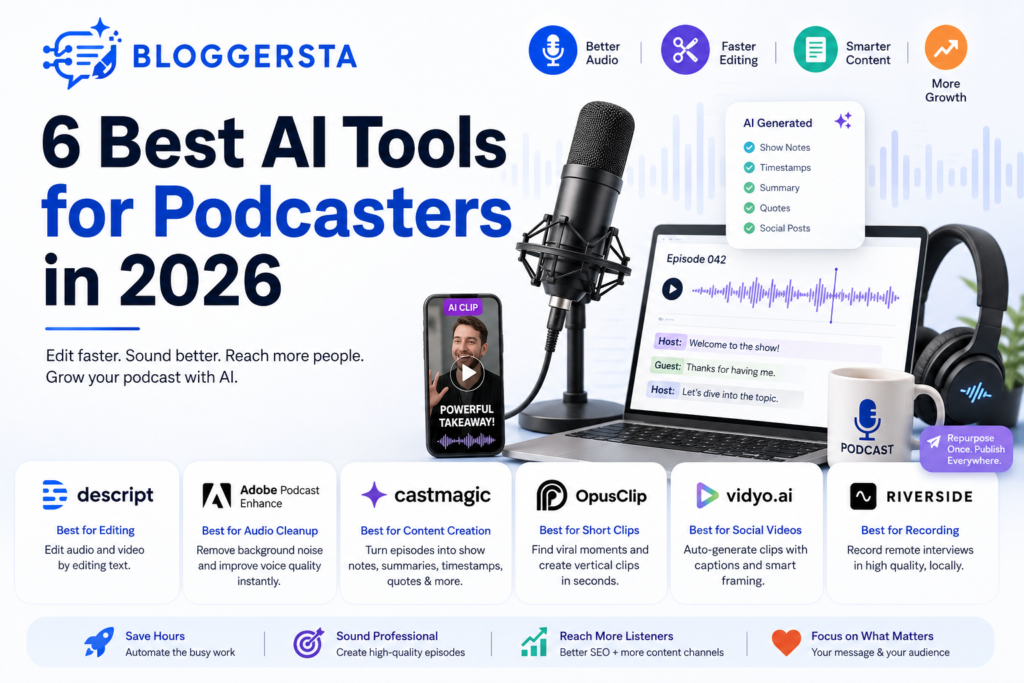
| Quick Answer The best AI tools for podcasters in 2026 are the ones that solve the biggest production problems first, like slow editing, weak audio, poor discoverability, messy transcripts, and time-consuming promotion. Descript, Adobe Podcast Enhance, Castmagic, Opus Clip, Vidyo.ai, and Riverside stand out because they help podcasters record, edit, repurpose, clean, and grow faster with less manual work. This makes it easier to compare the top tools by use case, budget, and workflow. |
Best AI Tools for Podcasters in 2026
No single tool wins every round. One tool fixes messy audio. Another turns a long chat into ten social clips. The sweet spot usually comes from mixing two or three smart tools instead of betting the farm on one.
Also Read: Revid AI Vs HeyGen: Which AI Video Tool is Better for Your Content Strategy?
1. Descript
Descript is one of the easiest tools to recommend because it cuts a lot of busywork. Instead of dragging waveforms around for hours, you edit the transcript and the audio follows. That feels a bit like using a word processor for sound. For solo creators, that’s a breath of fresh air.
- Best Us : Text-based audio and video editing
- Standout Feature : Edit audio by editing text
- Good Fit : Beginners and solo podcasters
- Watch Out for : Advanced users may want deeper manual control
2. Adobe Podcast Enhance
If your recording sounds like it was made in a kitchen or spare room, Adobe Podcast Enhance can help fast. It removes background noise, softens room echo, and makes speech clearer without much setup. Many people search podcast enhance ai or adobe podcast enhance audio when they want a quick fix without learning a full editor first.
- Cleans weak recordings fast
- Good for home setups
- Simple workflow
- Free option attracts new podcasters
3. Castmagic
Castmagic is built for the part many hosts dread: turning one episode into useful written content. It can create show notes, summaries, timestamps, quotes, email copy, and social captions from a single recording. Think of it like having a fast assistant sitting beside you after each episode saying, “I already drafted that.”
That matters because publishing the episode is only half the job. The rest is packaging it well so people can find it, skim it, and share it.
4. Opus Clip
Opus Clip is a strong pick if your podcast includes video. It scans long recordings, spots strong hooks, and cuts them into vertical clips for short-form platforms. That saves a lot of time because scrubbing through a one-hour episode by hand can feel like looking for a needle in a haystack.
- Best Use : Short-form video clips
- Output : Vertical social content
- Saves Time : Pulls strong moments from longer episodes
- Good for : YouTube Shorts, Reels, TikTok
5. Vidyo.ai
Vidyo.ai plays in a similar lane. It helps turn long podcast videos into shorter pieces with captions and cleaner framing for social channels. If Opus Clip is one lane on the highway, Vidyo.ai is the next lane over. Both aim to get your best moments in front of more people without hours of manual cutting.
For creators trying to post often, this kind of tool can keep the wheels turning.
6. Riverside
Riverside is not just about AI. Still, it belongs in this list because a clean recording makes every other step easier. It records local audio and video tracks, which usually sound better than a basic live call recording. That is a big deal for remote interviews where weak internet can ruin the flow.
If your show relies on guests, Riverside helps you start with better raw material. And better raw material means fewer headaches later.
Also Read: Best AI Tools for Content Creators in 2026: The Master List
How to Choose the Right AI Podcast Tool
Picking tools gets easier when you stop asking, “What is the best brand?” and start asking, “What slows me down the most?” One podcaster needs better sound. Another needs faster clips. A third one just wants a clean workflow that doesn’t eat the whole week.
- If your issue is editing : Choose Descript
- If your issue is poor sound : Choose Adobe Podcast Enhance
- If your issue is content reuse : Choose Castmagic
- If your issue is social clips : Choose Opus Clip or Vidyo.ai
- If your issue is remote interviews : Choose Riverside
- If your issue is budget : Start with free or trial plans
A simple stack often works best. For example, record in Riverside, clean the sound in Adobe, edit in Descript, and repurpose with Castmagic or Opus Clip.
Also Read: 5 AI Video Editors to Make Viral TikToks and Reels (2026)
Free AI Tools for Podcasters
If budget is tight, don’t sweat it. There are solid ai tools for podcasters free or at least cheap enough to test before you commit. That gives new hosts room to learn the ropes without burning cash too early.
- Adobe Podcast Enhance for free audio cleanup
- Free plans from Descript for light editing needs
- Trial-based clip tools for short-form testing
- Transcript helpers for basic text output
If someone searches for a free ai podcast editor, Descript usually comes up early for good reason. Also, some creators search ai podcast adobe when they are really trying to find Adobe’s podcast tools and cleanup features. Start free, test the workflow, then pay only for what saves real time.
Podcast SEO Tips for Better Discoverability
A great episode means very little if nobody finds it. Search engines still can’t do much with raw audio alone, so your job is to wrap each episode in text, structure, and context. That is where podcast SEO starts doing the heavy lifting.
First, use a clear episode title with a target keyword. Then add detailed show notes that explain the value of the episode in plain language. Full transcripts help too because they give search engines real text to crawl. And when you link related episodes together, your site starts building topic depth instead of looking scattered.
- Episode Title : Use a clear keyword-led title
- Show Notes : Write a detailed summary with related terms
- Transcript : Publish a clean full transcript on the page
- Internal Links : Connect related episodes and blog posts
- Topic Clusters : Group similar episodes under one theme
- Media Mix : Add video clips for more discovery channels
Here’s a simple example. If you publish an episode on podcast editing, link it to posts about microphones, transcripts, and clip tools. That way, your content works like a neighborhood instead of random houses with no roads between them.
FAQs
Is It Worth Starting a Podcast in 2026?
Yes, podcasting is still one of the easiest ways to build a loyal audience. Entry barriers are low, and a focused show can build trust faster than many other formats. Still, broad topics are harder to grow now. Niche shows tend to do better because they speak to a clear group with a clear need. Some forecasts point toward around 650 million listeners by 2027, which shows the space is still growing.
How Do I Improve My Podcast SEO and Discoverability?
Search engines cannot properly index raw audio by itself, so you need SEO-friendly text around every episode. That means keyword-rich titles, detailed show notes, and full transcripts. Also, group related episodes into topic clusters. When your content stays focused, it becomes easier for search engines and AI search tools to understand what your podcast covers.
Do I Need to Make a Video Podcast or Is Audio-Only Enough?
Audio-only can still work, but video-first podcasting now gives you more ways to grow. It opens the door to YouTube discovery and short-form content at the same time. That matters because discovery is no longer tied to podcast apps alone. One recorded video episode can become shorts, reels, teasers, and clips that keep your show visible between full releases.
What Are the Best AI Tools to Edit and Clean Up Podcast Audio?
Descript is one of the best tools for text-based editing, especially for beginners. Adobe Podcast Enhance is one of the easiest tools for quick audio cleanup. Together, they cover two common pain points: editing speed and sound quality. Descript helps remove filler words and move sections around. Adobe helps weak recordings sound cleaner and more polished.
How Can I Easily Promote My Podcast on Social Media?
The easiest route is using AI repurposing tools that turn long episodes into short clips and written posts. That saves time and gives each episode more than one life.Opus Clip and Vidyo.ai help with video highlights and captions. Castmagic helps with show notes, quotes, and social copy. Instead of starting from scratch each time, you get a running start.
Final Take
Choosing the best AI tools for podcasters in 2026 comes down to fixing the parts of your workflow that slow you down most. Some tools help you clean rough audio. Others speed up editing, transcripts, clips, and promotion.
The smart move is not chasing every shiny platform. It is building a simple stack that saves time and helps your content reach more people. When your tools support your process, podcasting feels less messy and more consistent.
Start with one strong tool, test what works, and grow from there. Better systems lead to better episodes, and better episodes create stronger audience growth.
4 Responses