

Project deadlines rarely fail because teams lack effort; they fail because updates, dependencies, and priorities scatter everywhere. Fortune Business Insights projects the AI in project management market at $4.14 billion in 2026. So, which AI tools are best for project management teams?
| Quick Answer The best AI tools for project management teams are ClickUp Brain, Motion, Asana AI, monday.com AI, Notion AI, Jira with Rovo AI, and Trello with Atlassian Intelligence. These AI project management tools help with task automation, project writing, AI scheduling, status reports, project timelines, team workload, meeting notes, and team collaboration. Now, let’s match each tool with a real project need. |
Why Project Management Teams Need AI Tools
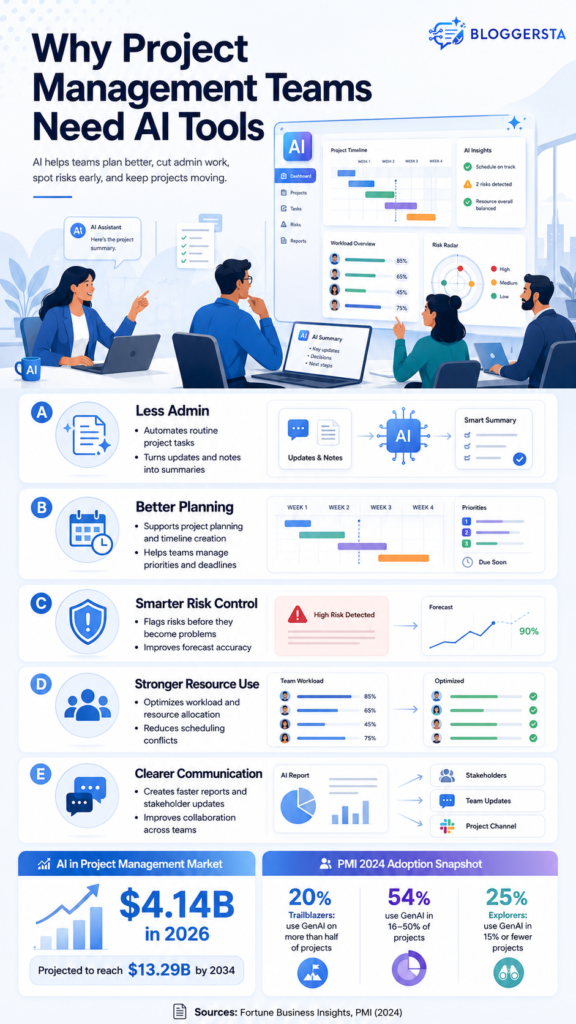
Project work gets messy fast. One team keeps updates in Slack. Another stores notes in Google Docs. Someone tracks deadlines in a spreadsheet, and the project manager becomes the poor soul stitching it all together. That’s where delays begin.
AI tools for project management teams help by handling repeat work that steals time. It can summarize comments, draft updates, organize tasks, suggest project timelines, and support deadline tracking. Still, AI does not replace leadership. It gives project managers more room for decisions, people, and client communication.
- Less admin: AI can reduce manual updates and repeat reporting
- Better planning: AI can help organize tasks, timelines, and priorities
- Clearer updates: AI can turn notes and comments into useful summaries
What to Look for in AI Project Management Tools
Don’t choose software just because it has “AI” in the headline. A simple team using a Kanban board may hate a complex system built for enterprise reporting. Yet a software team managing releases may need deeper tracking, permissions, and agile views.
The right choice depends on your team size, project type, current apps, budget, and daily habits. Free AI tools for project management can work well for students, startups, and small teams. Paid plans make more sense when you need richer workflow automation, reporting, and resource planning.
- Integrations: Does it connect with Slack, Google Workspace, GitHub, or Microsoft tools?
- Automation style: Does it auto-schedule, summarize, or build workflows?
- Ease of use: Can your team learn it without long training?
- Project writing: Can it help write briefs, plans, and updates?
- Data privacy: Does it fit your company’s security rules?
- Cost: Does the free plan or trial cover today’s needs?
Best AI Tools for Project Management Teams
The AI Tools for Project Management Teams solve different problems. One tool may help with calendars. Another may help with project documentation. A third may handle agile tickets or Gantt chart planning.
You don’t need every tool here. That’s like buying a full toolbox to tighten one loose screw. Pick AI project management tool that fixes your biggest team bottleneck first.
1. ClickUp Brain — Best Overall AI Project Management Tool
ClickUp Brain is a strong all-in-one choice for teams that want tasks, docs, chat, goals, and knowledge in one workspace. It can help create project reports, summarize task activity, draft updates, and turn scattered comments into cleaner next steps.
For example, a marketing team can ask ClickUp Brain to summarize a launch plan, pull action items from meeting notes, and draft a weekly update. That saves time when projects move fast and details get buried.
- Best for: AI project management, docs, tasks, and team knowledge
- Use case: Create updates, summaries, workflows, and project reports
- Strong point: Works with real workspace context
- Watch out for: Too many features may feel heavy for small teams
2. Motion — Best for AI Auto-Scheduling
Motion is built for teams and busy managers who struggle with calendars. It uses AI scheduling and calendar automation to place tasks, meetings, and priorities into realistic time blocks. When plans change, it can reshuffle the day.
Imagine a client meeting runs long. A manual planner means moving tasks one by one. Motion can adjust the remaining schedule around deadlines and priorities. That makes it useful for people who live by their calendar and still feel behind.
- Best for: AI scheduling, time blocking, and calendar planning
- Use case: Auto-plan daily tasks around meetings and deadlines
- Strong point: Adjusts schedules when plans change
- Watch out for: It works best when priorities are clear
3. Asana AI — Best for Team Workflows and Status Reports
Asana AI fits teams that need clean workflows, ownership, and leadership-ready updates. It can help with project summaries, status reports, task context, blockers, and handoffs across departments.
For example, a product team can turn goals into trackable work, monitor progress, and spot blockers before a deadline slips. Asana feels especially helpful when several teams touch one project. Nobody wants to play detective on Friday afternoon.
- Best for: Workflows, status reports, and team coordination
- Use case: Track milestones, blockers, updates, and handoffs
- Strong point: Good for larger team workflows
- Watch out for: Teams need clean task data for better AI output
4. monday.com AI — Best for Visual Work Management
monday.com AI works well for teams that like visual boards, dashboards, and no-code workflows. It supports work management across operations, marketing, PMO, sales, HR, and client projects.
An operations team, for example, can build a client project board, summarize progress, and automate alerts when deadlines approach. The visual layout helps teams see work at a glance. That matters when the project has many moving parts.
- Best for: Visual boards and no-code automation
- Use case: Manage campaigns, operations, PMO work, and client tasks
- Strong point: Easy visual setup for growing teams
- Watch out for: Advanced AI features may depend on plan limits
5. Notion AI — Best AI for Project Writing
Notion AI is one of the strongest choices for Best AI for project writing because it works inside notes, docs, plans, and wikis. It can summarize pages, pull action items, rewrite updates, and help draft briefs.
A student team can use it to write a project plan. An agency can keep research, timelines, client notes, and reports in one workspace. If your problem is messy writing and scattered docs, Notion AI can feel like a tidy desk after a long week.
- Best for: Project writing, docs, notes, and knowledge bases
- Use case: Write plans, reports, briefs, and meeting summaries
- Strong point: Great for documentation-heavy teams
- Watch out for: It needs setup before it feels organized
Also Read: 5 AI Tools to Automate Your Sales Outreach
6. Jira with Rovo AI — Best for Software and Agile Teams
Jira with Rovo AI is built for software, IT, and agile project teams. It can help connect issues, project context, search, agents, tickets, releases, and documentation across Atlassian tools.
A software team can track sprints, manage backlogs, summarize tickets, and connect Jira work with Confluence pages. For technical teams, that context matters. For non-technical teams, though, Jira can feel like a cockpit with too many buttons.
- Best for: Agile projects, issue tracking, releases, and software teams
- Use case: Manage sprints, tickets, backlogs, and technical docs
- Strong point: Strong fit for Atlassian users
- Watch out for: Non-technical teams may find it too detailed
7. Trello with Atlassian Intelligence — Best Free-Friendly Tool for Simple Boards
Trello is a friendly starting point for teams that want simple visual boards. It’s popular for Kanban board planning, content calendars, student projects, personal tasks, and light team workflows.
AI features may vary by plan, but Trello remains a good option for people searching for free AI tools for project management or Best ai tools for project management teams free. It’s easy to learn, quick to set up, and not scary for beginners.
- Best for: Simple boards and small team planning
- Use case: Track tasks, ideas, content plans, and light workflows
- Strong point: Easy to learn and free-friendly
- Watch out for: Larger teams may outgrow simple boards
Also Read: 5 Best AI CRM Tools to Manage Clients Effortlessly
Quick Comparison Table
The table below gives you a faster way to compare tools. Use it to match the software with your main project pain, not the longest feature list.
If scheduling is the headache, choose Motion. If project writing and docs feel messy, try Notion AI. If software projects have too many tickets, Jira with Rovo AI makes more sense.
| Tool | Best For | Main Use Case | Best Fit |
| ClickUp Brain | All-in-one AI work management | Tasks, docs, reports, summaries | Growing teams |
| Motion | AI scheduling | Auto-plan tasks and calendars | Busy managers |
| Asana AI | Workflows and updates | Status reports and coordination | Cross-functional teams |
| monday.com AI | Visual project boards | No-code workflows and dashboards | Operations teams |
| Notion AI | Project writing | Plans, briefs, notes, docs | Writers, agencies, students |
| Jira with Rovo AI | Agile project management | Sprints, tickets, releases | Software teams |
| Trello with AI | Simple task boards | Kanban planning and light workflows | Small teams and beginners |
Free AI Tools for Project Management: What Can You Use First?
Many teams search for Free AI tools for project management because they want to test AI before paying. That makes sense. A small team does not need a giant software stack just to manage tasks, write updates, or track a basic timeline.
However, “free” does not always mean full AI access. Some tools offer free project boards, trials, or limited AI credits. The smart move is to test workflow fit first, then pay only when the tool saves real time.
- Best free-friendly starting point: Trello for simple boards
- Best for project docs: Notion AI, depending on plan access
- Best for all-in-one testing: ClickUp free plan plus AI trial options
- Best for visual boards: monday.com free plan or trial
- Best for scheduling tests: Motion trial for calendar-heavy work
Also Read: Best AI Tools for Email Marketing in 2026
Final Recommendation
ClickUp Brain is best for all-in-one project control. Motion is best for auto-scheduling. Asana AI helps with workflows and reports. monday.com AI suits visual boards. Notion AI is the best fit for project writing. Jira with Rovo AI works for software teams. Trello is best for simple boards.
Start with one project bottleneck. Test one tool for two weeks. Track time saved, fewer missed deadlines, cleaner updates, faster reporting, and team adoption. The best tool is the one your team actually uses when the week gets busy.
Frequently Asked Questions
What Exactly is an AI Project Management Tool?
An AI project management tool adds artificial intelligence to normal project software. It can help with project planning, task summaries, schedule changes, risk signals, writing updates, and team workflows. Instead of only storing tasks, it helps teams act on project data. Think of it as a smart assistant sitting inside your project workspace.
What Are the Main Benefits of Adding AI to Project Workflows?
The main benefits include less admin work, fewer scheduling errors, faster status reports, stronger risk forecasting, and clearer team workload planning. AI can also help summarize meetings, draft updates, and keep project context easier to find. Results still depend on clean data, clear ownership, and good team habits.
Can AI Tools Replace a Human Project Manager?
No, AI tools cannot replace a human project manager. They can handle admin, scheduling, reporting, and documentation tasks, but they cannot replace leadership, stakeholder trust, conflict resolution, negotiation, team motivation, or client judgment. AI is the assistant. The project manager is still the person reading the room.
How Does AI Auto-Scheduling Work in Tools Like Motion?
AI auto-scheduling connects tasks, priorities, deadlines, and calendars. When meetings move, tasks run late, or new work appears, the tool reshuffles available time blocks. This helps teams keep a realistic plan without rebuilding the calendar by hand every day. It works best when deadlines and priorities are clear.
How Do I Choose the Right AI Project Management Tool for My Team?
Start with your biggest pain. Check integrations, automation style, ease of adoption, data privacy, and cost. Motion fits AI scheduling. ClickUp works for all-in-one control. Notion AI fits Best AI for project writing searches. Jira suits agile software teams. Trello fits simple boards and beginners.