

Picking an AI video tool sounds easy until you realize you may be choosing between two very different roads. One road is built for fast, faceless social clips. The other is built around presenter-style videos and avatar-led communication.
That is why this topic matters. A wrong pick can leave you with a tool that looks shiny on paper but feels awkward the moment you try to publish three or four videos in a week.
When comparing Revid AI vs HeyGen, Revid AI looks like the stronger fit for fast social-first video creation, while HeyGen looks like the stronger fit for avatar-led business content and presenter-style communication, based on how each product publicly presents its plans, tools, and use cases.
The better choice depends less on buzz and more on the kind of videos you need to make every week.
| Tool | Best Fit | What Stands Out |
| Revid AI | Solo creators, theme pages, and teams producing short-form videos often. | Text, links, and recordings can be turned into editable short-form videos, and its site speaks directly to TikTok, Instagram, and YouTube publishing. |
| HeyGen | Users who want creator or marketer plans with avatar-focused options. | Its public pricing pages highlight creator plans, marketers, avatar add-ons, and LiveAvatar slots, which point to a presenter-video focus. |
Revid AI Vs HeyGen At a Glance
A lot of Revid ai vs heygen searches come from people who want a one-minute answer before they read the fine print. That makes sense. Nobody wants to spend an hour comparing tools when a publishing deadline is already breathing down their neck.

Here is the plain version. Revid AI leans into short-form video generation, remixing, captions, scripts, voiceovers, and social publishing, while HeyGen’s public pages lean into creator and marketer plans with avatar-related add-ons.
Quick Verdict on Both Tools
Revid AI is the cleaner pick for faceless videos and high-volume short clips because its homepage and pricing page focus on short-form creation, remixing viral videos, editable outputs, and social publishing.
HeyGen looks stronger for AI avatars and presenter-style content because its public pricing support page talks about unlimited avatars for business, video avatar slots, and LiveAvatar slots.
Best Choice by User Type
- Solo creators and theme pages: Revid AI, because its public messaging is built around fast video creation for TikTok, Instagram, and YouTube.
- Coaches, sales teams, and training teams: HeyGen, because its pricing pages place clear weight on avatars and creator or marketer plans.
- Agencies with mixed deliverables: The answer depends on whether the weekly workload is mostly short social clips or presenter-led videos.
What Revid AI and HeyGen are Built For
Think of Revid AI like a quick-moving content kitchen. You bring the ingredients, such as a topic, a link, or a recording, and the tool helps turn that raw material into short-form video faster than a manual editing workflow.
HeyGen feels more like a digital presenter studio from the way it talks about creators, marketers, and avatar slots in its public pricing material. That difference matters because good software is rarely about who does more. It is usually about who fits the job better.
Revid AI Explained for Beginners
Revid AI says users can create from text, links, or recordings, and its homepage says it turns creative ideas into TikTok, Instagram, and YouTube stories with just a few clicks. Its site also highlights editable short-form videos, script generation, voice options, templates, and publishing support for social platforms.
That makes Revid AI a practical fit for content creators who want to move from idea to finished clip without touching a heavy editing timeline for every post.
HeyGen Explained
HeyGen’s pricing pages frame the product around creators and marketers, and its help page puts a clear spotlight on business avatar add-ons such as video avatar slots and LiveAvatar slots.
From that public positioning, HeyGen appears better suited to users who want a visible speaker or digital presenter rather than a faceless social clip machine.
Features that Matter Most
For Revid AI, the standout points on its public pages are short-form videos, script generation, editable outputs, 50+ voices, templates, text or link input, and one-click publishing to TikTok, Instagram Reels, and YouTube Shorts.
For HeyGen, the clearest public signals are creator plans, marketer-focused pricing, unlimited avatars for business, video avatar slots, and LiveAvatar add-ons.
Revid AI Vs HeyGen: The Biggest Differences
This is where the comparison gets real. If you publish five quick clips a week, the wrong tool feels like wearing dress shoes to a track meet. You can still move, but it is not pretty.
Based on public product pages, Revid AI puts more weight on speed, repurposing, remixing, and short-form social output, while HeyGen puts more visible weight on avatar-centered video creation.
Revid AI Vs HeyGen for Faceless Video Creation
Revid AI is clearly built for fast social media video work because it promotes short-form video creation from ideas, text, links, and recordings, along with hooks, rewrites, voiceovers, and platform publishing.
That matters for creators who live on volume. If your week revolves around Shorts, Reels, and TikTok clips, Revid AI looks like the tool that tries to keep your pace instead of slowing you down.
Revid AI Vs HeyGen for Avatar Videos
HeyGen’s public pricing material talks about avatar add-ons in a way that makes its direction pretty clear. Its Creator plan is public, and its support page lists paid avatar slot options, including Video Avatar Slots and LiveAvatar Slots.
So if your content works better with a digital spokesperson, a guided presentation, or a presenter-style delivery, HeyGen appears to have the stronger case.
Revid AI Vs HeyGen for Speed and Workflow
Revid AI may feel faster for short social output because its workflow starts with simple inputs like text, links, or recordings and pushes toward quick video creation and direct social publishing.
HeyGen may feel more structured for presenter videos because its public pages point users toward plan choices tied to creators, marketers, and avatar capacity rather than fast remix-style short-form production.
Revid AI Vs HeyGen for Editing Control
Revid AI says its short-form videos are editable, and its site also mentions an ultra-intuitive editor, templates, voices, and scripts. That suggests a workflow built around quick changes before posting rather than long manual editing sessions.
HeyGen’s public pricing pages say less about fast clip editing and more about access levels and avatar-related capacity, which hints that its value sits more in delivery style than social-first editing speed.
Revid AI Vs HeyGen Pricing and Value
Revid AI lists a Hobby plan at $39 per month and an Ultra plan at $199 per month on its pricing page, while its public pages also highlight a popular plan with 2,000 credits and premium features.
HeyGen’s public pricing page lists a Creator plan at $29 per month, and its help page lists avatar-related add-ons such as Video Avatar Slots at $29 per month and LiveAvatar Slots at $49 per month.
Price alone is only half the story. The sharper question is this: how much useful video do you get from that bill each month? For high-volume short clips, Revid AI may give better value. For presenter-style communication, HeyGen may give better value.
Revid AI Vs HeyGen Output Quality
Revid AI’s public pages talk a lot about going viral, remixing successful formats, scripting, voices, and turning simple ideas into attention-grabbing short videos. That points to output designed for pace, watchability, and quick platform fit.
HeyGen’s public pages, by contrast, point more clearly toward avatar-led delivery through pricing and add-on structure. So the better-looking video depends on what “better” means to you: fast social momentum or a polished on-screen presenter.
Revid AI Vs HeyGen Ease of Use for Beginners
Revid AI looks friendlier for beginners who think like creators first, because its public messaging stays focused on easy inputs, simple editing, and rapid social publishing.
HeyGen may feel simpler for beginners who already know they want a presenter-style output, since its public plan language points directly to avatars, creators, and marketers.
Revid AI Vs HeyGen for Creators and Teams
A creator and a business team can look at the same tool and see two totally different things. One sees speed. The other sees polish. One wants ten clips by Friday. The other wants one clean training video that does not look stitched together in a hurry.
That is why this section matters. A tool can be excellent and still be the wrong fit for your actual week.
For Content Creators
Revid AI is the stronger match for YouTube Shorts, Reels, TikTok, and similar short-form workflows because its pages speak directly to viral ideas, remixing, hooks, voiceovers, and quick publishing.
It also fits creators who build brands around storytelling, commentary, and ideas rather than always being on camera. That is a big deal. Sometimes a faceless format is not a backup plan. It is the whole strategy.
For Business and Marketing Teams
HeyGen looks more suitable for sales, marketing, and training-style communication because its public pages focus on creator and marketer plans, business avatar access, and extra avatar capacity.
If your team wants a repeatable presenter format, that direction makes sense. If your team wants rapid campaign testing with lots of short clips, Revid AI may feel more natural.
Pros and Cons
Revid AI
- Strong fit for faceless videos and short-form publishing volume.
- Supports creation from text, links, and recordings.
- Includes editable short-form outputs, script help, voices, and social publishing tools.
- Buyers should review current credits and plan terms before paying, because output volume matters a lot in short-form production.
HeyGen
- Stronger public signal for avatar videos and presenter-style communication.
- Entry pricing starts lower at the Creator level, at least on the public pricing page.
- Avatar-related costs can rise through add-ons such as Video Avatar Slots and LiveAvatar Slots.
- It may be less appealing if your real need is fast, faceless, social-first output in bulk.
Revid AI Vs HeyGen: Which One Should You Choose?
Here is the honest answer. Pick the tool that matches your publishing pattern, not the one with the louder hype. A hammer is great, but not when you need a paintbrush.
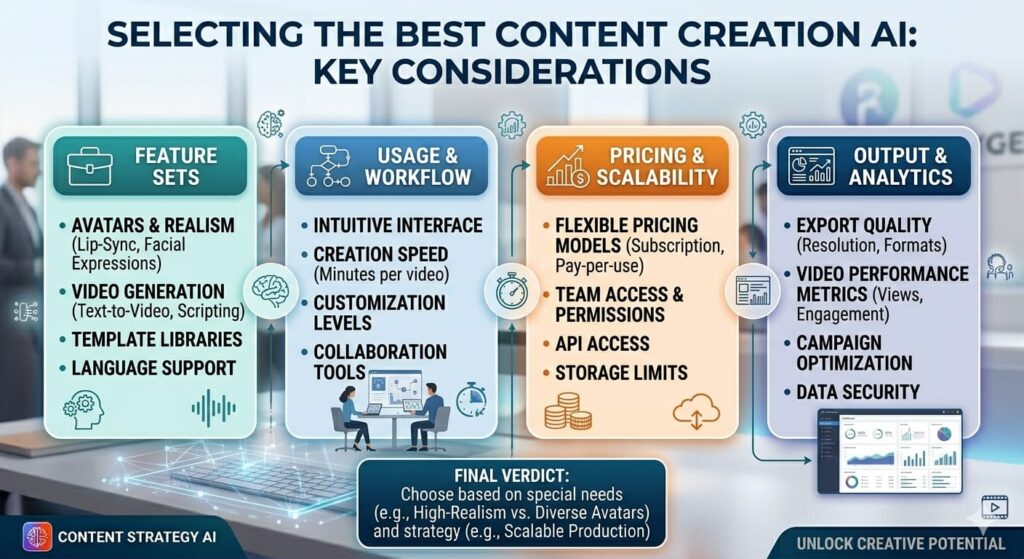
If your calendar is full of social clips, trend-based posts, repurposed links, and quick-turn content, Revid AI makes more sense from its public product direction.
If your calendar is full of presenter videos, avatar-led communication, or brand-facing delivery, HeyGen looks like the cleaner fit from its public pricing and support pages.
Choose Revid AI If
- You need fast, short-form videos more than digital presenters.
- You publish often on TikTok, Instagram Reels, or YouTube Shorts.
- You want inputs like text, links, or recordings to turn into editable clips quickly.
Choose HeyGen If
- You want avatar-led video as a core part of your workflow.
- You prefer a presenter-style format over faceless viral-style clips.
- You are comfortable checking the plan and add-on details to match your expected usage.
The Best Choice for Most Readers
For creators chasing growth through short clips, Revid AI is likely the better pick because its whole public message stays centered on rapid creation and publishing for major social platforms.
For businesses, training teams, and brand-led communication, HeyGen is likely the better pick because its public plans and add-ons point much more clearly toward avatar-based delivery.
FAQs
1. Is Revid AI better than HeyGen?
It can be better for short-form, faceless publishing, while HeyGen looks better for avatar-led video based on their public pages.
2. Is HeyGen better for business videos?
In many cases, yes, because its pricing and support pages place clear focus on creators, marketers, business avatars, and avatar capacity.
3. Is Revid AI good for YouTube Shorts?
Yes. Revid AI’s site directly mentions YouTube, short-form creation, remixing, and quick publishing workflows.
4. Which tool feels easier for beginners?
That depends on the video type. Revid AI looks simpler for social-first clips, while HeyGen looks simpler for users who already want avatar-led presenter videos.
5. Can you use both together?
Yes, and that can be a smart setup. One tool can handle fast social output, while the other can handle presenter-style business videos.
Final Take
The best pick comes down to what you publish every week. If your work leans toward fast, faceless short-form content, Revid AI looks like the better fit. If your work leans toward avatar-led communication and presenter-style delivery, HeyGen looks like the better fit.
A final tip: before buying, check the latest plan limits, credits, and add-ons on the official pages. That one small step can save you from paying for a tool that looks right in theory but feels wrong after the first week.
2 Responses