
Most people do not hate email itself. They hate the feeling of opening the inbox and finding a messy pile of newsletters, replies, alerts, receipts, and real work all mixed together.
That is where AI changes the game. Old filters were like sticky notes on a filing cabinet. An AI agent feels more like a smart assistant sitting beside you, reading the room, spotting what matters, and helping you act before the day runs away.
If you want to learn how to use an AI agent to sort emails, start by choosing one inbox tool, teaching it what matters, and reviewing its choices for the first week.
Tools like Shortwave can organize your inbox, analyze threads, create todos, and connect with apps like Slack, Asana, Notion, and Zapier, while SaneBox lets you train folders and rules for future sorting, and Microsoft is testing Copilot-powered inbox prioritization in Outlook.
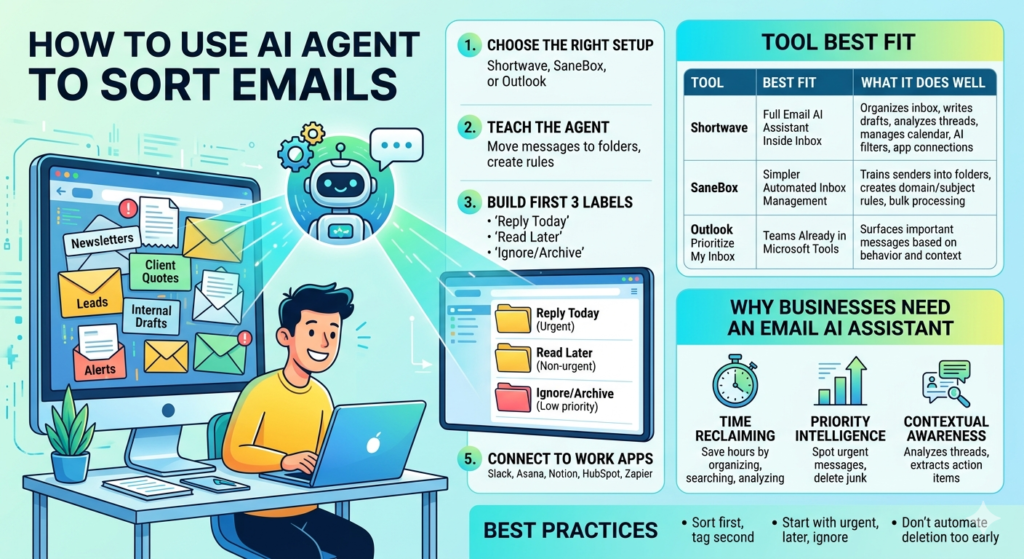
The best setup is usually the simplest one: sort first, tag second, and automate only the actions you would trust even on a busy Monday morning.
| Tool | Best Fit | What It Does Well |
| Shortwave | People who want a full email AI assistant inside the inbox | Organizes inboxes, writes drafts, analyzes threads, manages calendar actions, and adds AI filters and app connections |
| SaneBox | People who want simpler automated inbox management with folder training | Trains senders into folders, creates domain or subject rules, and helps process emails in bulk |
| Outlook Prioritize My Inbox | Teams are already working inside Microsoft tools | Surfaces important messages based on past behavior and organizational context |
Why Your Business Needs An Email AI Assistant
Picture a normal Tuesday. A client asks for a quote, a lead replies to pricing, a teammate sends a draft, and three newsletters land on top of all of it. Miss one message, and the whole day starts wobbling.
That is why a good email AI assistant is useful. It does not just move messages around. It helps you spot what needs a reply now, what can wait, and what never needed your time in the first place.
Time Reclaiming: The Power Of Email Automation
Shortwave says its AI Assistant can save users hours every week by organizing inboxes, searching email, analyzing threads, and handling routine writing tasks inside the mail client itself. SaneBox takes a more folder-based path by letting users train messages into places such as @SaneLater and create rules by sender, domain, or subject.
That mix matters because time is usually lost in two places: deciding what each email is, and deciding what to do with it. Good AI for email reduces both kinds of drag.
Priority Intelligence: Finding What Matters First
Shortwave’s AI Assistant can identify priorities, archive low-priority email, delete junk, and list customers who have not replied, all from plain-language requests inside the inbox. Microsoft says its Copilot-powered Prioritize My Inbox feature surfaces relevant messages based on past behavior, organizational context, and adjustable filters.
Contextual Awareness: Reading The Thread Before Sorting
Shortwave says its assistant can analyze long threads, extract action items, summarize selected messages, and pull details such as dates or receipts from email content. That is a big step up from the old rules that only looked at the sender line or a few keywords.
This is where AI feels different from basic filters. A rule sees “invoice” in the subject line. An agent can look at the full thread and tell whether it is a payment issue, a friendly update, or something that still needs your reply.
Step-By-Step: How To Use An AI Agent To Sort Emails
If you are serious about how to use an AI agent to sort emails, do not start with ten folders and twenty automations. Start with one small lane. Think urgent, later, and ignore. That is enough to get moving.
Once that works, you can build out the rest. A calm setup beats a clever mess every time.
Step 1: Choose The Right Setup
Shortwave is a better fit if you want an assistant that can organize, write, search, analyze, manage calendar tasks, and connect to other tools from inside the inbox. SaneBox is a better fi if you prefer training senders into folders and applying bulk actions or domain and subject rules from a central organizer.
A simple way to decide is this:
- Pick Shortwave if you want a chat-style assistant inside email.
- Pick SaneBox if you want lighter automated inbox management through folder logic and training.
- Pick native inbox prioritization if you want fewer moving parts and already live inside Outlook.
Step 2: Teach The Agent What “Important” Means
SaneBox lets you train messages by moving them into folders such as @SaneLater or back into the Inbox, and it can create rules by domain or subject for future mail. Shortwave goes further by allowing saved prompts, AI memories, and custom instructions that shape how the assistant responds and acts.
This is the part many people rush, and then blame the software. Do not just say “sort my email.” Tell it what counts as urgent:
- Client replies.
- Leads asking about pricing.
- Emails from your boss or team lead.
- Calendar changes.
- Anything with a live deadline today.
Step 3: Build Only the First Three Labels
Start with just three labels or folders:
- Reply Today
- Read Later
- Ignore Or Archive
That small setup is easier to manage, and it gives the agent cleaner examples. A cluttered system teaches clutter.
Step 4: Review The First Week By Hand
Shortwave says users stay in control while the assistant recommends actions for groups of threads. SaneBox also makes training adjustable, so you can reclassify senders into the Inbox or other folders as your pattern changes.
That first week is the learning window. Open the sorted folders once or twice a day. Pull back anything important that landed in the wrong place. Small corrections early make the setup much sharper later.
Step 5: Connect Email To The Rest Of Your Work
Shortwave says it can connect AI to Slack, Asana, Notion, Linear, HubSpot, Zapier, and other tools, and its Tasklet feature can draft replies, add comments, organize todos, and connect to 3,000+ apps.
This is where sorting turns into action. A demo request can become a task. A support thread can trigger a note. A sales reply can land in the right project flow without you playing copy-and-paste all day.
Using AI In Email Marketing And Lead Sorting
For marketers, inbox sorting is not only about staying sane. It is also about not missing money. Replies from warm leads, unsubscribe requests, bounce notices, content approvals, and customer complaints all carry different weight.
That is where AI in email marketing becomes practical. Instead of treating every reply like a generic message, you can sort by intent, tone, and next step.
Sorting Inbound And Outbound Marketing Messages
Shortwave says its assistant can search emails, find customer quotes, summarize conversations, and create lists from message history. That makes it useful for sorting inbound replies from campaign traffic, especially when you need to separate interest from noise.
A clean marketing inbox often uses lanes like these:
- Leads asking for pricing.
- Replies asking questions.
- Auto-replies and out-of-office notices.
- Unsubscribes or list-cleanup items.
- Internal approvals and asset feedback.
Sentiment And Sales Readiness
Even without a fancy data team, you can teach an agent to spot patterns. A message saying “Can you send pricing?” should not sit beside a newsletter signup. A message saying “We are unhappy with the delivery” should go to support fast.
That is the practical side of AI for email. It is less about magic and more about sorting the tone and goal of a message before it turns into a delay.
Lead Scoring Without A Huge System
You do not need a giant CRM built on day one. A simple sorting rule can already move “demo,” “quote,” “proposal,” or “pricing” emails into a high-priority lane.
Then, once the system proves itself, you can connect those messages to your task or CRM stack. Shortwave’s app integrations make that kind of handoff possible inside the inbox workflow.
Best AI Tools And Custom Workflows For Email Sorting
There is no single winner for everyone. Some people want a smart assistant that can read, write, summarize, and connect tools. Others just want the inbox to stop looking like a junk drawer.
So the better question is not “What is the best tool?” It is “What kind of inbox pain am I trying to fix first?”
Shortwave For Inbox Zero Workflows
Shortwave describes its AI Assistant as a conversational executive assistant built into email, with support for organizing the inbox, writing better emails, improving drafts, searching in plain language, analyzing threads, managing calendar actions, and using AI filters.
It also offers saved prompts, AI memories, and direct app links to Slack, Asana, Notion, HubSpot, Linear, and Zapier. If you want a full email AI assistant rather than a simple sorter, this is the more advanced path.
SaneBox For Straightforward Sorting
SaneBox’s Email Organize feature focuses on bulk processing and training, letting you assign senders to Sane folders, move messages back to the Inbox, mark mail as read, archive, trash, and build rules by domain or subject.
That makes SaneBox feel more like a smart sorting layer than a conversational assistant. For many people, that is enough. Sometimes you do not need a robot coworker. You just need the clutter to stop shouting.
Native Outlook Prioritization
Microsoft says Prioritize My Inbox in Outlook uses Copilot to surface relevant messages based on past behavior, organizational context, and user-adjustable filters.
That is a good fit for teams that want a lighter jump into AI sorting without adding another separate inbox tool. It may not give the same depth as a full assistant, but it can still clean up the first glance problem.
How To Build A Custom Agent Without Coding
A custom setup can stay simple:
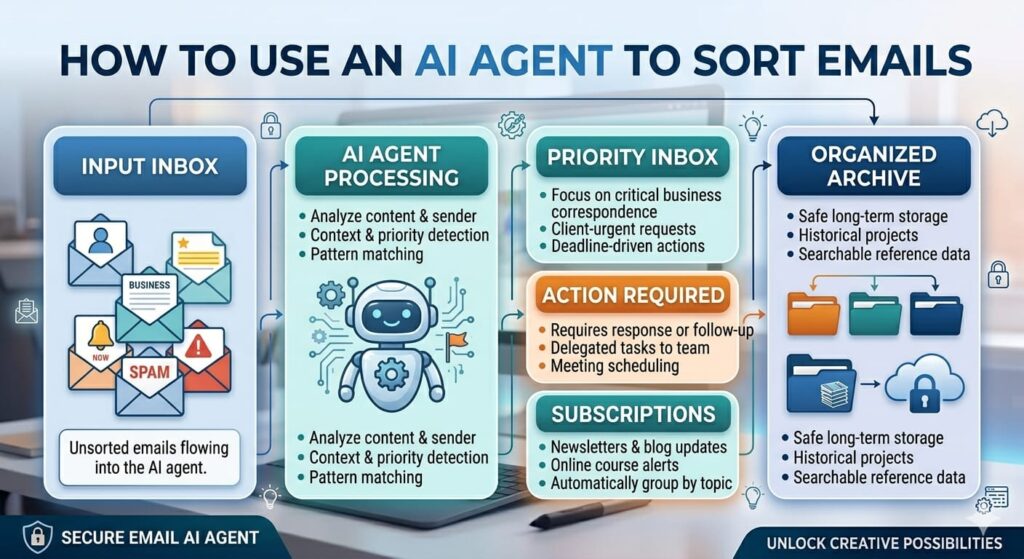
- Let the agent sort new mail into priority lanes.
- Send lead emails to a task tool.
- Send support issues to the right team channel.
- Keep a daily review folder for anything uncertain.
Shortwave’s listed integrations already cover several common work apps, so a connected workflow does not have to start from scratch. For privacy, keep access narrow, review permissions before connecting a mailbox, and start with one inbox before rolling anything out more widely.
Common Pitfalls To Avoid
- Do not automate deletion too early.
- Do not create ten labels before you test three.
- Do not skip the daily review in the first week.
- Do not let newsletters and leads share the same rule.
- Do not forget that a human still needs the final say on high-stakes messages.
FAQs
What Is The Easiest Way To Learn How To Use An AI Agent To Sort Emails?
Start with one inbox, three folders, and one rule for urgent mail. Review the results daily for a week, then add one more action only after the first setup feels stable.
Which Tool Is Better For Beginners?
Shortwave suits people who want an assistant that can organize, search, summarize, write, and connect with work apps inside the inbox. SaneBox suits people who want easier folder training and bulk sorting without a chat-style assistant layer.
Can AI Sort Email Threads By Context?
Yes. Shortwave says its assistant can analyze threads, summarize multiple emails, extract action items, and understand what is on screen when helping the user.
Is Native Outlook AI Enough For Some Teams?
Yes, for some cases. Microsoft says Prioritize My Inbox can surface relevant emails based on work patterns and organizational context, which may be enough for teams that want lighter automation first.
Does AI In Email Marketing Help With Lead Handling?
Yes, when you use it to separate pricing questions, demo requests, support issues, and low-value replies into different lanes. That keeps the sales inbox from turning into a haystack.
Final Thoughts On How To Use An AI Agent To Sort Emails
The smartest way to approach how to use an AI agent to sort emails is to treat it like training a new assistant. Start small. Be clear. Check the work. Then add more once the basics are steady.
That is how you get closer to inbox zero without building a monster system you no longer trust. And once the sorting starts working, the inbox changes from a daily headache into something much simpler: a place where the right messages rise, and the rest stop stealing your time.
What AI tool or sorting trick has helped your inbox the most?