
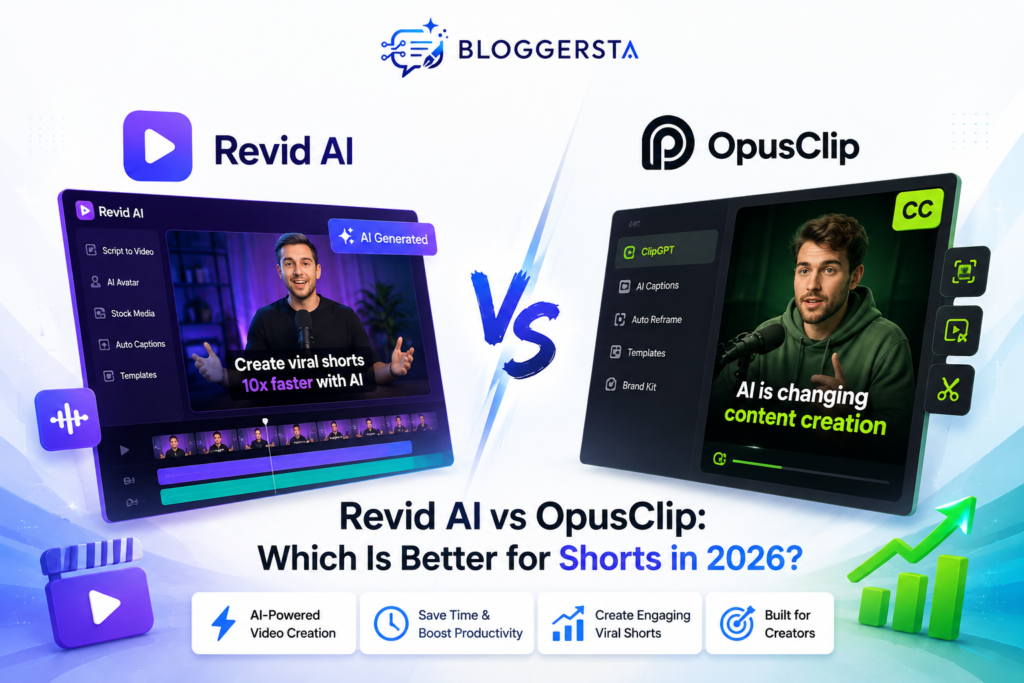
Short-form video is one of the most competitive formats of content online. According to YouTube, 200 billion short videos are viewed every day, and Wyzowl’s 2026 research finds that 63% of consumers prefer to learn about a product or service via short video. Meanwhile, AI video tools are transforming how creators make that video. With the automatic highlighting feature, creators can now identify the highlights, create visuals, write scripts, add captions, and prepare vertical videos in a fraction of an hour.
That creates an important question: Revid AI vs OpusClip—which is better for Shorts in 2026?
Quick Answer
| OpusClip is the better choice for creators who already have long-form videos and primarily want to turn them into polished Shorts. Its workflow focuses heavily on AI clipping, captions, reframing, B-roll, editing, and social publishing. Revid AI is the better choice for creators who need broader AI video production. It can work from prompts, scripts, articles, URLs, audio, and other inputs while also supporting editing and social publishing. |
If you want to explore Revid AI directly, you can check the platform here: Revid AI.
Revid AI vs OpusClip: What Is the Real Difference?
The main difference is where you start.
OpusClip is best for repurposing existing long-form videos. It finds highlights and turns them into AI Shorts with captions, reframing, B-roll, editing, and scheduling.
Revid AI is more flexible. It can create videos from prompts, scripts, articles, links, audio, or existing footage, while also offering voiceovers, editing, automation, and publishing.
In short:
- Choose OpusClip for podcasts, interviews, webinars, and long videos.
- Choose Revid AI for faceless content, scripts, articles, and videos created from scratch.
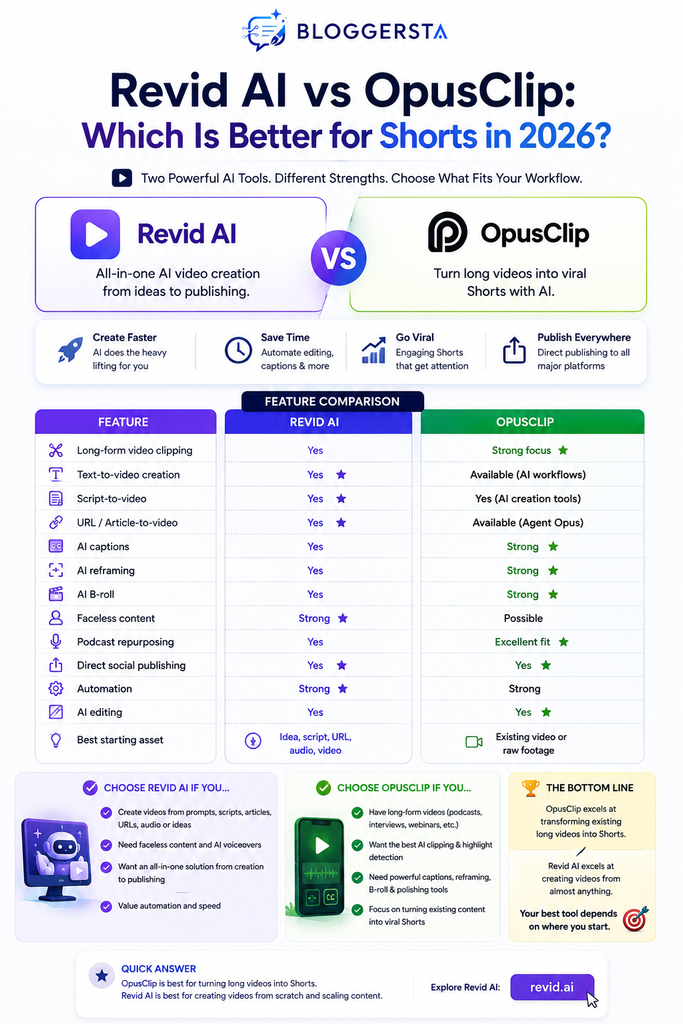
Revid AI vs OpusClip Feature Comparison
| Feature | Revid AI | OpusClip |
| Long-form video clipping | Yes | Strong focus |
| Text-to-video creation | Yes | Available through newer AI creation workflows |
| Script-to-video | Yes | Yes, through AI creation tools |
| URL/article-to-video | Yes | Available through Agent Opus workflows |
| AI captions | Yes | Strong |
| AI reframing | Yes | Strong |
| AI B-roll | Yes | Strong |
| Faceless content | Strong | Possible |
| Podcast repurposing | Yes | Excellent fit |
| Direct social publishing | Yes | Yes |
| Automation | Strong | Strong |
| AI editing | Yes | Yes |
| Best starting asset | Idea, script, URL, audio, video | Existing video or raw footage |
The table reveals why a simple winner can be misleading. Both platforms now overlap in several areas. The more useful question is which workflow each platform handles with less friction.
Where OpusClip Has the Stronger Edge
OpusClip is ideal for creators with existing long-form footage, such as podcasts, interviews, webinars, and educational videos. Its AI identifies strong moments and turns them into AI Shorts with captions, reframing, B-roll, and editing tools.
Its AI Producer also enhances raw talking-head footage with motion design, music, sound effects, and polished visuals. As a result, OpusClip is now more than a basic clipping tool—it supports broader short-form video production.
Where Revid AI Has the Stronger Edge
Revid AI is a strong choice when you want to create videos from scratch. It can turn prompts, articles, scripts, audio, or URLs into videos with voiceovers, captions, editing, and publishing tools.
This makes it useful for faceless creators, affiliate marketers, publishers, and businesses producing frequent social content. Its flexible input options also reduce the need to switch between multiple tools.
For a broader comparison, see our guide to Revid AI vs HeyGen.
Revid AI vs OpusClip for YouTube Shorts
YouTube Shorts are a major use case for AI video tools, with more than 200 billion daily views. But reach alone does not guarantee performance. Strong Shorts still need a compelling hook, clear context, readable captions, natural pacing, and a complete ending.
For existing long-form content, OpusClip is usually the better choice for turning podcasts, interviews, webinars, and YouTube videos into Shorts. Revid AI is better suited to creating Shorts from ideas, scripts, articles, URLs, or other non-video inputs.
- Existing long-form video: OpusClip
- Idea, script, article, or URL: Revid AI
- Mixed content library: Either tool
Since March 2025, YouTube has counted Shorts starts and replays as views, while the previous measurement is now called “engaged views.” For accurate performance analysis, track retention, engaged views, completion rate, subscribers, and conversions—not raw views alone.
If you want a deeper look at its performance for short-form platforms, read our Revid AI Review 2026, where we examine how it works for TikTok, Reels, and YouTube Shorts.
The Overlooked Metric: Content Multiplication
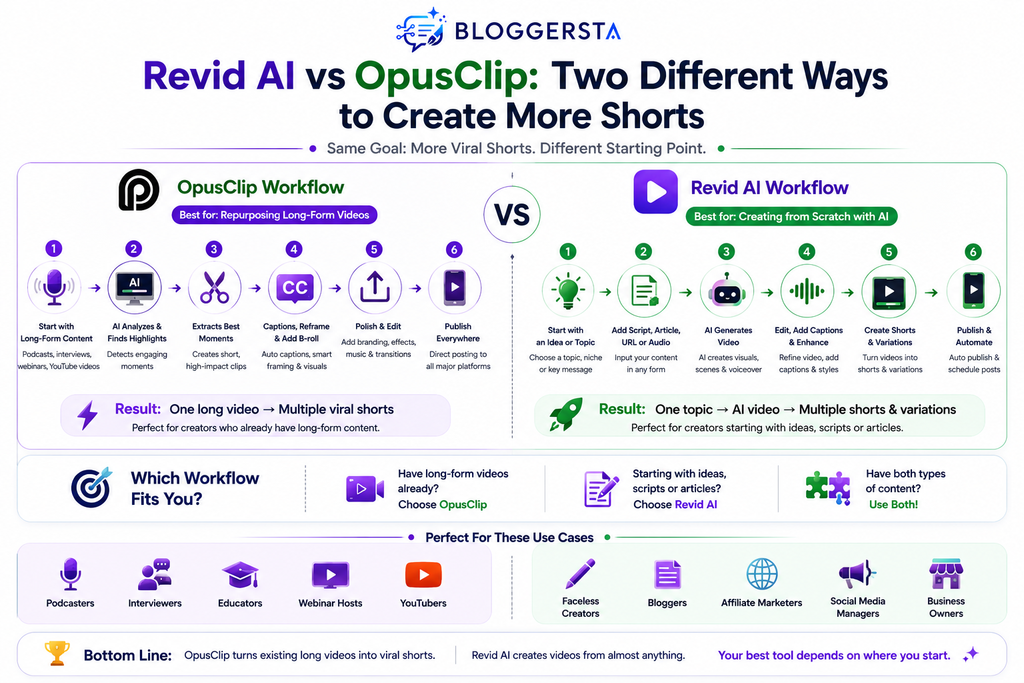
One of the most useful ways to compare these tools is content multiplication. Content multiplication measures how many useful pieces of content you can produce from one original asset.
For example:
One podcast → 10 Shorts → multiple platform versions
That is a repurposing workflow.
But consider another model:
One topic → script → narrated video → Short → multiple variations
That is a creation workflow.
OpusClip is particularly strong in the first model. Revid AI is more flexible across both models because it can begin with content that is not already video.
This distinction becomes valuable for marketers. A creator producing one podcast each week may prioritize extraction speed. A faceless channel producing five videos per day may prioritize generation and automation.
How to Measure Short-Form Video Quality
AI automation saves time, but speed should not become the only measurement.
A useful Short should work as a standalone narrative unit. Viewers should understand the context quickly without needing to watch the original 30-minute video.
When testing Revid AI or OpusClip, evaluate these areas:
- Hook: Does the opening create immediate curiosity?
- Context: Can viewers understand the subject quickly?
- Pacing: Does the clip remove unnecessary pauses?
- Captions: Are words accurate and easy to follow?
- Framing: Does the speaker or an important visual remain visible?
- Narrative closure: Does the clip feel complete?
- Visual variety: Are B-roll and supporting visuals useful?
- Brand consistency: Does the output match your visual identity?
- Editing time: How much manual correction remains?
Wyzowl’s 2026 research found that 89% of consumers say video quality affects their level of trust in a brand. That makes quality control especially important when using automated production.
Neither platform can guarantee virality. AI can accelerate production, but topic selection, storytelling, audience fit, distribution, and creative judgment still influence performance.
Revid AI vs OpusClip: Pricing and Value
Pricing changes frequently, so compare the current plans rather than relying on older reviews.
Revid AI’s public pricing currently lists paid plans starting around $39 per month, with higher tiers providing more credits and automation capacity. Its pricing page also highlights features such as 100+ tools, direct publishing, voiceovers, and automated workflows.
OpusClip currently offers a free plan with 60 credits per month. Its paid plans include Starter at $15 per month and Pro at $29 per month when billed monthly. The annual Pro option is displayed at $14.50 per month when billed annually.
| Tool | Entry Option | Paid Pricing Highlight | Best Value For |
| Revid AI | Paid plans | From about $39/month | Broad AI video creation |
| OpusClip | Free | Starter $15/month | Video repurposing |
| OpusClip Pro | — | $29/month | Higher-volume clipping |
The cheapest plan is not automatically the best value. If OpusClip saves hours of editing for a podcast creator, its lower-cost plan may offer excellent value. If Revid replaces several separate creation tools, its higher subscription could still make financial sense.
If your content workflow is more focused on turning articles and written content into videos, you can also explore Pictory AI as another option.
Who Should Choose Revid AI?
Choose Revid AI if your content process starts with ideas, scripts, articles, URLs, audio, or prompts.
It is a strong fit for creators who want to produce original short-form videos without recording every piece of content themselves. It also makes sense for marketers and publishers who want broader automation rather than a tool focused primarily on extracting clips.
Revid AI is especially attractive for:
- Faceless YouTube channels
- Affiliate marketers
- Bloggers
- Social media teams
- AI content creators
- High-volume video publishers
- Businesses turning written content into videos
If your goal is to build a repeatable content engine rather than simply repurpose existing footage, Revid AI deserves serious consideration.
Who Should Choose OpusClip?
Choose OpusClip when you already produce long-form video and want to multiply its reach. It is especially effective for podcast creators, interview channels, educators, coaches, consultants, and businesses that regularly publish webinars or talking-head videos.
A simple workflow could look like this:
Record long-form video → upload → identify strong moments → edit → caption → reframe → schedule → publish.
That workflow removes much of the repetitive work associated with manual clipping.
For creators focused heavily on TikTok and Instagram alongside YouTube Shorts, you can also read Bloggersta’s guide to 5 AI Video Editors for Viral TikToks and Reels.
Can You Use Revid AI and OpusClip Together?
Yes. In fact, some creators may get more value from combining them. Consider a podcast brand that publishes one long episode each week. OpusClip can handle the repurposing side by identifying potential Shorts from the recording. Revid AI can then support additional content created around the episode. You could produce an explainer, short promotional video, quote-based video, or another piece of social content from the same topic.
This creates a broader workflow:
Long-form recording → OpusClip → podcast Shorts
Episode topic → Revid AI → additional original social videos
The two platforms therefore do not always need to compete. They can serve different stages of the same content strategy.
Revid AI vs OpusClip: Pros and Cons
Revid AI Pros
- Broader AI video creation capabilities
- Suitable for original Shorts
- Useful for faceless content workflows
- More flexible content transformation
- Better fit for varied starting inputs
Revid AI Cons
- Broader functionality may require more experimentation
- Not every creator needs a full creation workflow
- Credit usage should be evaluated against usable output
OpusClip Pros
- Strong long-form-to-Shorts workflow
- Excellent fit for podcasts and interviews
- Focused video repurposing approach
- Useful for large content archives
- Reduces manual clip-selection work
OpusClip Cons
- Less useful when no source footage exists
- Original AI video creation is not its central advantage
- Some creators may require another platform for original content
Final Verdict
So, Revid AI vs OpusClip comes down to one fundamental question. If your main goal is transforming podcasts, interviews, webinars, and long-form YouTube videos into Shorts, OpusClip is the better choice. Its workflow is purpose-built around finding useful moments and preparing them for short-form distribution.
If you want to create videos from scripts, articles, prompts, URLs, audio, or ideas, Revid AI is the more versatile choice. It provides a broader production environment that extends beyond traditional clipping.
For most creators, there is no universal winner. The best tool is the one that matches the first asset in your workflow. Choose OpusClip for repurposing. Choose Revid AI for broader AI video creation. Choose both when your content strategy requires both.
FAQs
Is Revid AI better than OpusClip?
Revid AI is better for creators who need broader AI video creation from scripts, articles, prompts, URLs, and other inputs. OpusClip is generally better for creators who primarily want to repurpose existing long-form videos into Shorts.
Is OpusClip good for YouTube Shorts?
Yes. OpusClip is well suited to YouTube Shorts because its workflow focuses on identifying useful moments from longer videos and converting them into short-form content with captions, reframing, and editing tools.
Can Revid AI create Shorts from text?
Yes. Revid AI supports workflows that can turn prompts, scripts, articles, and other written inputs into videos. This makes it useful for creators who do not already have recorded footage.
Which is better for podcast clips?
OpusClip is usually the stronger choice for podcast clipping because its workflow is designed around repurposing existing long-form video. Revid AI can still be useful when you want to create additional promotional or supporting content around the podcast.
Which tool is better for faceless Shorts?
Revid AI is generally the stronger fit for faceless Shorts when the workflow starts with a topic, script, article, or other non-video input. It can help build videos without requiring the creator to appear on camera.
Can I use Revid AI and OpusClip together?
Yes. You can use OpusClip to extract Shorts from existing long-form content while using Revid AI to create additional videos from related ideas or written content. This can create a more flexible short-form production pipeline.
What should I test before choosing?
Run the same content workflow through both platforms. Measure production time, editing required, caption accuracy, hook quality, visual consistency, narrative completeness, and the number of genuinely publishable Shorts produced.
The Bottom Line
AI video tools are becoming less about simply generating clips and more about building repeatable production systems. YouTube’s enormous Shorts audience and the growing use of AI video tools make efficient short-form workflows increasingly valuable.
You can try Revid AI here and measure its output against your current process. For creators turning articles and written content into videos, Pictory AI can also be explored as part of a broader content repurposing strategy.
For more practical guidance, explore Bloggersta for additional resources covering AI video generation, content creation, and modern creator workflows.