
Every developer knows that feeling, the late night, code does not run, one silly error preventing your whole project from working as it should. You try fixing it line by line, but nothing works, and deadlines are approaching. Then coding goes from feeling creative to stressful.
This experience has been completely transformed with AI coding assistants. You no longer laboriously search for each solution; now you simply use tools that understand your code, which suggest and fix in real time, or help you write faster with smart, context-based suggestions. It is more like having an experienced developer guiding you within your editor rather than debugging alone.
- Smart code suggestions based on your project context
- Faster debugging with real-time error detection
- Support for multiple languages and frameworks
This guide reviews five of the top AI coding assistants, tested for speed, accuracy, repository understanding, and overall strength as GitHub Copilot alternatives.
What is the Best AI Tool for Coding Practices?
There isn’t a single “best” AI coding tool, but we think for most workflows, GitHub Copilot is the best overall. It seamlessly integrates with leading IDEs such as VS Code and assists in generating real-time code, ranging from standalone functions to entire logical blocks. Newer editors like Cursor and Windsurf (which are more AI-native) actually take this even further: whereas today’s generative helpers usually understand single files, these are much more powerful as they can understand whole projects — which is extremely useful for complex development tasks or debugging across multiple modules.
Modern AI-based coding systems use context-aware large language models that analyze the currently open tabs, connected files, and repository structure to suggest complete algorithms rather than basic line-by-line completions. By doing so, it enables developers to code more quickly while eliminating repetitive manual work. On the other hand, enterprise-specific considerations also come into play when determining if an LLM tool is being used correctly, as a poorly configured tool may expose sensitive source code to external training systems or shared model logs.
Developer Deployment Insight
GitHub Copilot: ~30–60 seconds setup in VS Code with instant inline suggestions
Cursor AI IDE: ~2–4 minutes setup with full repo indexing and agent mode activation
Windsurf: ~3–5 minutes setup with collaborative AI flow integration and workspace syncing
Top Code Automation Engines
Combining AI reasoning with IDE or terminal-level integration, code automation engines enable developers to write, debug, and manage software faster. Whether for enterprise development or individual coding workflows, these tools vary in context handling, privacy controls, and free-tier availability.
Also read: 5 Best Free AI Face Swappers and Photo Editors (2026)
| Assistant Name | Best Integration Target | Context Window Limits | Telemetry Privacy Settings | Best Free Account Alternative? |
| GitHub Copilot | VS Code / Visual Studio | Medium (project-aware snippets) | Microsoft enterprise-grade controls | Yes (limited free tier) |
| Cursor | AI-native IDE (VS Code fork) | Large (full repo understanding) | Opt-out is available for data training | Yes (free plan available) |
| Claude Code | Terminal / CLI workflows | Very large context window | Strong privacy-focused model design | Limited free access via Claude |
| Windsurf | Collaborative IDE environments | Large session memory retention | Configurable data usage settings | Yes (starter tier available) |
| Aider | Git-based CLI workflows | Medium to large repo context | Local-first privacy control | Yes (open-source option) |
Reviewing the 5 Best AI Coding Assistant Ecosystems
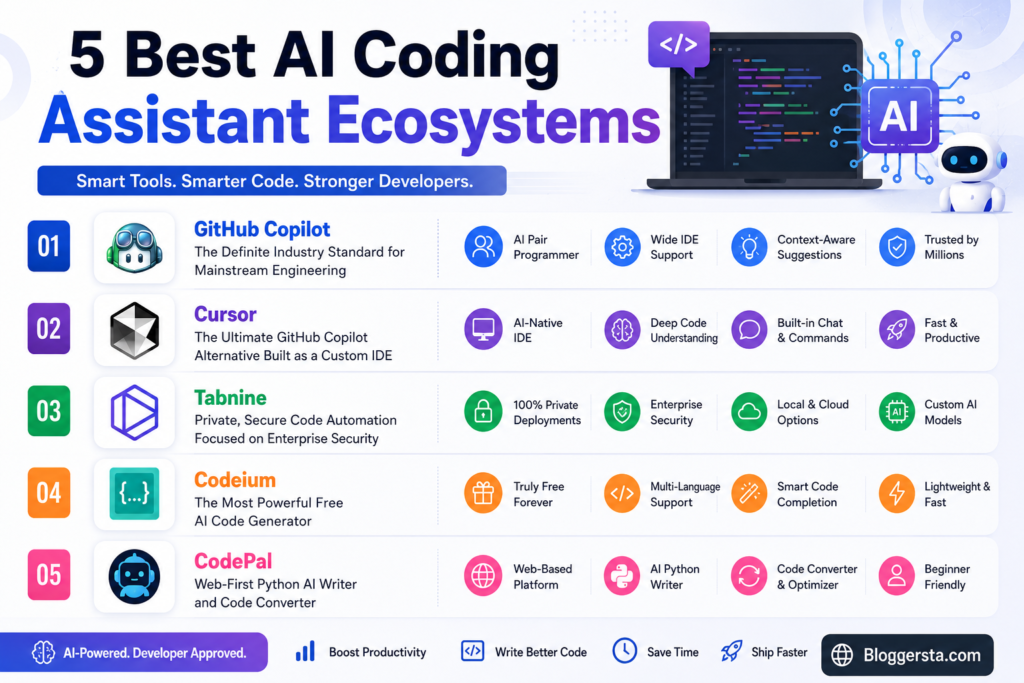
AI coding assistants have partially evolved into full-fledged development ecosystems, assisting in every stage of the process: writing, debugging, testing, and refactoring code at scale. These platforms now have much more in common with autocomplete tools than with modern AI-powered software—existing models scale to the repository level and securely handle multi-file edits in enterprise workflows. For starters, an analysis based only on the nuances of real-world performance, implementation depth limits, and privacy contours is given below.
1. GitHub Copilot – The Definite Industry Standard for Mainstream Engineering
GitHub Copilot is the most widely adopted AI coding assistant for professional development. Meticulous is built into VS Code and JetBrains IDEs, making it suitable for enterprise workflows. The chat system can refactor massive chunks of code while keeping the full project context in mind.
Feature Focus Block:
It can automatically generate unit tests and run them directly in your IDE.
- Feature: Automatic Generation of Test Units Inside IDE
- Pros: Quick suggestions, Highly context-aware, Good documentation support
- Cons: No free tier for regular users, sometimes outdated recommendations
2. Cursor – The Ultimate GitHub Copilot Alternative Built as a Custom IDE
Cursor is an AI-native IDE and is built on top of a modern base (VS Code). By letting developers converse with whole codebases using natural language, it has also enabled editing of multiple files simultaneously.
- Standout Feature: Multi-file codebase editing with dependency awareness
3. Tabnine – Private, Secure Code Automation Focused on Enterprise Security
Tabnine is all about privacy and enterprise-grade security. It also enables local or private cloud AI with complete confidentiality for the sensitive source code.
- Zero telemetry storage
- Local model fine-tuning
- Enterprise compliance certifications
4. Codeium – The Most Powerful Free AI Code Generator
Codeium offers one of the best free AI coding experiences with unlimited suggestions across 70+ languages, making it ideal for students and freelancers.
| Category | Details |
| Pros | Unlimited suggestions, free, fast performance, and versatile language types |
| Cons | Not a standalone IDE, it depends on an external editor |
5. CodePal – Web-First Python AI Writer and Code Converter
CodePal is an in-browser code assistant built for beginners. It assists in creating code, translating languages, and building logic from basic prompts.
- Feature: Instant language conversion (JavaScript → Python)
Can AI Write Code for Free Safely?
Yes, AI writes code for free, but it is safe to use. With modern tools that can generate functions, debug errors, and even auto-refactor projects. The trick is selecting the right platforms and carefully scrutinizing their output before deploying in real applications.
Strategic Selection Matrix
- Codeium – Best for Unlimited Free Coding Support: For free, unlimited coding support, it is Codeium. It offers sublime inline code completions, lightning-fast type suggestions, support for 70+ programming languages with no strict cut-offs.
- Cursor (Free Tier) – Best for Advanced Multi-File Editing: Cursor provides AI-powered codebase understanding and multi-file refactoring for developers working on full projects. It even offers free access, promoting a modern IDE experience with good context awareness.
- CodePal – Best for Beginners and Quick Learning Tasks: CodePal is great for generating simple scripts, language conversions, and coding help right in the browser, with a level-focused approach to learning. Maintaining a light and convenient aspect.
Avoiding Bugs in AI-Generated Codebases
Small errors can make it into production if the output of even sophisticated AI coding tools is not checked very carefully. Having a simple and structured approach is key to keeping your code stable, secure, and easy to maintain.
- Run Mandatory Code Reviews
Always have a human review AI-generated code before merging it. This helps catch logic problems, hidden bugs, and incorrect syntax for larger changes.
- Enforce Strong Automated Unit Tests
Ask the AI to generate test cases alongside your main code. This ensures every function is validated early and reduces the risk of system failures.
- Audit Third-Party Dependencies
Check all libraries and imports for updated, secure versions. Old or unsafe packages can create serious security risks in production environments.
Also read: 5 AI Graphic Design Tools That Save Hours of Work (2026)
FAQs
1. What is the best AI for coding for beginners?
Codeium and ChatGPT are great for beginners. They provide basic code suggestions, break down logic clearly, and walk users through programming step by step by developing real projects.
2. Which AI assistant is better for coding?
GitHub Copilot is tuned for professional development, while Cursor is solid for working through an entire project. Both aid in real-time suggestions, debugging, and fostering rapid development.
3. Which AI is best for coding-related questions?
ChatGPT, Claude & Gemini were doing well on coding questions. They do this by explaining errors, providing suggestions on how to fix them, and breaking down complex programming concepts into simple explanations.
4. Which AI is best for asking questions and getting answers?
ChatGPT is an all-purpose Q&A chatbot. It gives simple explanations with step-by-step solutions and covers coding problems, debugging errors in code, and programming-related doubts very well.
Conclusion: Embracing the Future of Software Engineering via Smart Co-Pilots
Software engineering has changed completely with AI coding assistants. No longer are developers occupied with simple syntax error fixes or repetitive coding chores. Instead, system design and architecture decisions and tools to deliver products faster and with greater intelligence have become the primary utilities.
The best AI coding assistant application for you is dependent on your workflow, IDE of choice, and how much you value data privacy, secure dev environments, etc. It strikes a balance that allows you to code faster without risking sensitive data from your project.
Try Codeium or start a free Cursor trial today, paste your toughest bug, and see how quickly AI helps you solve and compile it in real time.