
AI advertising has moved well beyond experimental clips and odd-looking avatars. IAB reported in 2026 that nearly two-thirds of digital video buyers now use generative AI for video creative. A product page can now serve as a social ad without requiring another shoot. So, how can you turn an ordinary product page into a realistic AI video ad within minutes?
Quick Answer
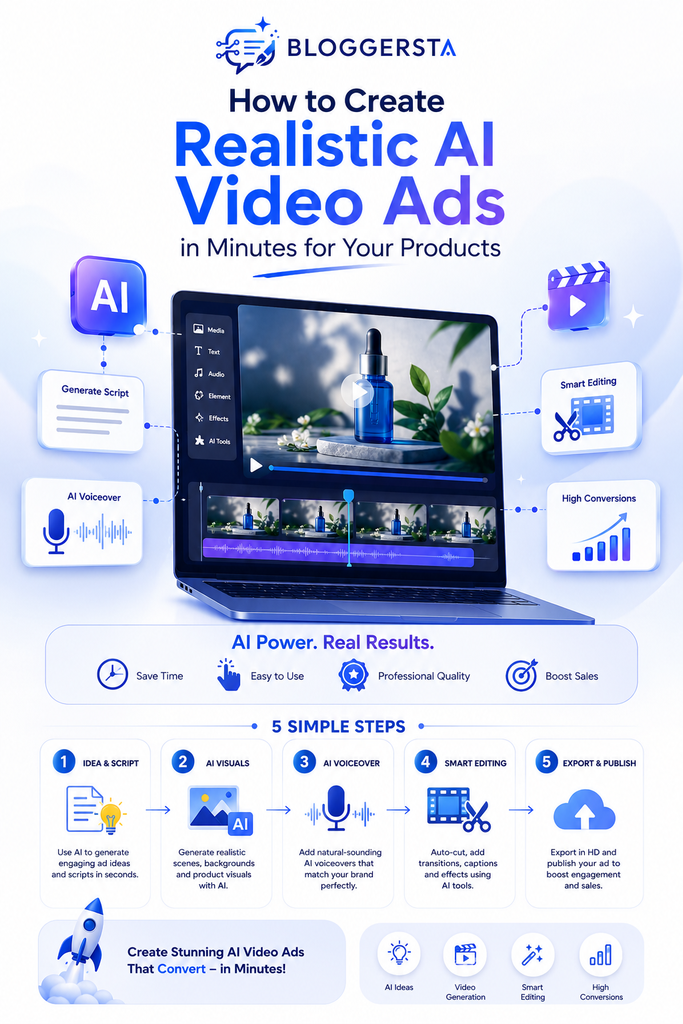
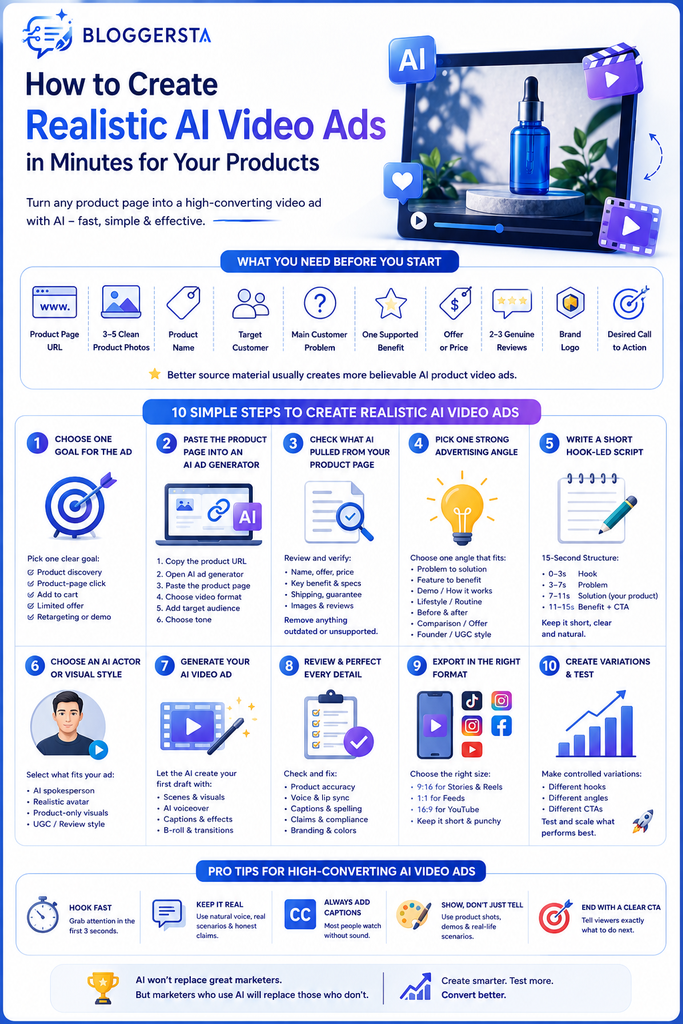
To create realistic AI Video Ads, start with a product URL or clean product images. Pick one customer problem, choose one advertising angle, then write a short hook-led script. Select an AI actor or product-focused style before generating the first draft. Next, check product accuracy, voice, lip sync, captions, and claims. Export the strongest version in the right format, then create controlled variations for testing.
The steps below show exactly how that process works.
What You Need Before Creating an AI Video Ad
AI works faster when you give it clean source material. Don’t throw an entire store catalog into one prompt and hope for magic. Gather the product information that supports one clear advertising idea. Think of this preparation like packing a small suitcase. Bring what the trip needs, not everything sitting in your closet.
Have these items ready:
- A public product page URL
- Three to five clean product photos
- Product name
- Target customer
- Main customer problem
- One supported product benefit
- Current offer or price
- Two or three genuine reviews
- Brand logo
- Desired call to action
Better source material usually creates more believable AI product video ads.
How to Turn a Product Page Into a Video Ad With AI
Your product page already holds most raw ingredients for an advertisement. The trick is narrowing those details into one message a viewer can understand within seconds.
Step 1 — Choose One Goal for the Ad
Start by deciding what the viewer should do next. One short ad cannot introduce your brand, explain six features, answer objections, and sell three products at once. Pick one goal.
You might focus on product discovery, a product-page click, an add-to-cart action, a limited offer, retargeting, or a demonstration. A cold-audience skincare ad may start with a problem. A retargeting ad can lead with the discount instead.
Step 2 — Paste the Product Page Into an AI Ad Generator
Next, copy your product URL into a URL-to-video tool. Revid AI’s Ad Generator can work from product descriptions, images, or URLs. It can then build scripts, voiceovers, social-ready visuals, captions, hooks, and calls to action around that source material.
A simple workflow looks like this:
- Copy the product URL.
- Open the AI ad generator.
- Paste your product page.
- Pick the desired video format.
- Add your target audience.
- Choose an appropriate tone.
The software does much of the first-pass work. You still control what gets published.
Step 3 — Check What AI Pulled From Your Product Page
This step matters more than many tutorials admit. URL-to-video AI can save plenty of typing, yet extraction isn’t fact-checking.
Review the product name, offer, price, key benefit, specifications, shipping information, guarantee, images, and customer reviews. Remove anything outdated or unsupported.
For example, your page may mention “results vary” beside one customer story. AI could accidentally turn that story into a general promise. That changes the meaning. AI extraction saves time, but your product page remains the source of truth.
Step 4 — Pick One Strong Advertising Angle
Product information describes what you sell. An advertising angle explains why someone should care.
A reusable travel mug could support several angles. One ad might focus on coffee going cold during commuting. Another could show spill protection inside a backpack. A third might position the mug as a practical gift.
Strong angles include:
- Problem to solution
- Feature to customer benefit
- Product demonstration
- Routine or lifestyle
- Before and after
- Objection handling
- Comparison
- Offer-led promotion
- Founder-style message
- AI UGC review style
Pick one. That keeps the script focused.
Step 5 — Write a Short Hook-Led Script
Don’t turn your product description into narration. Spoken advertising needs shorter wording, stronger rhythm, and an immediate reason to keep watching.
A useful 15-second structure looks like this:
| Timing | Purpose |
| 0–3 seconds | Hook |
| 3–7 seconds | Problem |
| 7–11 seconds | Product and benefit |
| 11–15 seconds | Proof and CTA |
Instead of saying, “Introducing our innovative insulated travel bottle,” start closer to real speech.
“Still drinking lukewarm coffee halfway through your commute?”
Then introduce the product. Show how it addresses that exact problem. Finish with one direct action.
That simple structure works because each sentence has a job.
Step 6 — Choose an AI Actor or Product-Only Style
Realism depends partly on choosing the right format. Not every product belongs in an AI actor’s hands.
Use AI UGC ads when human presentation supports trust. Beauty products, apps, household items, clothing, and subscription offers often fit that style. Creator-led videos also feel natural inside TikTok ads and Instagram Reels ads.
Use product-only footage when packaging, texture, luxury styling, or close-up detail matters more.
Creatify is useful for URL-to-video, AI UGC, avatars, product ads, and multiple creative versions. HeyGen makes more sense when you want a polished AI avatar, virtual creator, or multilingual spokesperson.
Need more generation styles? Compare Bloggersta’s best text-to-video AI tools.
Step 7 — Generate the First AI Video Ad
Generate one controlled draft first. Creating ten versions immediately only gives you ten possible problems to inspect.
Watch the first draft from beginning to end. Check scene order, product visibility, actor delivery, AI voiceover, captions, music, CTA, and pacing.
Then watch it again without focusing on the script. Does the person move naturally? Does the product suddenly change size? Does a bottle label shift between frames?
That second viewing often catches problems your first pass misses.
Create your first ad with Revid AI.
How to Make AI Video Ads Look More Realistic
Realism doesn’t come from resolution alone. Small choices carry more weight. Use sharp product photos, believable motion, natural spoken wording, and an actor who fits your buyer. Keep camera movement controlled. Watch hands carefully whenever they touch products. Real brand assets also help maintain product fidelity across scenes.
A realistic AI video ad should keep the product accurate, use natural speech, limit exaggerated movement, match the presenter with the intended buyer, and resemble normal social content instead of an over-polished television commercial.
Small imperfections can actually help. Real people pause. They change tone. They don’t smile through every sentence.
How to Check an AI Video Ad Before Publishing
Generation isn’t the final step. Review the output like an editor and a customer at the same time. Look for visual errors, false claims, awkward audio, and platform problems before ad spend enters the picture.
Check Product Fidelity
Review the video frame by frame when the product appears. Look closely at logos, labels, colors, buttons, package shape, quantity, size, and reflections.
Product-in-hand video deserves extra attention. AI hands can hide details or change product proportions between shots.
If a skincare bottle starts rectangular and ends slightly rounded, regenerate the shot. The ad should sell your real product, not AI’s interpretation of it.
Check Every Advertising Claim
Compare your generated script with the original product page.
Remove invented guarantees, fake discounts, old prices, unsupported performance claims, fabricated testimonials, and unverified comparisons.
A common mistake happens when AI converts “customers say this feels lighter” into “the lightest product available.” Those statements aren’t equivalent.
AI can change how your message appears. It shouldn’t change what the product actually does.
Check the Voice and Lip Sync
Listen once without watching the screen. Awkward pronunciation, pacing, and emphasis become easier to notice.
Then mute the video and watch the face. Look for delayed mouth movements, stiff expressions, strange pauses, or eye contact that feels too fixed.
Check pronunciation, emotional tone, speech speed, pauses, mouth timing, and unusual emphasis. Small errors can make an otherwise strong ad feel synthetic within seconds.
Check the Social Format
Your video also needs to fit its placement.
- 9:16: TikTok, Reels, and Shorts
- 1:1: selected social feed placements
- 16:9: YouTube and wider video placements
Keep captions and CTAs away from interface buttons. A great line hidden behind TikTok controls is effectively invisible.
Need more editing control? Compare Bloggersta’s AI video editors for TikToks and Reels.
Create Several Ad Variations Without Starting Again
One good product page can support several paid social creative ideas. However, change one meaningful variable at a time. That gives your A/B testing a cleaner signal.
Try variations such as:
- Hook A versus Hook B
- Creator A versus Creator B
- Benefit versus offer
- Product demo versus review style
- Soft CTA versus direct CTA
For example, Version A could open with, “Tired of reheating your coffee?” Version B might start, “This mug kept my drink hot throughout my commute.”
Keep most other elements unchanged. Otherwise, you won’t know what drove the difference.
Want more uses from the same campaign? See Bloggersta’s AI content repurposing tools.
Can You Create AI Video Ads for Free?
Yes. A free AI ad video generator can help you test your concept before paying. Still, free access often comes with credit limits, watermarks, export restrictions, or fewer premium AI features. Some platforms offer only trial generations rather than permanent free production.
Revid currently lets users start its AI Ad Generator without a credit card. When comparing a free AI ad video generator without watermark, always check current export rules before creating a whole campaign. Those conditions can change.
Use free access to test quality first. Pay only after the workflow proves useful.
Common Mistakes That Make AI Video Ads Look Fake
Most fake-looking ads fail because too many artificial signals pile up together. One stiff gesture might pass unnoticed. Add robotic speech, perfect lighting, generic wording, and warped packaging, and the illusion falls apart.
Watch for these problems:
- Long, overwritten scripts
- Generic advertising hooks
- Actors who don’t fit the target buyer
- Constant exaggerated enthusiasm
- AI hands hiding the product
- Warped logos or packaging
- Impossible product demonstrations
- Studio-perfect lighting in supposed UGC
- Voiceovers that sound too polished
- Fake testimonial language
- Too many transitions
- Several benefits packed into seconds
- No clear call to action
Natural advertising usually feels simpler than people expect.
When to Use Revid, Creatify, HeyGen, or InVideo
Each tool approaches AI video advertising differently. Choose based on the kind of ad you’re building rather than whichever demo looks most impressive.
| Tool | Best Fit |
| Revid AI | Fast product-page and social-first ads |
| Creatify | Multiple URL-to-UGC ad versions |
| HeyGen | AI avatars and multilingual presenter ads |
| InVideo AI | Beginner-friendly prompt-to-ad creation |
InVideo AI currently supports product links, AI actors, UGC workflows, scripts, voice cloning, captions, and several social formats.
For a closer look at social-first versus avatar workflows, read Revid AI vs HeyGen.
Turn your product into an ad with Revid AI.
If your campaign starts from a long article rather than a product page, turn the guide into video with Pictory AI.
You can also read Bloggersta’s guide on how to turn blog posts into videos.
Can You Use Realistic AI Video Ads in Paid Campaigns?
Yes, but synthetic media still needs human review. Check commercial-use rights, product claims, avatar permissions, voice rights, testimonials, and generated demonstrations before paying for distribution. Realistic output can become misleading when viewers reasonably believe an invented person, experience, or product result is genuine.
IAB’s AI transparency guidance recommends considering disclosure when AI materially changes authenticity, identity, or representation in ways that may mislead consumers.
Keep the rule simple: realism should improve presentation, not manufacture false proof.
Turn One Product Page Into Your First AI Video Ad
A realistic AI video ad doesn’t begin with a clever prompt. It starts with truthful product information and one customer problem worth solving. Take your product page, choose one angle, write one short hook, then generate one controlled draft. Check product accuracy, claims, actor movement, voice, captions, and platform format before creating variations.
Don’t judge a tool by its polished demo gallery. Test it with your actual product. That’s where useful software separates itself from flashy software. A strong AI ad should feel believable enough that the technology fades away and your product becomes the thing viewers remember.