

Making one short video isn’t particularly difficult. Making five, ten or twenty every month is another story. Suddenly, you’re juggling ideas, scripts, visuals, voiceovers, captions, edits and three different publishing dashboards.
That’s the problem Revid AI wants to solve.
In this Revid AI review, I looked beyond its long list of AI tools. The bigger question is whether Revid can actually simplify short-form production for TikTok, Instagram Reels and YouTube Shorts.
The short answer? Revid AI makes the most sense for creators who value speed, automation and frequent publishing. It combines video generation, editing, captions, voiceovers, scheduling and publishing in one workflow. However, its credit system and AI-dependent results mean it won’t suit everyone.
Let’s look under the hood.
Revid AI Review: Quick Verdict
Revid isn’t simply another AI video generator that creates a clip and sends you elsewhere for everything else. Its main advantage is how much of the content workflow sits inside one platform.
That distinction matters when you’re publishing frequently.
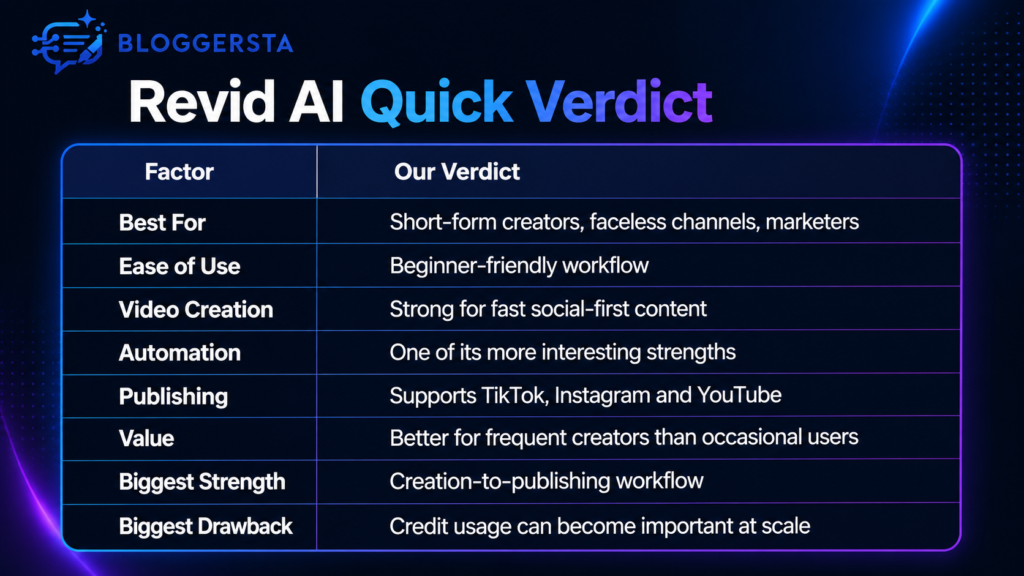
So, is Revid AI worth it?
It can be, especially if short videos form a regular part of your content strategy. If you only produce one polished video every few weeks, a traditional editor may give you more control for your money.
What is Revid AI and What Can It Actually Do?
Revid AI is a browser-based AI video creation platform built around turning ideas and existing content into finished videos.
You can start with text, scripts, links or recordings. Revid then brings several production tasks together, including visuals, scripts, AI voiceovers, captions, editing and export. Its current pricing page describes the workflow as handling the script, visuals, voice, captions, editing and export in one place.
The platform also stretches beyond simple text-to-video creation. Depending on the workflow, creators can use it for:
- Short-form social videos
- Faceless videos
- Product content
- AI-generated visuals
- Voiceovers and captions
- Content repurposing
- Video scheduling
- Auto-publishing
- Recurring video automation
This makes Revid slightly different from tools focused only on editing existing footage.
If you’re still comparing broader editing options, our guide to the best AI video editors for TikToks and Reels offers a wider starting point.
How I Evaluated Revid AI for Short-Form Video
A useful review shouldn’t become a rewritten product page. So, I focused on the questions that actually affect a creator’s workflow.
Can you move from an idea to a usable vertical video quickly? Does the platform cover enough production steps to replace several smaller tools? More importantly, does its workflow make sense for TikTok, Reels and Shorts rather than generic video creation?
I checked Revid’s current feature documentation, publishing system, credit structure, pricing and recent independent customer feedback. I also compared its positioning with other video tools already covered on Bloggersta.
For your own test, use one simple topic across all three platforms. Track generation time, retries, credits, caption quality and edits required. That gives you a much better picture than a shiny demo video ever could.
The Revid AI Features That Matter Most for Short Videos
Revid has a lot of tools, but more features don’t automatically mean a better workflow. A Swiss Army knife is only useful when you actually need the blades.
For short-form creators, three areas matter most.
From Idea to Editable Video
The starting point can be surprisingly simple. You provide an idea, script, link or other supported source, then build the video from there.
That can remove several small tasks from your day. Instead of drafting a script in one app, sourcing visuals elsewhere and assembling everything in another editor, Revid tries to pull those steps together.
For example, imagine you’re creating a 40-second Short about three productivity habits. You could begin with the concept, shape the script, generate or source scenes, add narration and prepare captions without constantly jumping between tabs.
Still, AI doesn’t magically understand taste. A generated first draft may need tighter hooks, different visuals or better pacing. Treat it as a production assistant, not a mind reader.
Editing, AI Voiceovers and Captions
Short-form videos live or die on pacing. A decent script can still flop when captions drag, visuals feel random or narration sounds disconnected.
Revid combines scene editing with AI voiceovers, captions, music and other video elements. Its current Growth plan also advertises voiceovers in more than 70 languages.
That all-in-one approach is useful for faceless content. You don’t necessarily need a microphone, camera setup, separate subtitle tool and voice generator before publishing.
However, creators who obsess over frame-level timing may still prefer something like CapCut or another traditional AI video editing workflow.
Publishing and Auto-Mode
This is where Revid becomes more interesting.
Some older Revid AI reviews still treat publishing as a missing feature. That information is now outdated. Revid’s current social publishing documentation says creators can schedule and auto-publish directly to YouTube, TikTok and Instagram from its dashboard.
TikTok publishing can include captions, hashtags, covers and scheduled uploads. Instagram supports Reels and feed videos, while YouTube publishing includes Shorts, titles, descriptions, tags and scheduling.
Then there’s Auto-Mode.
Revid describes Auto-Mode workers as recurring pipelines that can generate fresh videos and optionally publish them automatically. Its current Growth tier includes three workers, while Ultra includes ten.
For someone managing a faceless channel or several content themes, that can save serious admin time.
How Good is Revid AI for TikTok, Reels and YouTube Shorts?
The three platforms all love vertical video, but they’re not identical twins.
| Platform | Where Revid Fits Best | What Still Needs Human Input |
| TikTok | Fast videos, captions, scheduling, recurring content | Hook, trend awareness, personality |
| Instagram Reels | Branded short videos and scheduled publishing | Visual polish and brand consistency |
| YouTube Shorts | Faceless narration, explainers, repeatable formats | Retention, titles, topic selection |
For TikTok, Revid’s speed is attractive. You can generate content, add captions, then schedule it without moving the final file through several tools.
For Instagram Reels, I’d pay extra attention to visual consistency. Instagram audiences often notice when every scene looks like it came from a different creative universe.
YouTube Shorts may suit Revid especially well for repeatable formats. Think quick explainers, stories, facts, educational clips and faceless narration.
Just remember one thing: an AI TikTok video generator can make a publishable video. It cannot promise a viral video.
Reach still depends on the idea, hook, audience fit, watch time and creative execution.
Revid AI Pricing: What Does It Cost in 2026?
Revid AI pricing deserves attention because the platform uses credits for generation.
At the time of this update, the official Revid pricing page lists the following monthly options:
| Plan | Current Monthly Price | Notable Details |
| Hobby | $39 | Text/link/recording creation and editable short videos |
| Growth | $39 promotional price, shown from $99 | 2,000 credits, publishing, three Auto-Mode workers |
| Ultra | $199 | 12,000 credits and ten Auto-Mode workers |
Pricing checked: August 2026. Promotions and plan details may change.
The credit system matters more than the headline subscription price.
According to Revid’s current FAQ, a typical 30-second video using Pro moving images may consume around 40 to 80 credits, while different video models can cost considerably more. Extra credit packs are also available.
In plain English, heavy experimentation costs credits. If you constantly regenerate scenes until everything looks perfect, your allowance can disappear faster than expected.
Can You Use Revid AI for Free?
Revid currently lets visitors start creating without entering a credit card and it offers several free generators and testing tools. The pricing page explicitly states “No credit card required” when starting a first video.
However, don’t confuse free access with unlimited production. Serious recurring workflows eventually point toward a paid plan.
Is There a Revid AI Discount?
At the time of writing, Revid’s official pricing page displays the Growth plan at $39 per month instead of $99, with the page describing the discount as locked in.
I haven’t found evidence of a universal Revid AI discount code, so avoid random coupon codes from third-party sites unless Revid verifies them.
Check Current Revid AI Pricing →
Revid AI Pros and Cons
No tool deserves a glowing review without a few caveats. Revid has genuine advantages, but there are trade-offs.
Pros
- One connected workflow: Scripts, visuals, voice, captions, editing and publishing sit closer together.
- Built for short-form content: TikTok, Reels and Shorts aren’t afterthoughts.
- Direct publishing: You can schedule videos across three major platforms.
- Useful for faceless content: AI voiceovers and generated visuals reduce production requirements.
- Automation potential: Auto-Mode can support repeatable content workflows.
- Multiple input types: Creators aren’t limited to one basic text prompt.
Cons
- Credits need monitoring: More regenerations can increase usage quickly.
- AI output can vary: A generated scene may not match your mental picture.
- Manual editors offer deeper control: Revid favors speed over painstaking timeline work.
- Pricing suits frequent users better: Occasional creators may struggle to justify another subscription.
- Support feedback is mixed: Some public reviewers report customer-service and billing frustrations.
That’s the balance worth keeping in mind. Automation saves time, but it doesn’t remove every headache.
What Do Revid AI Reviews From Real Users Say?
Public Revid AI reviews are interesting because they’re not universally positive.
At the time checked, Trustpilot’s Revid page shows a 4.0 TrustScore from 305 reviews. About 54% are five-star reviews, while 25% are one-star.
That split deserves more attention than the average rating alone.
Positive reviewers commonly mention ease of use, video quality and faster production. Some recent users specifically describe getting videos prepared much faster than with more complex editing workflows.
On the other side, pricing comes up repeatedly. Trustpilot’s own review summary identifies cost as a recurring negative theme, while individual complaints also mention billing and customer-service experiences.
These are individual experiences, not proof everyone will have the same outcome. Still, they’re worth reading before subscribing.
Revid AI vs Alternatives: When Should You Choose Something Else?
Revid is not automatically the right answer just because it covers many steps.
| Tool | Better Fit When You Need |
| Revid AI | Short-form generation plus publishing automation |
| CapCut | Detailed manual editing and social-first creative control |
| InVideo AI | Prompt-led faceless video creation and broader video workflows |
| OpusClip | Turning existing long videos into short clips |
| HeyGen | Avatar-led presenter and business videos |
For example, if you already have podcasts or interviews, a clip-focused tool may be more sensible than generating fresh scenes.
If you’re deciding between prompt-based tools, read our InVideo AI review.
For avatar-heavy content, our Revid AI vs HeyGen comparison explains why the tools serve rather different workflows.
In other words, choose the tool around your content system, not the loudest feature list.
Is Revid AI Worth It in 2026?
Revid AI is worth considering if short-form content is something you produce regularly, not occasionally.
It makes the strongest case for:
- Faceless channel owners
- Short-form creators
- Social media marketers
- Small content teams
- Creators publishing across several platforms
- Anyone trying to reduce repetitive production work
Think twice if you need detailed professional editing, rarely publish video or dislike credit-based usage systems.
Its biggest advantage isn’t one magical generation model. It’s the way AI video creation, editing, scheduling and auto-publishing can live inside one workflow.
For a creator posting several Shorts, Reels or TikToks every week, that convenience can add up quickly.
Try Revid AI for Your Next Short Video →
Conclusion
This Revid AI review comes down to workflow rather than hype. Revid is strongest when you want to turn ideas into short videos, polish them and keep publishing without stitching together half a dozen tools.
It won’t replace creative judgment and the credit system deserves watching. Still, for frequent short-form creators, combining generation, captions, voiceovers, editing, scheduling and publishing in one place gives Revid a clear reason to exist.
One Response