

Some AI assistants lose the plot once a task becomes long. Claude takes the opposite route. Its Projects can expand knowledge capacity by up to 10× through RAG, according to Anthropic. So, is Claude AI still worth using in 2026? Claude has grown beyond a simple AI writing assistant. It now combines web search, extended thinking, Claude Projects, Artifacts, integrations, reusable workflows, and Claude Code. Still, its strict usage limits and missing visual-generation tools create genuine trade-offs.
Quick Answer
Claude is worth using for long-form writing, detailed reasoning, document analysis, research, studying, and software development. Claude Projects preserve instructions across ongoing work, while Claude Code handles complex repository tasks. However, heavy users may hit usage caps, and Claude cannot natively generate images. Its strongest value remains careful text, code, and knowledge work.
Claude AI at a Glance
| Review Area | Assessment |
| Best for | Writing, reasoning, research, documents, and coding |
| Current leading models | Claude Opus 5 and Claude Sonnet 5 |
| Free plan | Available with usage limits |
| Claude AI Pro | $20 monthly or $200 annually |
| Max plans | $100 or $200 monthly |
| Main strength | Maintains structure across complex tasks |
| Main limitation | No native image generation |
| Coding tool | Claude Code |
| Workspace tools | Projects, Artifacts, Research, and Skills |
| Overall verdict | Excellent for serious text and coding work |
As of August 2026, Anthropic lists Opus 5 and Sonnet 5 among its latest models. Sonnet 5 targets high-performance coding and agents, while Opus 5 is positioned for complex agentic coding and enterprise work.
What is Claude AI?
Claude is an AI assistant developed by Anthropic. It supports writing, reasoning, research, coding, file analysis, web search, and connected professional workflows.
You can use Claude through web, desktop, and mobile applications. Developers can also access Anthropic models through the API or run Claude Code inside supported development environments.
Claude can understand uploaded images, documents, text, and code. However, Anthropic confirms that Claude’s chat output remains text-based and does not natively produce images.
Artifacts fill part of that gap. They let Claude create editable documents, websites, SVG graphics, diagrams, React components, and interactive tools beside the conversation. These are coded outputs rather than AI-generated photographs or artwork.
Best Claude AI Use Cases
Claude AI shines when your work requires patience, structure, and considerable context. It feels less like a quick answer box and more like a thoughtful working partner.
Long-Form Writing and Editing
Claude works especially well with articles, reports, email campaigns, policy documents, and technical guides.
Its real advantage appears during revision. Suppose you upload a style guide, an existing article, and several client notes. Claude can follow those instructions while changing one section without unnecessarily rebuilding the entire draft.
That makes it useful for:
- Restructuring long articles
- Maintaining a consistent voice
- Simplifying technical explanations
- Comparing several drafts
- Editing reports without losing their argument
Writers comparing several platforms may also find our guide to the best AI tools for newsletter writers useful.
Document Analysis, Projects and Studying
Claude Projects act like separate workrooms. Each Project can hold files, instructions, code, reference material, and related conversations. Anthropic says Projects automatically use retrieval-augmented generation as stored knowledge approaches normal context limits.
For example, a researcher could build one Project containing journal papers, interview transcripts, and a methodology guide. Claude could then summarize themes or compare evidence without mixing that material with unrelated conversations.
So, is Claude AI good for studying? Yes, particularly for:
- Explaining difficult concepts
- Creating practice questions
- Reviewing essay structure
- Summarizing lecture notes
- Building study guides
- Guiding problem-solving
Claude’s Learning Mode uses guided exploration and Socratic questions instead of immediately handing over every answer. Students should still verify sources and follow academic-integrity rules.
Software Development with Claude Code
Claude Code is Anthropic’s agentic coding system. It can read a repository, edit several files, run commands, test changes, investigate errors, and produce working code.
Picture a developer chasing a stubborn bug across five files. Instead of copying each function into a browser chat, the developer can let Claude Code inspect the actual repository and run the test suite.
That is powerful, though there is a catch. Claude Code remains closely tied to terminals, repositories, permissions, and command-line workflows. Beginners may need time before it feels comfortable. Anthropic describes it as a tool that lives directly inside the terminal and repository.
Claude Projects, Skills and Artifacts
Claude’s supporting tools matter almost as much as its models.
- Projects organize conversations, uploaded knowledge, and custom instructions around one topic. Pro currently includes unlimited Projects.
- Skills store repeatable instructions for tasks such as research, document preparation, coding standards, or branded writing. They reduce the need to explain the same workflow repeatedly.
- Artifacts place substantial outputs in a separate editing window. You can create documents, websites, visualizations, diagrams, and small applications, then improve them through conversation.
Claude may also pause when a request feels vague. That habit can be useful because a sensible question often prevents an expensive wrong turn. However, this behavior depends on the model, task, and prompt.
Claude AI Limitations
Claude is highly capable, but it is not an all-purpose creative studio.
No Native Image or Video Generation
Claude can examine uploaded images and create coded graphics. It cannot directly generate images inside chat, according to Anthropic. It also lacks a built-in video-generation workflow comparable to broader creative platforms.
Creators needing visual assets may prefer tools covered in our Revid AI vs HeyGen comparison.
Usage Limits Can Interrupt Heavy Work
Is Claude AI free? Yes, but the free plan has limited capacity. Long conversations, large attachments, web search, Research, complex models, and Artifacts can consume the allowance faster. Anthropic says usage depends on message length, conversation length, attachments, tools, model choice, and Artifact activity.
Pro provides at least five times more session usage than Free. Still, it is not unlimited, and weekly caps may also apply.
Outputs Still Need Human Review
Claude can misunderstand evidence, invent details, or produce faulty code. Researchers should check quotations and references. Developers should review changes and run their own tests.
That rule applies to every AI assistant. Polished language can still hide a weak conclusion.
Claude AI Pricing in 2026
| Plan | Current Price | Best for |
| Free | $0 | Occasional questions and light work |
| Pro | $20 monthly | Regular writing, research, and coding |
| Pro Annual | $200 yearly | Regular users seeking a discount |
| Max 5x | $100 monthly | Frequent professional use |
| Max 20x | $200 monthly | Heavy daily workloads |
| Team Standard | $20 annually or $25 monthly per seat | Collaborative teams |
| Enterprise | Seat fee plus usage | Corporate security and deployment |
Claude AI Pro includes more usage, Claude Code, Research, additional models, and unlimited Projects. The annual plan works out to roughly $17 monthly when paid upfront.
One detail often causes confusion: a Claude subscription does not provide unlimited Anthropic API use. API usage and optional extra credits follow separate, usage-based pricing.
Claude AI vs ChatGPT
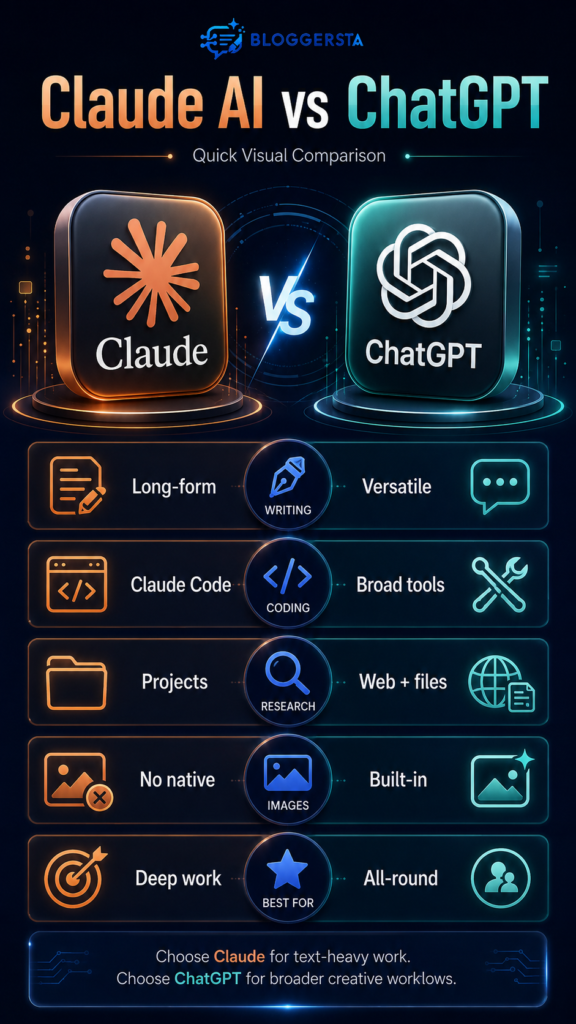
Claude is often stronger for careful long-form writing, document-heavy research, and terminal coding. ChatGPT provides a wider creative toolkit, including native image generation, voice, file analysis, Projects, and broader consumer-facing tools.
Choose Claude when you mainly need:
- Structured writing and editing
- Large document analysis
- Careful reasoning
- Project-based knowledge
- Repository-level coding
Choose ChatGPT when you mainly need:
- Native image generation
- Voice interaction
- Mixed creative workflows
- Custom GPTs
- A broader all-in-one interface
Both Claude Pro and ChatGPT Plus cost $20 monthly. Neither is universally better. The better choice is the tool that removes more work from your actual week.
Frequently Asked Questions
Is Claude AI Better Than ChatGPT in 2026?
Claude often suits long writing, document analysis, and terminal coding. ChatGPT offers broader visual, voice, and creative features. Your workflow decides the winner.
Is Claude AI Worth Having?
Yes, especially for regular research, writing, document review, or coding. Claude Pro makes sense when Projects and Claude Code save meaningful time.
What is the Best AI in the World in 2026?
No single platform wins every category. Claude, ChatGPT, Gemini, and specialist tools perform differently across coding, research, writing, visuals, and integrations.
Is Claude the Best AI Right Now?
Claude ranks among the strongest options for reasoning, documents, writing, and coding. It is less complete for users needing native visual creation.
Which AI is Better Than Claude?
ChatGPT may be better for visual work, while other platforms may fit specific ecosystems. A better tool only exists relative to your task.
Should I Switch From ChatGPT to Claude?
Switch only after testing the same real task in both. Many professionals gain more value by using each platform for its strongest work.
is Claude AI Free?
Yes. Claude offers a free plan for everyday use, though limits may arrive quickly during large file analysis, Research, or extended conversations.
Final Verdict
This Claude AI Review 2026 finds a focused, capable assistant built for serious text, research, documents, and code. Projects maintain context, Artifacts make outputs easier to develop, and Claude Code brings powerful automation into real repositories.
However, Claude is not the perfect all-in-one platform. Usage limits can interrupt heavy work, terminal tools have a learning curve, and native image generation remains absent.
Start with the free plan. Upgrade to Claude AI Pro when its careful reasoning, writing quality, or coding support consistently saves more than the monthly fee.