
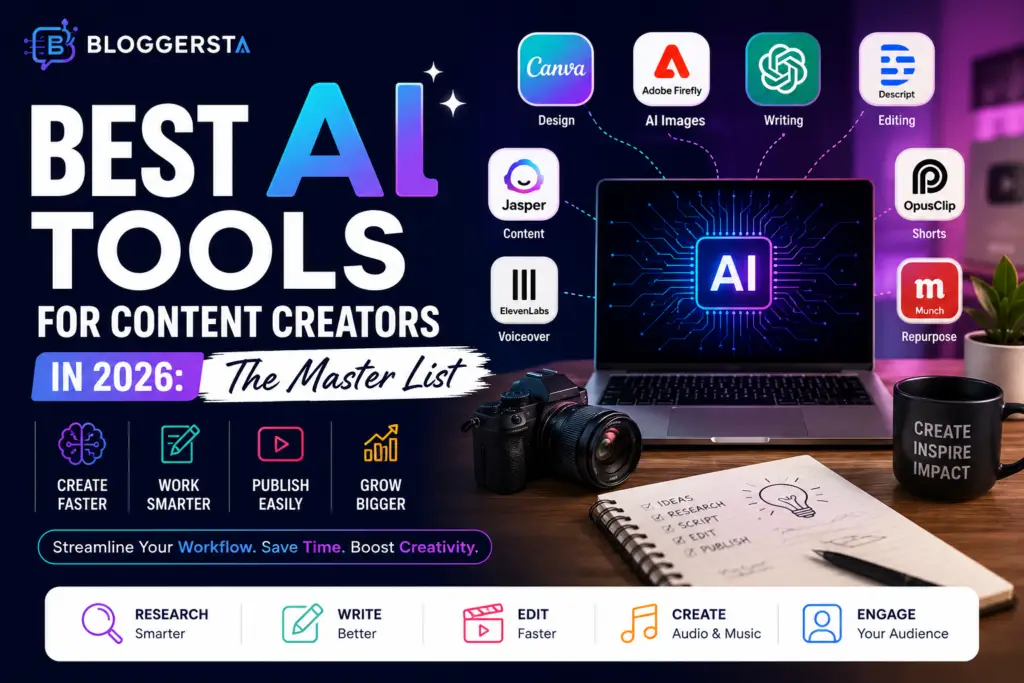
Every year, content creation is getting tougher. One content piece could call for research, writing, design, editing, captioning, and optimization for each platform. While AI can be a time-saving and efficient ally for creators, the market offers many choices—so which AI tools for content creators are truly worth using in 2026?
| Quick Answer: The best content creation AI tools for 2026 include Canva Magic Studio for design creation, Adobe Firefly for visual content creation, OpusClip and Munch for generating short videos, Descript for video editing, Jasper and ChatGPT-style writing tools, Suno and ElevenLabs for audio creation, HeyGen and Synthesia for avatar video, and Perplexity AI for content research. The right option is dependent on your content workflow, content aims, and content format. |
What Are AI Tools for Content Creators?
AI tools enhance content creation, editing, publishing, and optimization for content creators. They reduce repetitive tasks and allow creators to focus more time on creativity, storytelling, and interaction with their audience.
Content tools create content from prompts, and workflow tools aid workflow automation. They will provide you with research, captions, scripts, thumbnails, editing, SEO, social media scheduling, ling, and more!
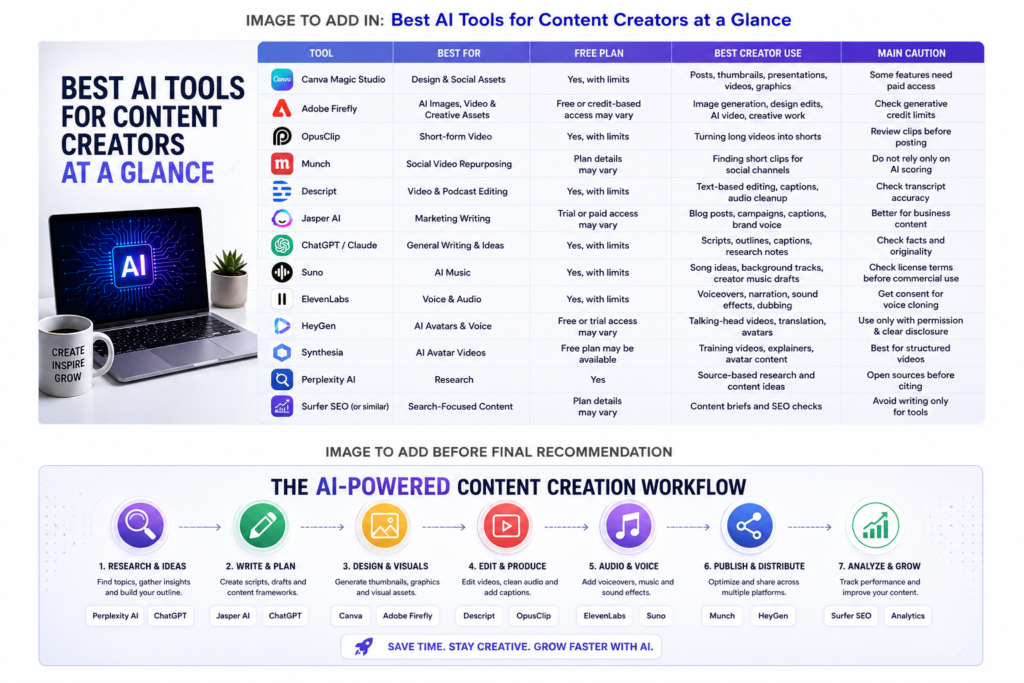
Best AI Tools for Content Creators at a Glance
The best ai tools for content creators 2026 will depend on your content objectives and flow. The following is a detailed breakdown of the best platforms, including their pros, cons, and users.
1. Canva Magic Studio — Best All-in-One Design Tool for Creators
Canva Magic Studio is one of the most useful AI tools for content creators, as it integrates design, image editing, writing support, and content creation all into a single tool. It enables creators to create high-quality, professional quality visuals without requiring advanced design expertise.
With the help of templates and AI, you can design Instagram posts, YouTube thumbnails, presentations or marketing graphics more easily. It will be especially helpful for those who post their content on multiple platforms, such as social media.
- Best for: Social Media Posts, Thumbnails, presentations, and short video files.
- Best user: Social Media Creators, Coaches, Freelancers, and Small Teams.
- Free option: Canva offers free tools, but certain AI capabilities might require additional payment.
- Creator tip: Create templates for every platform to ensure consistency of posts.
- Caution: Edit AI designs so they do not look generic.
2. Adobe Firefly — AI Tools for Content Creators for Creative Visual Assets
Adobe Firefly is designed to offer creators visual editing, image generation, and creative concepts at the speed of thought. It works perfectly with Adobe Creative Suite.
Helpful for thumbnails, illustrations, promotional, and creative graphics. It can be used by designers and visual creators to increase the speed of creating content.
- Best for: AI images, design edits, video ideas, and creative assets.
- Best user: Designers, editors, YouTubers, marketers, and visual creators.
- Free option: Free or credit-based access may vary.
- Creator tip: Use Firefly for visual drafts, then refine the final design manually.
- Caution: Check generative credit rules and commercial-use terms.
3. OpusClip — Best AI Tool for Viral Short-Form Videos
One of the most useful AI tools for social media creators looking to convert long videos into short ones is OpusClip. Vertical video clips are automatically identified, highlighted, and generated on the platform for modern social networks.
Using OpusClip, content makers can convert their podcasts, interviews, webinar recordings, educational videos,deos, and live streams into TikTok videos, Instagram Reels, YouTube Shorts, LinkedIn videos, and X content.
- Best for: Converting long videos to short clips.
- Best user: YouTubers, podcasters, coaches, and video makers.
- Free option: Free access to all, but it may be limited.
- Creator tip: Review hooks, captions, and cuts before publishing.
- Caution: AI may miss the strongest clip if the video lacks clear moments.
4. Munch — Best AI Tool for Social Video Repurposing
Munch is a tool designed to assist creators in converting long-form content to social-friendly videos. It measures content and recommends shorter videos that could be successful on other sites.
Many content creators rely on Munch for content repurposing. They don’t have to record multiple video pieces for each platform; instead, they can record one long video piece and then edit multiple shorter versions.
- Best for: Converting long-form videos to social content.
- Best user: Agencies, coaches, podcasters, creators, and marketing teams.
- Free option: Check current plan details before publishing.
- Creator tip: AI clips can be a starting point; edit pacing and captions.
- Caution: Be careful not to post all recommended clips without checking context.
5. Descript — Best AI Tool for Video and Podcast Editing
Descript is one of the most widely used AI video editing tools due to its text-based editing system. Creators can edit content without dealing with a complex timeline by editing the transcript itself.
It’s especially useful for podcasts, interviews, tutorials, educational videos, webinars, and social media videos. Captioning, elimination of filler words, voice removal, and transcription improve production speed.
- Best for: Editing podcasts, making video cuts, cleaning up audio, and captioning.
- Best user: Podcasters, YouTubers, course creators, and editors.
- Free option: Free access can be available with limits.
- Creator tip: Use transcript editing for first-pass cuts.
- Caution: Always check the transcript before exporting client or public content.
6. Jasper AI — Best AI Tool for Marketing Copy and Captions
Jasper AI is designed for creators who produce marketing content and struggle to maintain a consistent brand identity. Perfect for blog posts, social media captions, emails, landing pages, ads, and promotions.
Jasper is more focused on marketing than many AI tools built for general use. Businesses, agencies, and professionals frequently use it to expedite content creation while ensuring message consistency across platforms.
- Best for: Marketing copy, blog drafts, captions, ions,s and brand voice.
- Best user: Content marketers, agencies, business creators, and SaaS teams.
- Free option: The details or trial should be checked before publishing them.
- Creator tip: Feed it your brand examples before asking for content.
- Caution: Edit every draft so it sounds like the creator, not the tool.
7. Claude or ChatGPT — Best AI Tools for Scripts, Ideas, and Outlines
Claude and ChatGPT are among the most versatile AI tools available for content creators. They can provide ideas, outlines, scripts, captions, a content calendar,ndar and creative directions for almost every type of project.
These tools can be used before creating the text, not after it is published. They are great to use during brainstorming sessions for content angles, to enhance drafts, to rewrite text, and to break creative blocks.
- Best for: Ideas, scripts, outlines, captions, and editing support.
- Best user: Bloggers, YouTubers, creators, students, and freelancers.
- Free option: Free access may be available, but limited.
- Creator tip: Ask for 10 angles, then choose and rewrite the best one.
- Caution: Check facts, examples, and claims before publishing.
Also Read: Gemini vs ChatGPT vs Claude: Which AI Is Actually Best?
8. Suno and ElevenLabs — Best AI Tools for Music, Voice, and Sound
Suno and ElevenLabs enable creators to integrate music and sound effects into their content without the necessity of both recording and producing audio. Suno is a music gene,rator, and ElevenLabs is a voice-over, narration, dubbing, bing, and synthetic speech generator.
For video makers, teachers, podcasters, and social media content creators who often require background music, narration, or multilingual sound, these tools can prove very time-saving.
- Best for: Music Draft, Voice Over, Narration, Sound Effects.
- Best user: Video creators, podcasters, educators, and social media creators.
- Free option: Free access may be available with limits.
- Creator tip: Save license details for any audio used in commercial work.
- Caution: Do not assume every AI-generated song or voice is automatically safe for all commercial use.
9. HeyGen and Synthesia — Best AI Tools for Avatar Videos
HeyGen and Synthesia help creators produce avatar-based videos from written scripts. Such platforms create authentic presenters that can share content without the need for a video shoot.
They are particularly useful for tutorials, education videos, product demonstration videos, training videos, onboarding videos, and for multilingual marketing campaigns. Creators can create variations more easily, rather than recording them manually.
- Best for: AI avatars, talking-head videos, voice translation, and explainer videos.
- Best user: Educators, business creators, marketers, and course sellers.
- Free option: Free or trial access may be available with limits.
- Creator tip: Use avatars for repeated explainers, not every personal video.
- Caution: Get consent before cloning any voice or face.
10. Perplexity AI and SEO Tools — Best for Research and Search Visibility
Research is the first step in content creation, and creators must have access to trustworthy sources of information before they can create content. Perplexity AI assists users in finding information, learning from sources,ources and finding content opportunities faster.
Platforms like Surfer-style tools assist creators in optimizing their content for search visibility. These solutions together form some of the best AI search optimization tools for content creators, as they cover the content planning and content performance spectrum.
- Best for: Research, topic ideas, source discovery,ery and search-oriented briefs.
- Best user: Bloggers, YouTubers, affiliate site owners, and content teams.
- Free option: Perplexity AI has free access; SEO tool pricing varies.
- Creator tip: Research before you write or record.
- Caution: Don’t write just for the SEO score, write for the reader first.
Also Read: Perplexity AI vs ChatGPT: Which Is Better for Research?
Final Recommendation
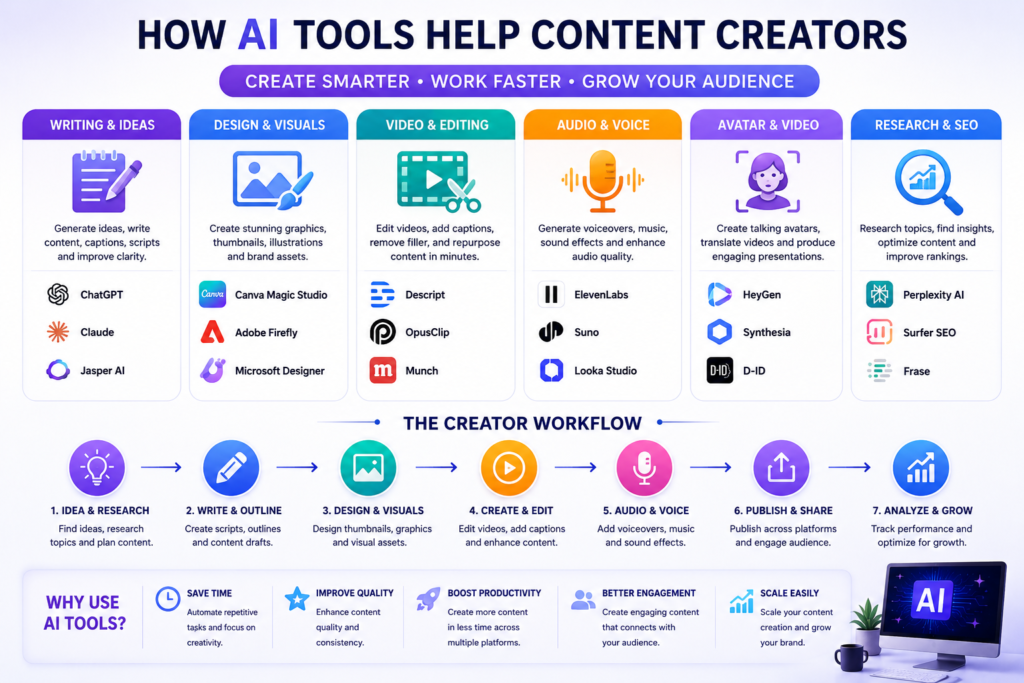
The ideal AI tools for content creators will ultimately depend on the specific kind of content you create frequently. For visual content, consider using Canva Magic Studio and Adobe Firefly; for video content, Munch, OpusClip, and Adobe Firefly are great options.
When it comes to writing, Jasper AI, Cha, and Claude AI are still viable options. Suno, ElevenLabs, HeyGen, and Synthesia are great options for creating audio and avatar content, providing a range of powerful features that can help streamline content creation while not replacing creativity.
Try one tool that will solve the most time-consuming problem on your project and stick to it until you see results in a real project. Then look at other tools that will help with this if they add quality, efficiency, or consistency.
FAQs
What is the overall best AI tool for content creators?
Canva Magic Studio and Adobe Firefly are two of the top all-in-one AI tools for content creators.
Which AI tool is best for creating viral social media shorts?
For short videos, OpusClip and Munch are good options.
Can AI generate original music and sound effects for creators?
Yes. Suno and ElevenLabs are tools for creating music ideas, songs, voiceovers, narration, and sound effects.
What is the ai tools for content creators for writing blog posts and social media captions?
Jasper AI does well on marketing-related content, while ChatGPT and other Claude-style AI assistants are strong for outlines, scriptwriting, captions, brainstorming, mingling, and editing.
Is there an AI tool that can clone a creator’s voice and face
Yes. HeyGen and Synthesia are platforms that can generate avatar videos and voice presentations.
One Response