
There are millions of tutorials, lectures, podcasts or webinars on YouTube but it’s hard to find the time to watch them all. Hence, everyone is shifting toward AI tools to discover valuable information, dates and notes within a few minutes. However, there are numerous tools to choose from but and which ones are the best options for best ai tools to summarize youtube videos in 2026?
| Quick AnswerThe top AI tools for summarizing YouTube videos in 2026 are Eightify, Glasp, NoteGPT, HARPA AI, Mindgrasp, Descript, Summarize.tech, Summarize.ing, ChatGPT, Gemini and NotebookLM. Different tools are available for different tasks, such as taking notes on videos, creating quick notes for later reference, making study guides, creating research guides and making video summaries. The choice is based on the need for fast insights, explanatory notes, browser-centric workflows or comprehensive transcript analysis. |
What Are AI YouTube Video Summarizers?
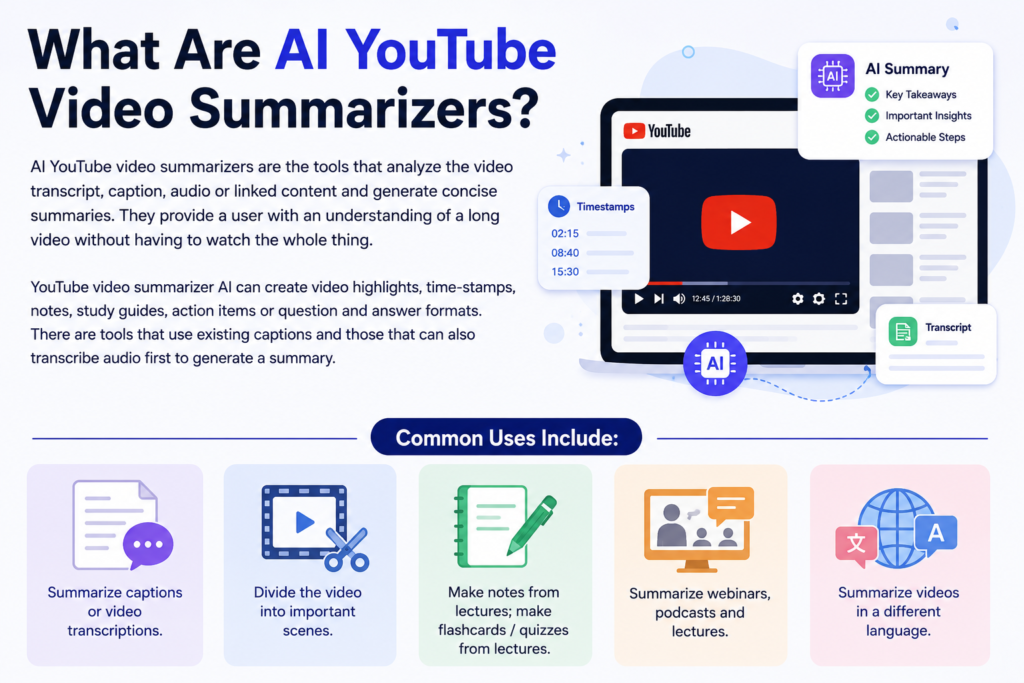
AI YouTube video summarizers are the tools that analyze the video transcript, caption, audio or linked content and generate concise summaries. They provide a user with an understanding of a long video without having to watch the whole thing.
YouTube video summarizer AI can create video highlights, time-stamps, notes, study guides, action items or question and answer formats. There are tools that use existing captions and those that can also transcribe audio first to generate a summary.
Common uses include:
- Summarize captions or video transcriptions.
- Divide the video into important scenes.
- Make notes from lectures; make flashcards / quizzes from lectures.
- SummarizeReduce webinars, podcasts and lectures.
- Summarize videos in a different language.
Best AI Video Summarization tools for Youtube at a Glance
| Tool | Best For | Free Plan | Best Use Case | Main Caution |
| Eightify | Quick YouTube summaries | Free or trial details may vary | Fast key points and timestamps | Check limits before publishing |
| Glasp YouTube Summary | Free transcript summaries | Yes, basic use may be free | YouTube summaries, transcripts and key points | Works best when transcript is available |
| NoteGPT | Long videos and study notes | Yes, limits may apply | Lectures, podcasts and tutorials | Check length limits |
| HARPA AI | Browser-based summaries | Free or trial details may vary | Chrome workflow summaries | Often depends on transcripts |
| Mindgrasp AI | Study summaries | Trial or plan details may vary | Notes, quizzes and flashcards | Best suited to learners |
| Descript | Videos without captions | Free plan may be available | Audio transcription and summaries | More advanced than basic tools |
| Summarize.tech | Simple URL summaries | Free access may vary | Quick video breakdowns | Check availability |
| Summarize.ing | Highlights and mind maps | Free access may vary | Visual summaries | Review output quality |
| Gemini or ChatGPT | Manual transcript summaries | Yes, with limits | Custom summaries and notes | May not read every link directly |
| NotebookLM | Source-based learning notes | Yes, availability may vary | Learning and research | Depends on transcript quality |
1. Eightify — Best AI Tool for Fast YouTube Summaries
When you need a summary of a YouTube video quickly, Eightify is one of the best AI tools available. It highlights important ideas and moments in videos to enable users to understand the main ideas before they watch a video extensively.
This tool is very useful when it comes to tutorials, interviews, podcasts and any other educational materials. It is a tool that students and professionals often use to quickly review long videos.
- Best for: Fast summaries and timestamped takeaways.
- Best user: Students, professionals, researchers and busy viewers.
- Free option: Check current free limits before publishing.
- YouTube tip: Use it before watching a long tutorial or podcast.
- Caution: Review timestamps before using the summary for notes.
2. Glasp YouTube Summary — Best Free YouTube Summary Extension
Glasp is among the strongest free AI YouTube summarizer options available. It enables users to create video summaries, find important parts of videos and analyze key points without watching them in full.
The browser extension seamlessly integrates with YouTube and is especially effective when accurate captions are provided.
- Best for: Free YouTube summaries and transcripts.
- Best user: Students, researchers and everyday learners.
- Free option: Basic use may be free.
- YouTube tip: Use it for videos with clear captions or transcripts.
- Caution: Weak transcripts can reduce summary quality.
3. NoteGPT — Best AI Tool for Long YouTube Videos
NoteGPT is designed for long-form content such as webinars, online courses, lectures and podcasts. It helps users convert lengthy videos into digestible notes, summaries and study materials.
This makes it especially valuable for learners who need to review hours of content quickly while retaining the most important information.
- Best for: Long YouTube videos and study summaries.
- Best user: Students, online learners and researchers.
- Free option: Free use may be available with limits.
- YouTube tip: Use it for lectures, interviews and tutorials.
- Caution: Check video length and subtitle limits before relying on it.
4. HARPA AI — Best Browser Tool for YouTube Summaries
HARPA AI combines browser automation with AI-powered assistance. It allows users to summarize YouTube videos directly inside their browsing workflow without constantly switching between tools.
Researchers, marketers and content curators often appreciate the convenience of generating summaries while performing other online tasks.
- Best for: Browser-based YouTube summaries.
- Best user: Researchers, students, marketers and content curators.
- Free option: Check current plan details before publishing.
- YouTube tip: Use it when a video transcript is available.
- Caution: Some summary functions depend on transcript access.
5. Mindgrasp AI — Best YouTube Summarizer for Students
Mindgrasp goes beyond simple summaries by transforming educational content into notes, quizzes, flashcards and learning materials. This makes it particularly useful for students studying from YouTube lectures and academic channels.
The platform aims to improve knowledge retention rather than simply shortening content.
- Best for: Study notes, quizzes, flashcards and learning support.
- Best user: Students, exam learners and online course viewers.
- Free option: Trial or plan details should be checked before publishing.
- YouTube tip: Use it for academic videos and course playlists.
- Caution: Review generated notes before using them for revision.
6. Descript — Best Tool for Videos Without Captions
Descript is primarily a transcription and editing platform but it can also support video summarization workflows. It is especially useful when captions are unavailable and audio must be converted into text first.
Creators, editors and podcasters frequently use it to generate transcripts before creating summaries, show notes or content repurposing materials.
- Best for: Transcribing videos and editing audio or video.
- Best user: Creators, editors, podcast teams and students.
- Free option: Free plan may be available with limits.
- YouTube tip: Use it when video files require transcription first.
- Caution: It may be more advanced than needed for basic summaries.
7. Summarize.tech — Best Simple URL-Based YouTube Summarizer
Summarize.tech focuses on simplicity. Users can paste a YouTube URL and receive a summary without navigating complex dashboards or advanced settings.
This straightforward workflow makes it attractive for busy professionals, casual viewers and anyone seeking quick insights from long videos.
- Best for: Simple YouTube link summaries.
- Best user: Casual viewers, students and busy professionals.
- Free option: Check current access before publishing.
- YouTube tip: Paste the video link and review the main sections.
- Caution: Confirm current status and usage limits.
8. Summarize.ing — Best AI Tool for Highlights and Mind Maps
Summarize.ing offers a more structured approach to summarization. It can organize content into highlights, segments and visual learning formats that are easier to review.
Users who prefer visual organization often find mind-map style summaries more useful than traditional text-only outputs.
- Best for: Highlights, sections and mind-map style summaries.
- Best user: Students, teachers, researchers and visual learners.
- Free option: Free access may vary.
- YouTube tip: Use it for tutorials and educational explainers.
- Caution: Check summary depth before using it for research.
9. Gemini or ChatGPT — Best for Manual Transcript Summaries
Gemini and ChatGPT are flexible options for users who want customized summaries. Instead of relying on built-in YouTube integrations, users can provide transcripts, notes or accessible content and request specific formats.
This flexibility allows the creation of study guides, outlines, action plans, FAQs or audience-specific summaries.
- Best for: Custom summaries from pasted transcripts.
- Best user: Students, writers, researchers and creators.
- Free option: Free access is available with usage limits.
- YouTube tip: Copy the transcript and request structured notes.
- Caution: Do not assume every YouTube link can be read directly.
10. NotebookLM — Best for Learning From YouTube Videos
NotebookLM is ideal for users who want to learn deeply from YouTube content alongside PDFs, documents, research papers and notes. Rather than offering quick summaries alone, it supports source-based learning and knowledge organization.
Researchers, teachers and students can combine multiple resources and ask follow-up questions based on the source material.
- Best for: Learning notes from YouTube transcripts and study sources.
- Best user: Students, researchers, teachers and knowledge workers.
- Free option: Free access may be available but availability varies.
- YouTube tip: Use it when you want source-backed learning notes.
- Caution: Results depend heavily on source quality.
Best AI YouTube Summarizers by Use Case
| Use Case | Best Tool | Why It Fits |
| Quick summaries | Eightify | Fast key points and timestamps |
| Free summaries | Glasp YouTube Summary | Free transcript-based summaries |
| Long videos | NoteGPT | Great for lectures and podcasts |
| Browser workflow | HARPA AI | Works inside the browser |
| Student notes | Mindgrasp AI | Notes, flashcards and quizzes |
| Videos without captions | Descript | Can transcribe audio first |
| Simple URL summaries | Summarize.tech | Paste a link and get a summary |
| Visual notes | Summarize.ing | Highlights and mind-map style notes |
| Custom summaries | ChatGPT or Gemini | Flexible transcript summarization |
| Source-based learning | NotebookLM | Strong for research workflows |
Best Free AI Tools to Summarize YouTube Videos
If you’re searching for the best AI tool to summarize YouTube videos without paying, several free or partially free options are available.
- Glasp YouTube Summary: Good free option for transcripts, summaries and key points.
- Eightify: Useful for fast summaries and timestamps, depending on current free limits.
- NoteGPT: Helpful for long videos and study notes with usage restrictions.
- Summarize.tech: Suitable for quick link-based summaries.
- Gemini or ChatGPT: Great for custom transcript summaries and study notes.
- NotebookLM: Useful for source-based learning when transcript data is available.
Free plans and usage limits change frequently. Always review the latest pricing and feature information before choosing a tool.
Also Read: 5 AI Video Editors to Make Viral TikToks and Reels (2026)
How to Choose the Best AI Tool to Summarize YouTube Videos
The best AI tools to summarize YouTube videos depend on your goals. Some users need quick timestamps while others need study notes, research support, or long-video analysis.
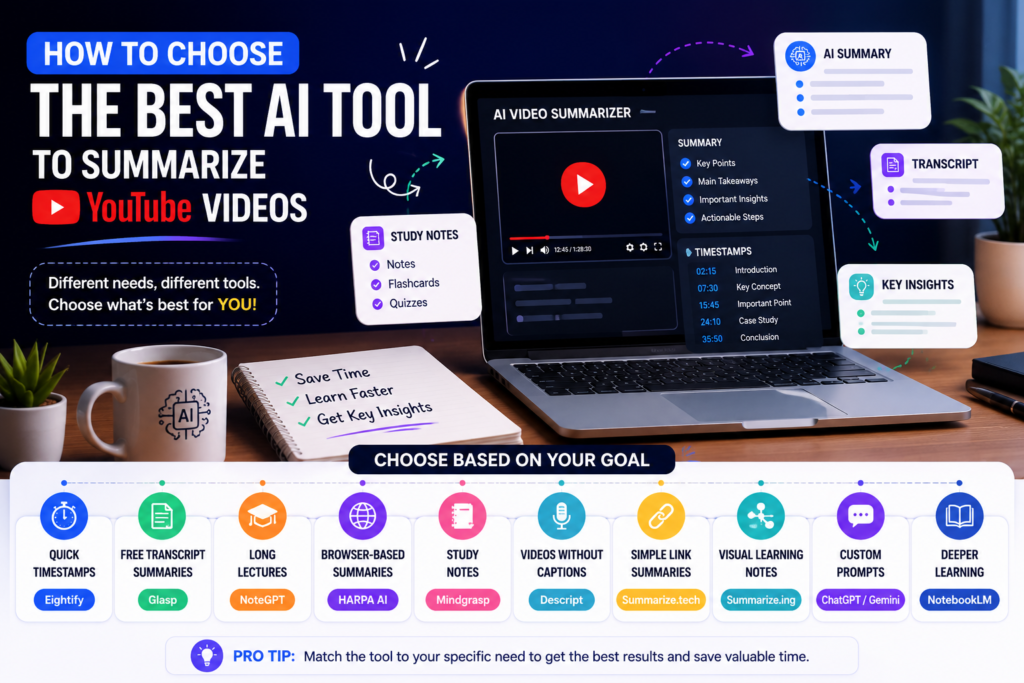
- For quick timestamps: Choose Eightify.
- For free transcript summaries: Choose Glasp.
- For long lectures: Choose NoteGPT.
- For browser-based summaries: Choose HARPA AI.
- For study notes: Choose Mindgrasp.
- For videos without captions: Choose Descript.
- For simple link summaries: Choose Summarize.tech.
- For visual learning notes: Choose Summarize.ing.
- For custom prompts: Choose ChatGPT or Gemini.
- For deeper learning: Choose NotebookLM.
How to Get Better YouTube Summaries With AI
The quality of AI-generated summaries depends heavily on transcript accuracy, audio clarity, video structure and prompt quality. A well-captioned educational video usually produces better results than a poorly transcribed podcast.
Different tools also perform better in different situations. A three-hour webinar may require a specialized summarizer while a short tutorial can often be summarized effectively by almost any platform.
- Ask for structure: Request key points, timestamps and action steps.
- Ask for audience level: Specify whether the summary is for students, creators or researchers.
- Check the transcript: Poor captions often create weak summaries.
- Review important claims: Verify information before quoting it.
- Save useful outputs: Keep summaries, notes and source links together.
Also Read: Revid AI Vs HeyGen: Which AI Video Tool is Better for Your Content Strategy?
Final Recommendation
The best AI tools to summarize YouTube videos depend on the type of content you watch. Eightify and Glasp are excellent for quick summaries and transcript-based insights. NoteGPT and HARPA AI work well for long-form content and browser-based workflows.
For education-focused use cases, Mindgrasp and NotebookLM offer deeper learning support. If transcription is required before summarization, Descript is often the better choice.
Start with a free summarizer, test it on one short video and one long video, then keep the tool that gives clear notes without missing key details.
FAQs
What is the best completely free AI tool to summarize YouTube videos?
Glasp YouTube Summary is one of the strongest free AI YouTube summarizer options because it provides transcripts, key points and summaries. Eightify, NoteGPT, Gemini and ChatGPT may also offer free access with varying limits.
Can AI summarize a YouTube video that does not have captions?
Yes. Some AI tools can summarize videos without captions by transcribing the audio first. Descript and Mindgrasp are examples of tools that support transcription-based workflows.
Is there an AI tool that can summarize long YouTube videos over 2 hours?
Yes. Tools such as NoteGPT, Eightify and HARPA AI may help summarize long-form content depending on transcript availability and plan limitations. Always review summaries for missed sections.
How can I get a summary of a YouTube video without watching it?
Use a tool such as Glasp, Eightify, NoteGPT, Summarize.tech or Summarize.ing. Paste the URL or use the extension to generate key points, transcripts, timestamps or condensed notes.
Can AI translate and summarize a foreign language YouTube video into English?
Yes. Several AI tools can translate and summarize foreign-language transcripts into English. Results depend on transcript quality, language support and the capabilities of the chosen platform.