
Typing galaxy. ai vs chatgpt into a search bar sounds easy enough, but the comparison becomes complicated quickly because people are often referring to two different things: Galaxy. ai the multi-tool AI platform, or Samsung Galaxy AI integrated into Galaxy devices. That confusion is important because these tools are solving different problems, and a good answer has to figure that out early on.
This guide provides a straightforward answer based on writing assistance, work assignments, efficiency, and value in day-to-day use usage — what Galaxy. ai, ChatGPT and Samsung claim their tools indeed do. That way, rather than spinning in circles, you can equate the tool to the task and get on with confidence.
If you mean Galaxy. ai Vs ChatGPT, Galaxy. ai is more useful for people looking for many AI models and tools under one roof, while ChatGPT is likely more useful for people looking for a refined assistant serving writing, thinking, and follow-up work.
If you mean Galaxy AI Vs ChatGPT, Samsung’s tool will be stronger for phone-based actions like translation, writing help and device-aware features, but ChatGPT is going to be much better than Samsung for deeper tasks like writing, planning coding, and research.
| Tool | Best For | Main Strengths | Main Limits |
| Galaxy.ai | Users who want one dashboard for many AI models and tools | Multi-tool access across text, images, video, audio, and more | The official homepage is light on detailed workflow explanations, so the experience may feel less familiar to first-time users |
| ChatGPT | Users who want a polished chat experience for writing, ideas, coding, and file work | Writing help, web search, file analysis, charts, image support, and voice features | Model access and advanced features vary by plan, with Plus at $20 per month and Pro at $200 per month |
| Samsung Galaxy AI | Galaxy device users who want help inside their phone and apps | Writing Assist, Interpreter, Photo Assist, Now Brief, and Bixby integration | It is tied to supported Samsung devices and feature support can vary by model and region |
Galaxy.ai Vs ChatGPT at a Glance
At a glance, Galaxy. ai is built around model variety and all-in-one access, while ChatGPT is built around a smoother assistant-like experience for writing, research, coding work and revision. That difference influences nearly every buying decision people make.
Consider Galaxy. ai is more like a toolbox with lots of drawers, and ChatGPT feels more similar to having the right tools set out at your workbench and ready to go as soon as you sit down. Both are helpful, but they don’t feel the same in day-to-day use.
Quick Answer for Busy Readers
Galaxy.ai suits people who like choice because its official pitch centers on being an all-in-one AI platform with thousands of models and tools in one place. ChatGPT suits people who want a familiar assistant for writing, coding, data analysis, image work, voice, and web search.
Best Pick by User Type
- Students and writers: ChatGPT, because it supports drafting, follow-up questions, file uploads, data analysis, and revision-friendly workflows such as canvas.
- Agencies and experiment-heavy users: Galaxy.ai, because its platform pitch is built around broad model and tool access in one hub.
- Samsung phone users: Samsung Galaxy AI for device tasks, ChatGPT for thinking-heavy work that needs longer back-and-forth help.
What is Galaxy.ai?
Galaxy.ai presents itself as an all-in-one AI platform rather than a single chatbot. Its homepage says it offers 5000+ AI models and tools for text, images, videos, ads, audio, speech, music, voice, and more.
That setup makes Galaxy.ai appealing to people who do not want to jump between separate AI subscriptions all day. It is the kind of service that can feel handy when your work changes by the hour and one model does not always cut it.
Galaxy.ai Explained
Simply stating, Galaxy.ai is a single place where you can access many AI tools instead of relying on one assistant alone. That matters for users who like comparing outputs, testing styles, or switching tools without opening five different tabs.
Main Galaxy.ai Features
Based on its official description, Galaxy.ai covers text, images, videos, ads, audio, speech, music, and voice tools under one platform. That means it is positioned less like a simple chat box and more like a broad AI workspace.
Who Galaxy.ai is Best For
Galaxy.ai fits freelancers, small teams, and curious users who like trying different models for different tasks. If your work involves testing headlines, comparing drafts, or moving between content and media tasks, that variety can be the real selling point.
Also Read: 5 Best AI Coding Assistants for Beginners and Pros (2026)
What is ChatGPT?
ChatGPT is OpenAI’s conversational AI tool, which its official overview describes as a space to receive answers, seek inspiration and increase productivity. The topics include writing, brainstorming, editing, coding, research, web search and data analysis and use of images and voice.
This gives ChatGPT a straightforward pitch to a new user: You open it up, ask a question, and just iterate with the work until it sounds right. It seems less like a shelf of tools and more like an able assistant across the desk.
ChatGPT Explained
OpenAI describes ChatGPT as a writing, brainstorming, editing, learning, coding, data analysis and web search tool for creating charts and working with images in addition to dealing with complex tasks via its agent features. Its greatest strength is not capability alone but the ease with which the back-and-forth process feels in practice.
Main ChatGPT Features
Compatible with long-format writing, idea generation, coding support, file uploads, data analysis and charts creation, image conversations, creating images and web search and voice interaction (some features also depend on plan level). That’s a broad spread, yet it feels like the product is still deliberately curated because the chat flow remains at the center.
Who ChatGPT is Best For
ChatGPT is excellent for students, professionals, solo creators, and everyday users who need a clear starting point. If you write, revise or think through problems with follow-up questions at the forefront of your mind, it is not hard to understand why so many people stick around.
Galaxy.ai Vs ChatGPT: Key Differences that Actually Matter
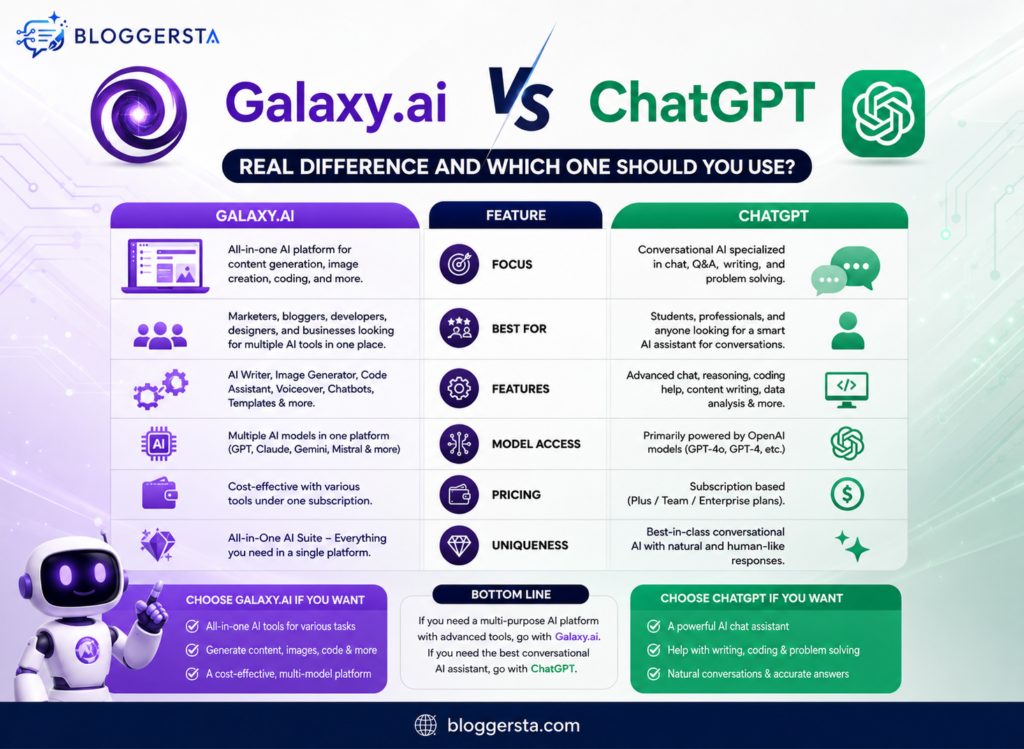
The true divide is this: Galaxy. ai sells breadth via all these models and tools, while ChatGPT sells depth via a polished assistant flowing with strong writing, search, file and analysis capabilities. So, that is the aspect a lot of comparison posts lose.
An impressive list of features can sound good, but everyday use reveals the truth. Some people want a choice for every task, and some just want one tool that feels as smooth going from the initial prompt to the final draft.
Galaxy.ai Vs ChatGPT for Writing Quality
ChatGPT is built with writing, brainstorming, editing, and revision in mind, and its canvas and chat workflow make long-form drafting feel steady and easy to refine. Galaxy.ai has a different appeal because users can compare outputs across many tools and models instead of staying inside one assistant style.
Galaxy.ai Vs ChatGPT for Research and Accuracy Checks
ChatGPT can search the web, follow up on questions, scan files and help shape a line of thought step by step. Galaxy. ai may especially appeal to users who want to take a look at what different tools produce and compare answers before adopting a final overview.
Galaxy.ai Vs ChatGPT for Ease of Use
For beginners, ChatGPT is easier because the official experience revolves around a single chat interface — there are clear add ons like voice, file uploads, search and image support. Galaxy. ai might be more to users who like flexibility and don’t mind a wider tool-style setup.
Galaxy.ai Vs ChatGPT for Pricing and Value
ChatGPT offers a free plan, a Plus plan at $20 per month, a Pro plan at $200 per month, a Team plan starting at $25 per user per month billed annually or $30 billed monthly, and an Enterprise tier through sales. Galaxy.ai’s main value pitch is different because it centers on many AI models and tools in one platform rather than a single assistant plan story.
Galaxy.ai Vs ChatGPT for Teams and Business Use
ChatGPT Team includes shared workspace features, unified billing, admin tools, custom GPT sharing, and internal knowledge connections through Google Drive. Galaxy.ai may be a better fit for teams that care more about model variety across content and media work than about one standard chat interface.
Galaxy AI Vs ChatGPT: Are People Comparing the Wrong Things?
Yes, very often they are. Galaxy.ai is a platform on the web, while Samsung Galaxy AI is a set of AI features built into supported Samsung devices.
That mix-up changes the whole answer. If a reader wants writing help on a laptop, the Galaxy.ai discussion is one thing, but if they want translation, note help, or photo edits on a phone, Samsung Galaxy AI belongs in the conversation.
Galaxy.ai Vs Samsung Galaxy AI
Galaxy.ai is presented as an all-in-one AI platform with many models and tools. Samsung Galaxy AI is built into Galaxy phones and other supported devices, with features such as Writing Assist, Photo Assist, Interpreter, Now Brief, and Bixby.
Samsung Galaxy AI Vs ChatGPT
Samsung Galaxy AI is stronger for phone-based actions because it lives inside the device experience and supported apps, where it can help with translation, text rewriting, summaries, image edits, and context-aware actions. ChatGPT is stronger for deeper writing, extended planning, coding, charting, file analysis, and longer research conversations.
Why This Confusion Matters for Searchers
When an article compares the wrong product, readers bounce because the answer feels off from the first few lines. Clearing up the name confusion early builds trust and makes the rest of the comparison far more useful.
Which One is Better for Real-Life Use Cases?
This is where the choice becomes practical instead of theoretical. A student, a business owner, and a Samsung phone user may all pick different winners for good reasons.
The best tool is the one that fits the task with the least friction. That sounds obvious, yet it saves people from paying for features they will never touch.
For College Students
ChatGPT is usually the easier fit for essays, study help, summaries, and follow-up explanation because it supports conversational learning, writing help, file uploads, and data analysis in one familiar flow. Galaxy.ai can still be useful for students who like comparing responses from multiple tools before turning in a draft.
For Small Business Owners
ChatGPT works well for emails, product descriptions, planning, customer replies, and task support because its writing and revision flow is easy to keep moving. Galaxy.ai makes sense for users who want to test different styles, models, or media tools without leaving one dashboard.
For Content Creators and Bloggers
ChatGPT is a strong pick for first drafts, rewrites, content structure, and polishing because the chat experience and editing tools are built for steady revision. Galaxy.ai can be helpful for headline testing, angle comparison, and experimenting across different model voices.
For Samsung Phone Users
Samsung Galaxy AI is the better fit for quick mobile actions because it is built into supported Galaxy devices and includes device-aware tools such as Interpreter, Writing Assist, and Photo Assist. ChatGPT is the better fit when the task needs deeper reasoning, longer drafting, or a more detailed work session.
Pros and Cons of Galaxy.ai Vs ChatGPT
A good buying choice is not about crowning one winner for every person. It is about seeing where each tool feels natural and where it starts to feel like hard work.
That is why a fast pros-and-cons view helps. It cuts through hype and gets back to daily use, which is where software earns its keep.
Galaxy.ai Pros and Cons
Pros
- Many AI models and tools in one platform.
- Covers text, image, video, audio, speech, music, ads, and more.
- Good fit for users who like comparing outputs instead of relying on one assistant style.
Cons
- The official site gives a broad pitch but fewer workflow details than some users may want before buying in.
- It may feel less familiar to average users who just want one clear chat interface.
ChatGPT Pros and Cons
Pros
- Polished chat experience for writing, editing, brainstorming, coding, research, and follow-up work.
- Supports web search, file uploads, data analysis, charts, voice, and image tasks.
- Team plans add workspace, admin, billing, and shared-tool features.
Cons
- Advanced access depends on plan tier.
- Paid plans can feel expensive for casual users, especially when Pro is priced at $200 per month.
Also Read: 5 Best No-Code AI App Builders for Entrepreneurs (2026)
Galaxy.ai Vs ChatGPT: Which One Should You Choose?
For most readers, ChatGPT is the safer pick because it combines writing help, search, file work, charting, voice, and revision tools inside a cleaner assistant experience. It is easier to recommend when someone says, “I just want one AI tool that works.”
Still, Galaxy.ai may be the smarter pick for people who want more model choice in one place and like testing tools side by side before making a decision. That kind of flexibility can be a real advantage when your workflow changes from writing to images to media tasks in the same afternoon.
Choose Galaxy.ai if…
- You want many AI models and tools in one dashboard.
- You like experimenting and comparing outputs before picking a final answer.
- You work across text, images, video, audio, or ads instead of only chat-based writing.
Choose ChatGPT if…
- You want a simple and polished assistant experience.
- You write often and need strong back-and-forth revision support.
- You care about web search, file analysis, charts, coding help, and team workspace options.
Best Choice for Most Readers
ChatGPT is the safer choice for most people because its official features line up well with common everyday work: writing, editing, learning, coding, search, files, images, and voice. Galaxy.ai stands out more for users who want broader model access and a one-platform approach to many kinds of AI tasks.
FAQs
Is Galaxy.ai the same as Samsung Galaxy AI?
No. Galaxy.ai is a web-based all-in-one AI platform, while Samsung Galaxy AI is built into supported Galaxy devices and apps.
Is Galaxy.ai Better than ChatGPT?
It depends on the job. Galaxy.ai is better for model variety in one platform, while ChatGPT is better for a polished everyday assistant experience with strong writing and workflow tools.
Can Galaxy.ai replace ChatGPT?
For some users, yes, especially if they care more about tool variety than one chat-first experience. Many others may still prefer ChatGPT for its smoother writing, follow-up flow, search, file work, and broader plan structure.
Which Is better for students?
ChatGPT is usually the easier choice for studying, summaries, note help, and drafting because it supports conversational learning, file uploads, data analysis, and revision-friendly workflows. Galaxy.ai can still help students who want to compare answers from multiple tools.
Which is better for business users?
Galaxy.ai may suit users who want many AI tools in one place. ChatGPT may suit users who want a cleaner workflow, team features, billing controls, and a familiar interface for daily work.
Final Take on Galaxy.ai vs ChatGPT
So, simply, Galaxy.ai is the broader all-in-one platform choice, ChatGPT is the smoother assistant choice, and Samsung Galaxy AI is a separate device-based option that should not be mixed into the same comparison without context.
For most readers, ChatGPT is the easier pick. Still, if you like comparing models and want more tool variety in one place, Galaxy.ai may feel like the better buy, and if you meant Samsung Galaxy AI, the right answer changes based on whether the task starts on your phone or at your desk.