

A product image can answer questions before shoppers read anything. Baymard’s large-scale ecommerce testing found that 56% of users first looked at product images upon reaching a product page. Yet 25% of e-commerce sites provided images with insufficient resolution or zoom levels.
That makes product photo editing more than a cosmetic task. For online sellers, weak visuals can obscure details, reduce confidence, and create extra editing work. Photoroom promises to simplify that process with AI photo editing, background removal, product staging, and batch workflows. This Photoroom Review 2026 explores its AI editing features, pricing, ecommerce tools, and overall value for online sellers.
So, is Photoroom actually worth using in 2026?
Quick Answer
Photoroom is one of the stronger choices for sellers who need fast ecommerce product photography without building a complicated editing workflow. Its core strengths include background removal, AI backgrounds, batch editing, product staging, and AI fashion models. Recent 2026 updates have also pushed it further toward large-catalog workflows. However, advanced features depend on plan limits and AI credits. User feedback is broadly positive about speed and background removal, while accuracy and support remain areas worth watching.
Best for: Ecommerce sellers, marketplaces, small brands, and catalog teams.
Watch for: AI-credit consumption, detailed-edge accuracy, and plan-specific limits.
Photoroom at a Glance
Before exploring Photoroom’s features in detail, the table below summarizes its main strengths, capabilities, and limitations. It is primarily designed for ecommerce sellers who need to create consistent product visuals quickly without relying on complex editing software.
| Category | Photoroom |
| Best for | Ecommerce product visuals |
| Primary strength | AI-powered image editing |
| Background removal | Yes |
| AI backgrounds | Yes |
| AI fashion models | Yes |
| Batch editing | Up to 250 images |
| Product staging | Yes |
| Free option | Yes |
| Advanced AI tools | Paid plans |
| Best suited to | Sellers and growing brands |
| Main limitation | Credits and advanced controls |
Best overall use: Photoroom works especially well when the same image workflow repeats across many products.
If you want to turn those product visuals into short-form content, read our guide to 5 AI Video Editors to Make Viral TikToks and Reels. For short-form product promotions, Revid AI can then fit naturally into that workflow.
What Is Photoroom?

Photoroom is an AI-powered visual editing platform focused heavily on ecommerce. Its original appeal came from quick background removal. The platform now covers a much wider range of AI image editing tasks.
Current features include AI Backgrounds, AI Fashion Models, Product Beautifier, AI Shadows, Product Staging, Recolor, Flat Lay, Ghost Mannequin, and video generation on selected plans.
That expansion changes its position in the market. Photoroom is no longer simply a background-removal app. It is becoming an e-commerce visual workflow. That distinction matters for sellers who repeatedly prepare marketplace listings.
Photoroom Features That Matter Most
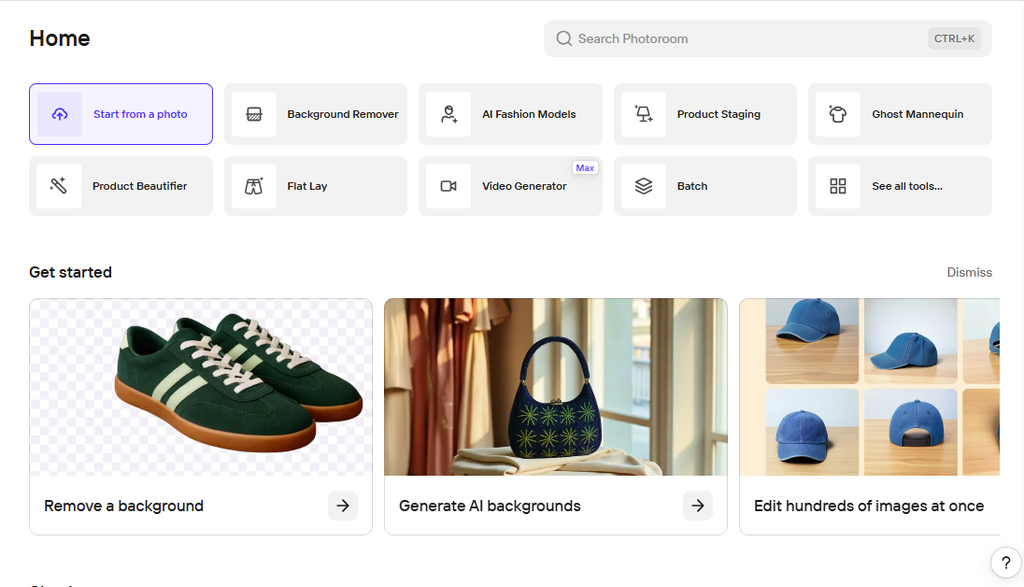
Photoroom includes several AI-powered tools designed to simplify product photography and ecommerce content creation. The following features are the most useful for sellers who want faster editing, consistent visuals, and less manual work.
1. Background Removal
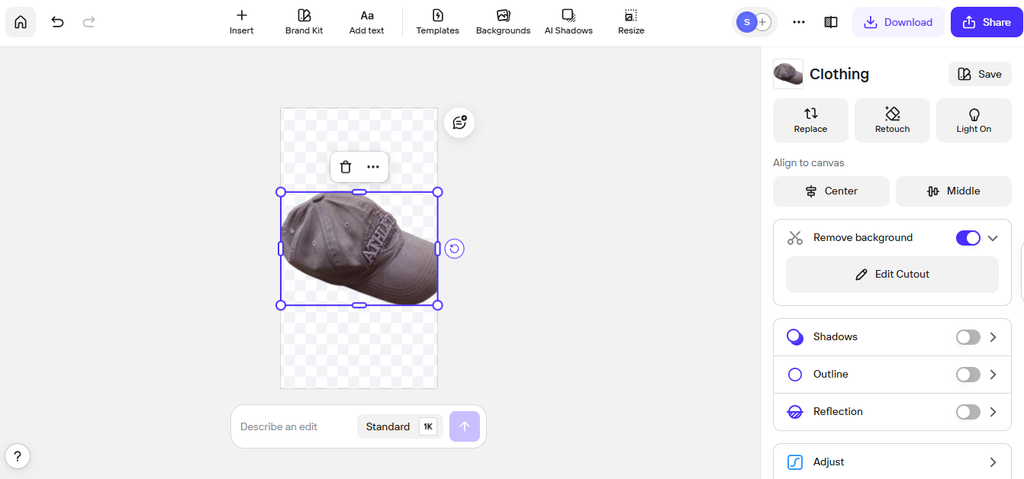
Background removal remains the platform’s foundational feature. It is particularly useful when sellers photograph products against cluttered or inconsistent surroundings. The AI can isolate the subject and prepare it for another visual treatment.
G2 reviewers repeatedly identify background removal as one of Photoroom’s strongest capabilities. Some users also report that detailed edges can require additional correction. That limitation is worth remembering. Simple products are easier. Hair, transparent packaging, fine fabric, and irregular edges demand more scrutiny.
Best for: Marketplace listings, product catalogs, and quick social creatives.
Watch for: Fine-edge accuracy on complicated subjects.
2. AI Backgrounds

A plain background is useful for many listings. It is not always ideal for marketing. AI backgrounds allow sellers to create more contextual product staging without arranging a physical photoshoot.
This can be useful for social ads, landing pages, seasonal campaigns, and lifestyle imagery. The important question is not whether the scene looks impressive. It is whether the scene looks commercially plausible.
Watch for inconsistent shadows, strange perspective, and lighting that does not match the product.
3. Product Fixer
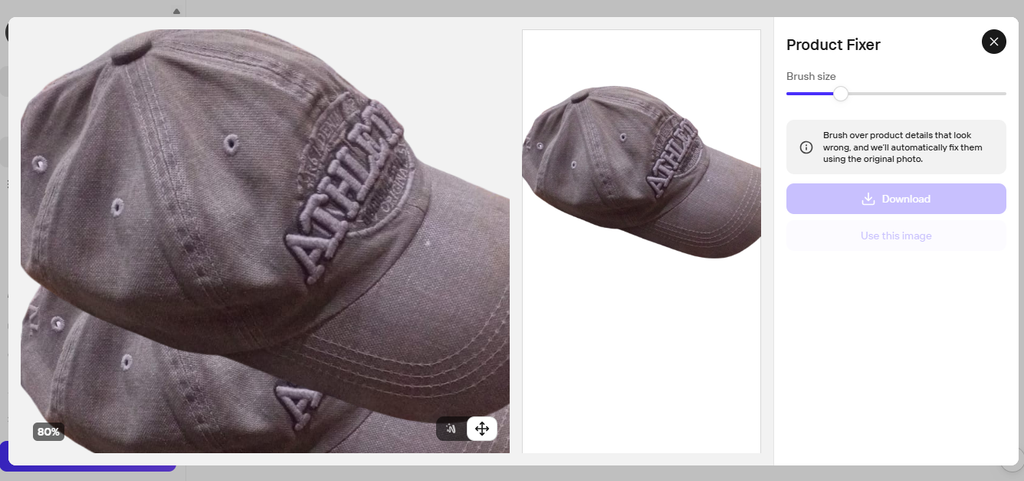
This is one of Photoroom’s more interesting 2026 additions. Product Fixer lets users provide an accurate reference image, mark an incorrect area, and ask Photoroom to repair that section. The company says these corrections do not consume additional AI credits.
That solves a problem common to AI-generated product images. Generation is often easier than correction.
A model may create an attractive scene but alter a logo or product detail. Product Fixer is designed to repair that mismatch without rebuilding the entire image.
4. Batch Editing
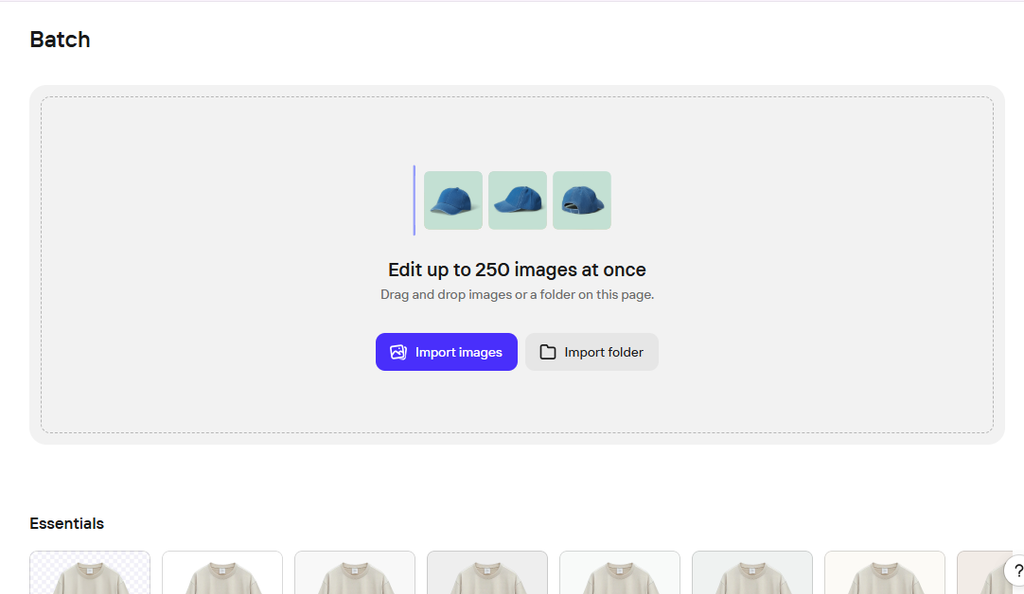
Batch editing is where Photoroom becomes more compelling for larger catalogs. The current workflow can apply e-commerce AI tools across up to 250 images. That includes product staging, recoloring, virtual models, flat lays, and other editing functions.
This is more than convenience. It can create catalog consistency. When every SKU uses similar framing, shadows, and backgrounds, a store looks more cohesive. That consistency is easy to overlook when evaluating individual images.
Yet shoppers experience the catalog as a whole.
5. AI Fashion Models
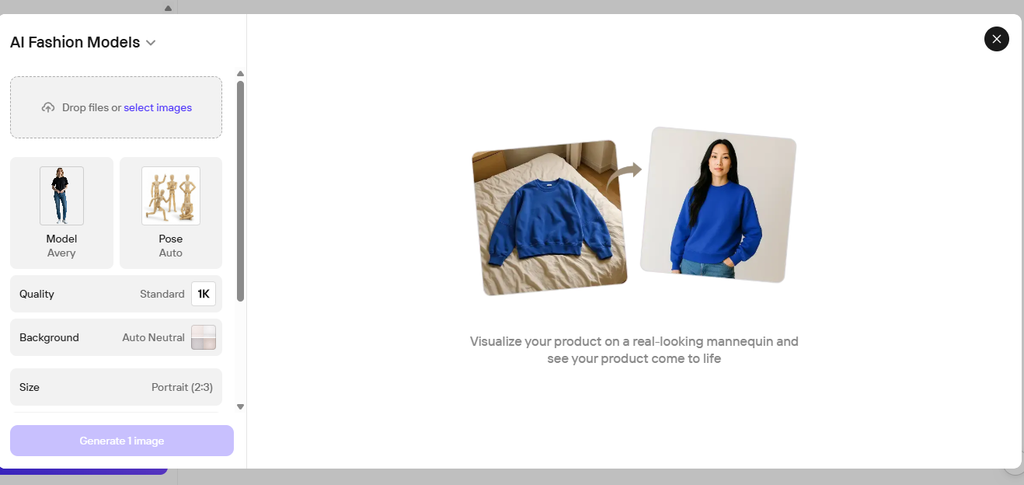
Photoroom has also moved into AI-generated fashion presentation. Its 2026 updates introduced multi-product AI Fashion Model workflows that can place up to four clothing items on one generated model.
That could reduce the need for repeated apparel shoots. However, clothing deserves stricter inspection than generic objects.
Check garment shape, seams, prints, proportions, and colors before publishing.
Photoroom can handle the visual side of content production, while the best AI tools for bloggers can help with research, writing, and publishing.
A Real-World Ecommerce Example
GoodBuy Gear provides a useful example of why visual consistency matters. The resale marketplace used Photoroom to standardize product imagery across its workflow. Photoroom’s published case study reports a 23% increase in conversion rate after the implementation.
That result should not be interpreted as proof that Photoroom will automatically increase every store’s conversions. The implementation involved a broader operational workflow. Still, the case highlights something many reviews miss. Visual consistency can become an operational advantage.
A seller with hundreds of listings does not necessarily need spectacular images. They need a repeatable system that produces credible images without slowing product launches.
Real Workflow: How I Would Test Photoroom
For a genuine hands-on review, the strongest test is not one perfect product.
Use several difficult examples.
Test 1: Simple Product
Start with a clean object on a normal background.
Check:
- Subject isolation
- Edge quality
- Color accuracy
- Export quality
Test 2: Complicated Edges
Use clothing, hair, straps, transparent packaging, or irregular shapes.
Look for:
- Jagged edges
- Missing details
- Incorrect cutouts
- Manual correction requirements
Test 3: AI Background
Place the same product into a generated scene.
Check whether:
- Perspective matches
- Shadows look believable
- Product scale feels realistic
- Lighting makes sense
Test 4: Batch Workflow
Upload multiple related products. Then compare whether the final product visuals maintain similarity:
- Background style
- Framing
- Shadows
- Color balance
- Product scale
A complete content workflow needs more than visuals. If you’re also creating articles around your products, see our guide to the 9 Best AI Blog Writers in 2026.
Photoroom Pricing: What Are You Actually Paying For?
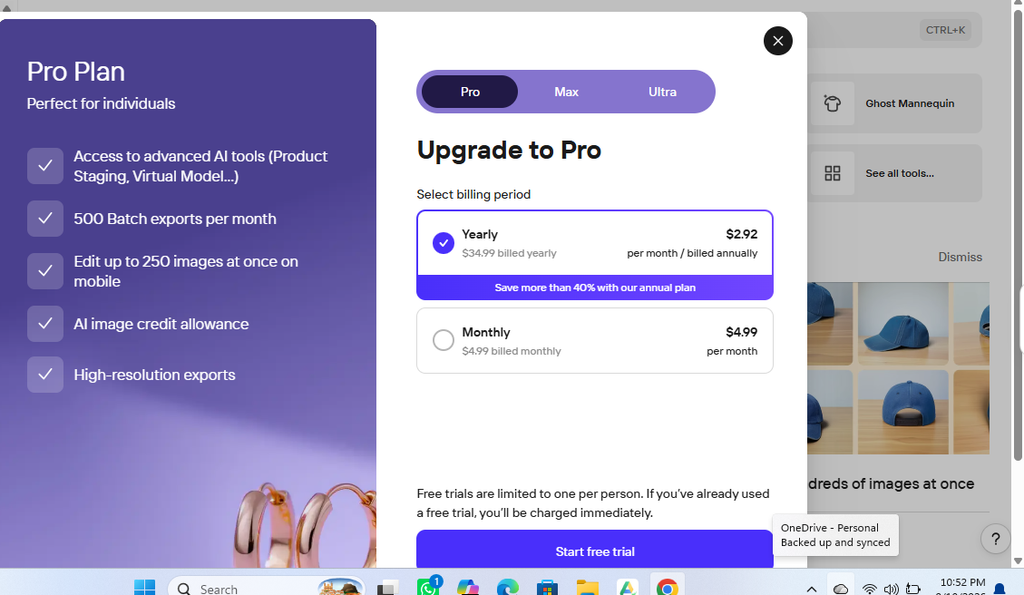
The current Photoroom pricing structure includes Free, Pro, Max, and Ultra plans, with Enterprise available for larger requirements. The official pricing page currently lists Pro with 8,000 AI credits and 1,000 exports, Max with 25,000 credits and 3,000 exports, and Ultra with 75,000 credits and 10,000 exports.
| Plan | Best for | AI credits | Exports |
| Free | Testing | Limited | Limited |
| Pro | Solopreneurs | 8,000 | 1,000 |
| Max | Small businesses | 25,000 | 3,000 |
| Ultra | Growing brands | 75,000 | 10,000 |
| Enterprise | Larger teams | Custom | Custom |
The official page displays billing options and features that can change. Check it before purchasing rather than relying on an older review.
One useful detail is the Space-based subscription model. Photoroom says one paid Space can include up to 50 people without additional user charges.
That could make the pricing more interesting for small teams.
Is Photoroom Free?
Yes, there is a free plan. Photoroom says its Free Space is intended for basic visuals and exploring AI-assisted product imagery. However, it has feature restrictions and monthly export limits.
I would treat the free plan as a testing route.
Do not test only easy images.
Try the products that are hardest to edit. That tells you whether a paid plan will actually improve your workflow.
Photoroom Pros and Cons
Photoroom is especially useful for sellers, marketers, and small businesses that need to create professional-looking product images quickly. Its features are focused on simplifying common editing tasks, but it may not offer the same level of control as advanced desktop design software. Here are the main advantages and limitations to consider.
Pros
- Excellent focus on product image editing
- Fast background removal
- Useful AI-generated backgrounds
- Strong batch-editing potential
- Designed around e-commerce workflows
- Accessible for non-designers
- Useful tools for product correction and enhancement
Cons
- Advanced workflows can consume AI credits
- Complex products may still need manual corrections
- It does not replace a full professional editor
- Customer support experiences appear inconsistent
- Heavy users need to monitor usage limits
The last two points are particularly important because they rarely appear in feature-focused reviews.
A tool can save editing time while still creating operational friction elsewhere. For a business, both sides belong in the buying decision.
Photoroom vs Alternatives
There is no universal winner among Photoroom alternatives. The better choice depends on the type of work you actually perform.
| Tool | Best for | Main advantage |
| Photoroom | Ecommerce visuals | Fast product workflows |
| Canva | General design | Templates and broader design tools |
| Photoshop | Advanced editing | Granular manual control |
| Pixelcut | Quick product content | Lightweight AI workflows |
Photoroom’s biggest advantage is specialization.
Canva covers a much wider design ecosystem. Photoshop offers considerably deeper control. Other AI editors may focus more heavily on rapid social content.
Photoroom sits somewhere between those extremes.
It is less intimidating than a professional desktop editor. Yet it offers more e-commerce-specific automation than a basic background-removal tool.
Who Should Use Photoroom?
Photoroom is particularly suitable for:
- Ecommerce store owners
- Marketplace sellers
- Small product brands
- Resellers
- Social-commerce businesses
- Apparel sellers
- Catalog teams
- Solo entrepreneurs
The platform becomes more valuable as image volume increases. Editing one image manually is manageable. Editing hundreds creates a different problem. That is where batch photo editing can become a genuine productivity advantage.
Who Should Skip It?
You may want another solution if you:
- Need advanced manual compositing
- Perform professional retouching
- Require complete layer-level control
- Edit only a few images each month
- Already have an established Photoshop workflow
The goal is not to find the most powerful editor.
It is to find the shortest reliable path to your finished image.
Final Verdict: Is Photoroom Worth It?
This Photoroom review points to a fairly clear conclusion. Photoroom is strongest when image production becomes repetitive.
Its background removal, AI backgrounds, batch editing, product staging, and correction tools can compress several editing steps into one workflow. Recent 2026 updates also show a clear push toward larger ecommerce catalogs and more structured production.
However, it is not a replacement for every professional editor. Complex products still require inspection. AI-generated scenes can introduce subtle inaccuracies. Paid users also need to understand credits before scaling production.
The real selling point is therefore not the number of features. It is workflow compression. If you run an ecommerce store, start with the free plan. Test your hardest products first. Compare the time saved against the plan’s credits and export limits.
That gives you a much better buying signal than comparing feature lists alone.
FAQs About Photoroom
Is Photoroom worth it in 2026?
Photoroom is worth considering if you regularly create ecommerce product images. Its batch workflows become especially useful as your product catalog grows.
Is Photoroom free?
Yes. Photoroom offers a Free plan with limited features and exports. Paid plans provide higher allowances and additional capabilities.
What is Photoroom mainly used for?
Photoroom is mainly used for product photo editing, background removal, AI backgrounds, product staging, resizing, retouching, and e-commerce visual creation.
Is Photoroom better than Photoshop?
Not for every workflow. Photoroom is better suited to fast automated editing. Photoshop offers deeper manual control for complex retouching and compositing.
What are the best Photoroom alternatives?
Canva is useful for broader design work. Photoshop suits advanced editing. Pixelcut is another option for quick AI product visuals.
Does Photoroom use AI credits?
Yes. Several advanced AI functions use credits depending on the plan and feature. Check the current official pricing page before estimating monthly costs.
Can Photoroom edit many product images at once?
Yes. Its current Batch workflow supports AI tools across up to 250 images, although feature availability and export limits depend on the subscription.
Final Takeaway
Photoroom is most compelling when product-image production becomes repetitive. Its biggest advantage is not simply removing backgrounds. It brings multiple ecommerce visual tasks into one streamlined workflow.
For a growing catalog, this can save meaningful production time. Before subscribing, test difficult images rather than perfect ones. Check product accuracy, edge quality, background realism, exports, and credit usage. Then decide whether the time saved justifies the subscription.
If you also need to turn those product visuals into marketing videos, consider Revid AI or Pictory AI as complementary tools.
For more practical AI-tool reviews, comparisons, and workflow guides, explore Bloggersta.
One Response