
Small business owners don’t need another shiny app; they need fewer late nights and faster decisions. According to Thryv’s 2025 national survey, small business AI use jumped from 39% in 2024 to 55% in 2025. So, which AI tools should owners use in 2026?
| Quick Answer The best AI tools for small business owners in 2026 are ChatGPT, Canva AI, Zapier, HubSpot Breeze AI, Microsoft Copilot, Notion AI, Grammarly, QuickBooks AI, and Perplexity. These tools solve major daily problems like content creation, design, workflow automation, CRM automation, customer support, invoice tracking, meeting notes, and business research. Now, let’s break down which tool fits each business need. |
What are Best AI Tools for Small Business Owners in 2026
The Best AI tools for small business owners in 2026 include ChatGPT for writing and planning, Canva AI for design, Zapier for workflow automation, HubSpot Breeze AI for sales and CRM, Microsoft Copilot for office work, Notion AI for team knowledge, Grammarly for better communication, QuickBooks AI for finance and Perplexity for research.
Start with one daily headache. If writing takes too long, choose ChatGPT. If design slows you down, try Canva AI. If follow-ups fall through the cracks, use Zapier or HubSpot Breeze AI.
- Best overall: ChatGPT
- Best for design: Canva AI
- Best for automation: Zapier
- Best for CRM and sales: HubSpot Breeze AI
- Best for office work: Microsoft Copilot
- Best for finance: QuickBooks AI
Why Small Business Owners Need AI Tools in 2026
Running a small business often feels like driving a car while building the road. You need sales, service, marketing, admin, reporting and planning. Yet the day still has only twenty-four hours. That’s why AI tools for small business now matter so much.
AI helps with routine work that eats your calendar. A salon can draft promotional texts faster. A local store can create product posts in minutes. A consultant can turn meeting notes into client-ready next steps. An online seller can automate order updates. Used well, AI becomes a quiet assistant that keeps the wheels turning.
How to Choose the Right AI Tool for Your Business
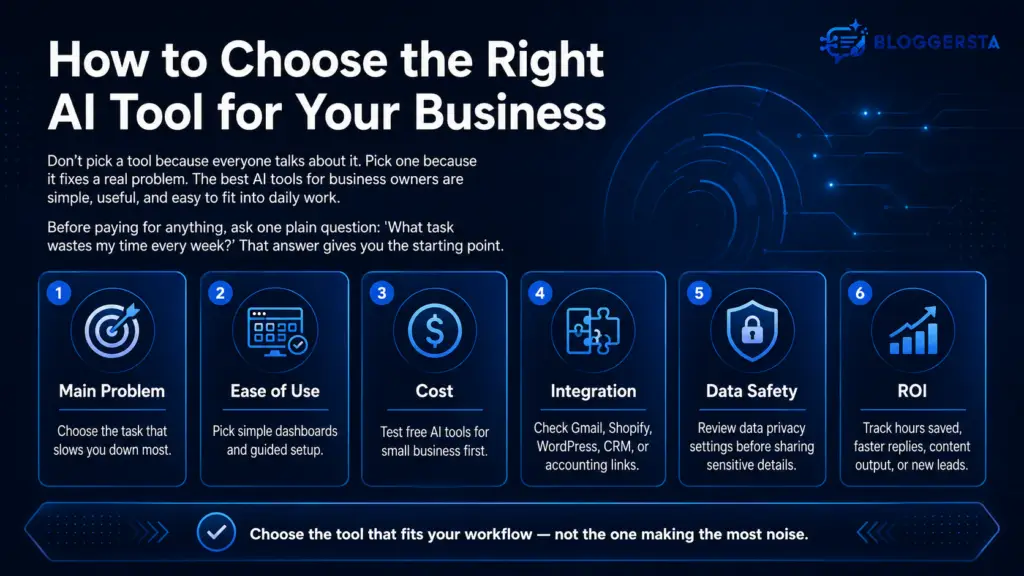
Don’t pick a tool because everyone talks about it. Pick one because it fixes a real problem. The best AI tools for business owners are simple, useful and easy to fit into daily work.
Before paying for anything, ask one plain question. “What task wastes my time every week?” That answer gives you the starting point.
- Main problem: Choose the task that slows you down most
- Ease of use: Pick simple dashboards and guided setup
- Cost: Test free AI tools for small business first
- Integration: Check Gmail, Shopify, WordPress, CRM, or accounting links
- Data safety: Review data privacy settings before sharing sensitive details
- ROI: Track hours saved, faster replies, content output, or new leads
Best AI Tools for Small Business Owners in 2026
The best stack depends on your business model. Still, these tools cover the work most owners repeat every week. They help with content creation, design, sales, operations, finance, research and business productivity.
Think of this list like a toolbox. You don’t need every tool today. You need the right wrench for the loose bolt in front of you.
ChatGPT: Best Overall AI Tool for Small Business
ChatGPT is one of the most useful AI productivity tools for business because it helps across many tasks. You can use it for emails, blog outlines, ad copy, SOPs, customer replies, product descriptions, sales scripts and planning.
It’s also helpful when your brain feels stuck. For example, a cleaning company owner can ask ChatGPT for five follow-up emails after a quote request. That saves time and keeps leads warm.
- Best for: Writing, planning, brainstorming and customer reply drafts
- Use case: Blogs, ads, emails, SOPs and product copy
- ROI angle: Saves writing time and reduces blank-page stress
- Best user: Solo owners, marketers, consultants and agencies
Canva AI: Best AI Design Tool for Marketing
Canva AI is ideal for owners who need good-looking visuals without hiring a designer for every small task. It helps create posts, flyers, menus, banners, presentations, ads and product graphics.
For example, a coffee shop can create a weekend offer graphic in minutes. A boutique can make Pinterest pins for new arrivals. These AI design tools help brands show up more often without draining the budget.
- Best for: Social posts, flyers, ads and quick brand graphics
- Use case: Facebook ads, menus, banners and Pinterest graphics
- ROI angle: Cuts design time for daily marketing
- Best user: Shops, restaurants, creators and eCommerce sellers
Zapier: Best AI Automation Tool for Small Business
Zapier is one of the strongest AI automation tools for small business because it connects apps and handles repeat tasks. It can move leads from forms into spreadsheets, send alerts, create tasks, update CRM records and trigger follow-up emails.
Picture a lead form as a doorbell. Without automation, someone must hear it, answer it, write it down and follow up. Zapier can handle much of that path. That’s why many owners treat it as one of their favorite no-code AI tools.
- Best for: App connections and repeat workflows
- Use case: Forms, emails, CRM updates, tasks and alerts
- ROI angle: Saves admin time and reduces missed follow-ups
- Best user: Businesses with repeatable steps
HubSpot Breeze AI: Best for CRM, Sales and Marketing
HubSpot Breeze AI works well for businesses that care about leads, follow-ups, contacts and sales pipelines. It supports CRM tasks, marketing work, customer records and service processes.
A small agency, for example, can use it to draft sales outreach, summarize contact history and manage campaign ideas. When leads sit inside one system, follow-up becomes easier. That’s where CRM automation can protect revenue from slipping through the cracks.
- Best for: CRM, sales, marketing and customer support
- Use case: Lead tracking, contact summaries and campaign drafts
- ROI angle: Helps teams follow up faster
- Best user: Agencies, service firms and growing sales teams
Microsoft Copilot: Best for Office Productivity
Microsoft Copilot makes sense for teams already using Word, Excel, Outlook, PowerPoint and Teams. It helps draft documents, summarize emails, review spreadsheets, prepare presentations and process meeting information.
If your day lives inside Microsoft apps, Copilot can feel like a helper sitting inside your desk. It’s useful for reports, internal summaries, client decks and analysis. For many teams, it supports team productivity without changing tools.
- Best for: Documents, sheets, email and meetings
- Use case: Reports, presentations, summaries and Excel analysis
- ROI angle: Saves time inside familiar apps
- Best user: Teams using Microsoft 365 daily
Notion AI: Best for Notes, Projects and Team Knowledge
Notion AI helps organize messy ideas, project pages, team notes, task lists and internal documents. It works well for businesses that have too many scattered files and too many “where is that?” moments.
A consultant can turn call notes into action items. A small team can build a knowledge hub for SOPs. For AI tools for startups, Notion AI is useful because it keeps early chaos from becoming a monster later.
- Best for: Notes, projects, knowledge and planning
- Use case: Meeting summaries, task pages, SOPs and databases
- ROI angle: Reduces repeat explanations
- Best user: Consultants, creators, startups and project teams
Grammarly: Best for Clear Business Communication
Grammarly helps improve emails, proposals, support replies, reports, website copy and sales messages. It catches awkward wording and improves tone before your customer sees the message.
This matters more than people think. A sloppy proposal can make a good business look careless. Grammarly gives your writing a second pair of eyes. That’s handy when you’re moving fast.
- Best for: Editing, tone, clarity and client communication
- Use case: Emails, proposals, reports and support replies
- ROI angle: Reduces writing mistakes and builds trust
- Best user: Sales teams, agencies, consultants and service brands
QuickBooks AI: Best for Finance and Invoice Tracking
QuickBooks AI is useful for owners who want better finance control without drowning in spreadsheets. It can support bookkeeping tasks, expense review, cash flow checks, payment work and invoice tracking.
For example, a freelancer can spot unpaid invoices faster. A retail owner can review expenses without digging through piles of records. Finance is not glamorous, sure. But cash flow keeps the lights on.
- Best for: Bookkeeping, invoices, expenses and cash flow
- Use case: Transaction review, payment tracking and finance insights
- ROI angle: Saves admin time and reduces manual finance work
- Best user: Freelancers, retailers, service providers and small teams
Perplexity: Best for Fast Business Research
Perplexity works well when you need quick research with sources. Business owners can use it to study competitors, compare products, gather trend ideas, check industry questions and research content topics.
A marketing consultant might use it before writing a strategy. An eCommerce owner might compare product demand. It’s useful when you need answers fast, not a rabbit hole of tabs.
- Best for: Research, competitor checks and market questions
- Use case: Content research, product research and trend checks
- ROI angle: Speeds up decisions before campaigns or sales work
- Best user: Founders, marketers, writers and consultants
Also Read: Best AI Tools for Email Marketing in 2026
Quick Comparison Table of Small Business AI Tools
The table below gives a fast view of the top small business AI tools. Use it to match each tool with the job it handles best.
| Tool | Best For | Best Small Business Use | Skill Level |
| ChatGPT | Writing and planning | Emails, blogs, SOPs, scripts | Beginner |
| Canva AI | Design | Social posts, flyers, ads | Beginner |
| Zapier | Automation | App connections and follow-ups | Beginner to intermediate |
| HubSpot Breeze AI | CRM and sales | Lead tracking and sales support | Beginner |
| Microsoft Copilot | Office productivity | Docs, sheets, email, meetings | Beginner |
| Notion AI | Team knowledge | Notes, tasks, internal docs | Beginner |
| Grammarly | Communication | Emails, proposals, support replies | Beginner |
| QuickBooks AI | Finance | Invoices, expenses, cash flow | Beginner |
| Perplexity | Research | Competitor and market research | Beginner |
Start with one tool before adding another. If you try five at once, you may create more confusion than progress. A smart AI stack grows with your process, not ahead of it.
Free vs Paid AI Tools: What Should Small Businesses Choose?
Free plans are perfect for testing. They let you learn the tool, try real tasks and see if it fits your workflow. Many AI tools for entrepreneurs offer free access, trials, or limited features.
Paid plans make sense when a tool saves several hours each week or helps bring in revenue. For example, if ChatGPT helps write daily sales emails, paying may be easy to justify. If Canva AI helps produce weekly ads, that upgrade may also make sense.
- Choose free: When testing a new workflow
- Choose paid: When the tool supports sales, service, or high-volume content
- Upgrade slowly: Pay only after you track results
- Watch limits: Free plans may limit usage, storage, exports, or team seats
How to Use AI Tools Safely in a Small Business
AI can help, but it still needs guardrails. Don’t paste private customer details, bank data, contracts, passwords, or employee information into tools without checking privacy settings first. That’s plain business hygiene.
Also, review AI outputs before publishing or sending them. AI may sound confident even when it gets a date, price, name, or claim wrong. Treat it like a fast junior assistant. Helpful? Yes. Perfect? No.
- Customer data: Share only what your platform policy allows
- Passwords: Never place login details inside prompts
- Financial records: Use trusted finance tools for sensitive work
- Human review: Check facts, pricing, claims and tone
- Brand voice: Set clear writing rules for your team
- Access control: Give each user only the access they need
Final Takeaway: Start Small, Then Automate
The best AI setup is not the biggest one. It’s the one your team actually uses. For many owners, a simple mix works best: ChatGPT for writing, Canva AI for design and one automation or CRM tool for follow-ups.
Pick one painful task this week. Test one tool for two weeks. Track time saved, response speed, content output, or new leads. Once the gain feels real, add another tool. That’s how AI business software 2026 becomes practical instead of overwhelming.
Frequently Asked Questions
Which AI Tools Deliver the Strongest ROI for Small Businesses?
The strongest ROI usually comes from tools that save time or support revenue. ChatGPT helps with content, emails, customer replies, SOPs and sales scripts. Canva AI helps create graphics without paying for every small design. Zapier automates lead capture, alerts and follow-ups. If you repeat a task every week, that task is often the best place to start.
Are There Genuinely Free AI Tools for Small Business Owners?
Yes, many free AI tools for small business users are worth testing. ChatGPT offers free access for everyday tasks. Canva AI includes free AI-powered design features. Other tools may offer trials, limited credits, or starter plans. Free plans are best for learning and testing. Once a tool saves time or helps generate sales, then a paid plan may make sense.
Do I Need Technical or Coding Skills to Use AI Business Tools?
No, most modern AI tools use prompts, templates, menus and visual builders. You don’t need coding skills to draft emails, create graphics, build simple automations, summarize notes, or improve customer replies. Tools like ChatGPT, Canva AI, HubSpot Breeze AI, Notion AI and Zapier are built for regular users. Basic prompting helps, though. Clear input usually gives better output.
How Can Small Business Owners Safely Use AI Tools?
Use AI with clear rules. Avoid sharing passwords, private customer details, bank data, contracts, or sensitive employee information unless the platform fits your security needs. Review all AI-written content before using it with customers. Check tone, facts, dates, pricing and claims. For sensitive finance work, use trusted accounting software instead of random copy-paste prompts.
Will AI Tools Replace My Employees or Agency?
AI tools work best as assistants, not replacements. They can draft, summarize, organize, schedule, research and create first versions. Your people still bring judgment, taste, strategy, customer insight and relationship skills. A good agency or employee also knows what not to publish. Let AI handle the busywork so humans can focus on higher-value decisions.