

Creating one video is no longer the hardest part. Keeping the entire production pipeline moving is. Adobe Express found that 71% of surveyed creators have used AI video generation or editing tools. More than half of those creators save over 30 minutes per video. Meanwhile, Wistia found that 57% of teams spend more time creating videos than promoting them.
That gap explains why creators are moving beyond isolated AI tools. The bigger opportunity is connecting AI video creation, editing, optimization, and publishing into one repeatable system. This guide explains how that workflow works and where human judgment still belongs.
Quick Answer
AI video automation connects several production tasks into one coordinated workflow. Instead of creating a script, generating visuals, editing clips, writing metadata, and uploading manually, automation passes information between connected tools. A typical pipeline can move from content idea to script, assets, editing, formatting, approval, and publishing.
The important distinction is that automation does not necessarily mean “hands-free.” The strongest workflows automate repetitive handoffs while keeping humans responsible for creative direction, factual checks, brand consistency, and final approval.
What Is AI Video Automation?
AI video automation is a connected system that uses AI models and workflow software to move video content through multiple production stages. The AI handles tasks such as script generation, voice creation, visual production, and editing. Automation handles the movement of files, instructions, metadata, triggers, and outputs between those stages.
A simple workflow looks like this:
Idea → Script → Visuals → Voiceover → Editing → Captions → Metadata → Review → Publishing → Analytics
The exact tools can change. The architecture remains surprisingly similar.
AI Video Generation vs AI Video Automation
These terms sound interchangeable, but they solve different problems. An AI video generator mainly creates video content from prompts, images, scripts, or other inputs.
| Feature | AI Video Generation | AI Video Automation |
| Main purpose | Creates video content | Connects the production pipeline |
| Script generation | Often available | Can be automated |
| Visual generation | Core feature | One workflow stage |
| Editing | Tool dependent | Can be connected automatically |
| Captions | Often available | Can become an automated step |
| Metadata | Usually separate | Can be generated automatically |
| Publishing | Usually separate | Can be connected to workflow |
| Analytics | Limited | Can feed future workflows |
| Human review | Optional | Recommended |
This means you do not necessarily need to replace every tool you already use. The bigger improvement often comes from orchestrating existing tools so fewer manual decisions are required between stages.
How an AI Video Automation Workflow Works
Map the production process before choosing software. Define each stage’s input, output, and quality standard to create a continuous content pipeline and avoid new bottlenecks.
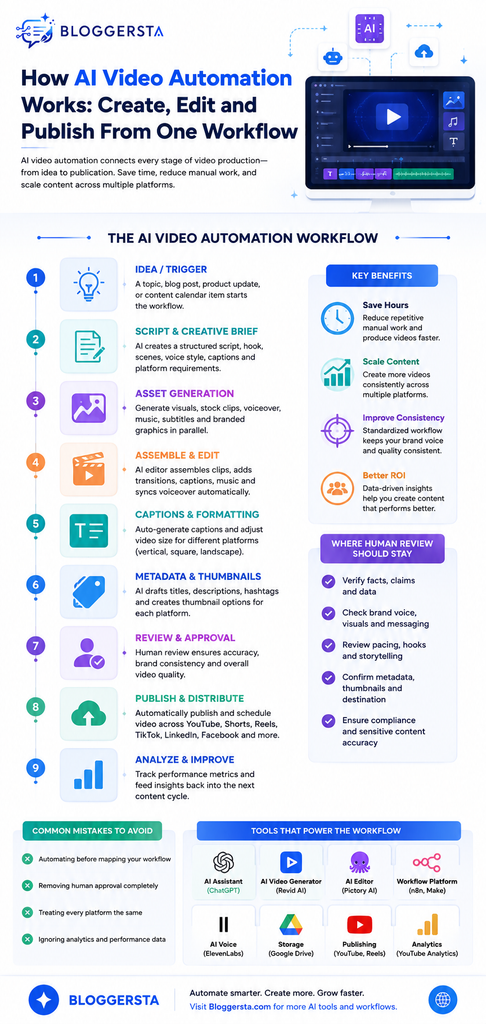
1. Start With an Idea or Content Trigger
Every workflow needs a starting signal, such as a spreadsheet topic, scheduled content item, blog post, product update, or form submission. Clear inputs improve every later stage. Include the audience, topic, platform, length, angle, and call to action.
For example:
- Topic: How AI video automation works
- Audience: Small marketing teams
- Format: 60-second vertical video
- Goal: Explain the workflow
- Tone: Educational
- CTA: Visit the related Bloggersta guide
The workflow can then pass these details to the next stage.
2. Build the Script and Creative Brief
After the trigger fires, AI can turn the idea into a production brief with a hook, script, scene descriptions, voiceover, visuals, captions, and platform requirements. Using one central content brief keeps every stage aligned and reduces prompt drift.
A brief might include:
- Hook: The hidden problem with separate AI video tools
- Core message: Automation connects the production chain
- Scene direction: Show a pipeline from idea to publishing
- Voice style: Clear and authoritative
- Caption style: Short educational phrases
- CTA: Read the complete workflow guide
3. Generate Visual and Audio Assets
The workflow can create visuals, stock footage, illustrations, voiceovers, music, subtitles, and branded graphics. These tasks can run in parallel. One branch can create visuals while another prepares narration or captions. The outputs then come together during assembly.
This modular setup also makes fixes easier. You can replace a failed voiceover or an incorrect scene without restarting the entire workflow.
4. Assemble and Edit the Video
An automated editor can combine the assets using rules for timing, transitions, captions, music, voiceover synchronization, and aspect ratios. Automation removes much of the repetitive editing work. Adobe Express found that editing was the most common AI video use among surveyed creators at 58%. It also found that 56% of AI-using creators save more than 30 minutes per video.
However, human review still matters. Templates improve consistency, while people can catch pacing issues, awkward cuts, and creative problems.
Why the Workflow Matters More Than the Individual AI Tool
The best AI video generator cannot eliminate manual work if you still need to download files, create captions, resize videos, write metadata, and schedule posts.
A connected workflow reduces these handoffs, preventing missing files, version errors, delays, and forgotten publishing tasks. As AI increases video production, workflow management becomes just as important as the tools themselves.
The Hidden Bottleneck: Moving Content Between Tools
Imagine creating a script in one platform, a voiceover in another, visuals somewhere else, and the final edit in another application. Every tool may work perfectly.
The problem appears between them.
Someone still has to transfer files, preserve versions, match scenes, check naming conventions, and ensure the correct output reaches the correct destination.
That is where workflow orchestration becomes valuable. A connected system can track whether a video is waiting for generation, ready for editing, awaiting approval, or already published.
This creates state awareness that individual AI tools often lack.
How Automated Publishing Completes the Workflow
A finished video is only an asset until someone distributes it. Publishing automation connects the final render with social media scheduling, platform metadata, thumbnails, descriptions, and destination accounts. Instead of treating publishing as a separate administrative task, the workflow can make distribution another predefined production stage.
This matters because content teams often create faster than they distribute. Wistia’s research found that 57% of teams spend more time creating videos than promoting them. That imbalance can leave valuable content sitting in folders rather than reaching an audience.
One Master Video Can Become Several Platform Versions
A common mistake is publishing the exact same file everywhere. Different platforms reward different viewing behaviors. A long-form YouTube video may need a condensed vertical version for Shorts. LinkedIn may need stronger context, while TikTok may need a faster opening.
An automated workflow can create these variants from one approved master. This turns video content repurposing into a systematic process rather than another manual editing assignment.
| Platform | Typical Workflow Adjustment | Automation Opportunity |
| YouTube | Longer edit and detailed metadata | Upload and scheduling |
| YouTube Shorts | Vertical crop and tighter hook | Automatic resizing |
| Instagram Reels | Vertical format and captions | Caption generation |
| TikTok | Faster pacing and concise copy | Format conversion |
| More contextual introduction | Platform-specific copy | |
| Flexible video format | Scheduled distribution |
The goal is not to create six completely different videos. It is to preserve the central message while adapting the presentation to each destination.
How AI Handles Video Metadata
Publishing automation becomes more useful when the workflow generates supporting information alongside the video. AI can create draft titles, descriptions, hashtags, captions, keywords, and calls to action from the approved script.
However, metadata should not be generated from the final video alone. The workflow should retain the original content brief because it contains the intended audience, topic, angle, and conversion goal.
This creates a context-preserving workflow. The title generator knows why the video exists rather than merely describing what appears on screen.
Metadata Should Still Pass Through a Quality Check
AI-generated metadata can introduce unsupported claims or repetitive phrasing. A short human review can prevent those issues before publication.
Check:
- Title: Does it accurately represent the video?
- Description: Does it add useful context?
- Keywords: Are they relevant rather than stuffed?
- CTA: Does it match the video’s purpose?
- Hashtags: Are they appropriate for the platform?
This small checkpoint can protect both search visibility and brand credibility.
What Happens After Publishing?
The most sophisticated workflows do not stop when a video goes live. They create a feedback loop where video analytics, audience behavior, and publishing results inform the next production cycle.
Imagine a workflow that discovers one recurring pattern. Videos with direct hooks consistently generate stronger retention during their opening seconds. That insight can become a rule for future scripts.
The cycle then becomes:
Create → Publish → Measure → Learn → Adjust → Create Again
This is more valuable than simply generating videos faster. It allows automation to become a learning system rather than a content factory.
Useful Signals to Feed Back Into the Workflow
Different metrics answer different questions. Views show reach, while retention reveals whether people actually stayed. Engagement can indicate resonance. Conversions show whether the video achieved its business purpose.
Focus on:
- Watch time: Measures sustained viewing.
- Audience retention: Reveals where attention drops.
- Engagement: Shows audience response.
- Click-through rate: Measures interest beyond the video.
- Conversions: Connects content with business outcomes.
Avoid optimizing the entire workflow around views alone. A video with fewer views can still outperform a viral clip if it generates better-qualified traffic.
Common AI Video Automation Mistakes
Automation can magnify both good systems and bad ones. If the underlying process is poorly designed, automating it simply produces mistakes faster. The most useful approach is to identify failure points before adding more tools.
1. Automating Before Mapping the Workflow
Teams sometimes purchase several AI tools before documenting what actually needs automation. This can create overlapping subscriptions and unnecessary handoffs.
Start by writing down every manual step. Then identify which steps are repetitive, predictable, and measurable. Those are usually the best automation candidates.
2. Removing Human Approval Completely
Fully autonomous publishing sounds efficient. Yet one incorrect claim or distorted product visual can create disproportionate damage.
Keep a human-in-the-loop workflow for sensitive content, brand campaigns, product claims, and important announcements. Automation should reduce repetitive work without eliminating accountability.
3. Treating Every Platform Identically
A single video file does not automatically become a good multi-platform asset. Aspect ratio, pacing, captions, copy, and audience expectations vary.
Build platform rules directly into the workflow. This allows the system to generate appropriate variants without requiring someone to remember every formatting requirement manually.
4. Ignoring Failed Generations
AI generation is not always deterministic. A video model may produce an unusable scene, an incorrect object, or a strange visual artifact.
A resilient workflow should therefore include error handling, retries, status checks, and fallback paths. If generation fails, the system should know what happens next rather than simply stopping.
Which Tools Can Build an AI Video Automation Workflow?
There is no universal tool stack because different teams begin with different inputs. Some start with blog posts. Others work from product pages, spreadsheets, scripts, or social content calendars.
A practical workflow may combine several categories:
| Workflow Stage | Tool Category | Purpose |
| Planning | AI assistant | Ideas and scripts |
| Video generation | AI video generator | Visual production |
| Voice | AI voice generator | Narration |
| Editing | AI video editor | Assembly and cleanup |
| Automation | Workflow platform | Connects stages |
| Storage | Cloud storage | Asset management |
| Publishing | Social platforms | Distribution |
| Analytics | Platform analytics | Performance feedback |
For creators who want to turn existing written content into videos, Bloggersta’s guide to the best AI tools for turning blog posts into videos can help identify suitable options for the creation stage.
Turn existing content into videos faster with Pictory AI.
Pictory is particularly relevant when written content already exists and the challenge is converting it into a more visual format.
How to Build Your First AI Video Automation Workflow
You do not need to automate an entire production department on day one. A smaller workflow is easier to test and exposes weaknesses before they become expensive.
A Practical Six-Stage Implementation
1. Define the input.
Choose one consistent trigger such as a topic, blog URL, or content-calendar row.
2. Standardize the brief.
Create fixed fields for audience, tone, length, platform, CTA, and visual direction.
3. Automate the repetitive stages.
Connect script generation, asset creation, rendering, captions, and formatting.
4. Add an approval checkpoint.
Do not let important content move directly from generation to publishing.
5. Connect distribution.
Send approved versions to the correct platform with suitable metadata.
6. Feed analytics back into planning.
Use performance data to improve future hooks, formats, and topics.
This staged approach creates a modular video workflow. You can replace individual components without rebuilding the entire production system.
When Should You Use AI Video Automation?
Automation makes the most sense when video production contains repeated patterns. A creator publishing one highly customized campaign each quarter may gain less than a team producing dozens of educational or promotional videos every month.
It becomes particularly useful for:
- High-volume content: Frequent production creates repetitive administrative work.
- Repurposing: Existing articles or webinars can become multiple video assets.
- Multi-platform publishing: One workflow can prepare several versions.
- Small teams: Automation can reduce low-value production tasks.
- Content libraries: Older assets can be refreshed and redistributed systematically.
It is less suitable when every video requires extensive bespoke cinematography, complex storytelling, or constant creative experimentation.
How AI Video Automation Changes the Creator’s Role
The biggest change may not be technical. Automation shifts creators away from repetitive production tasks and toward content strategy, creative direction, audience research, and quality control.
The creator increasingly becomes a workflow designer.
That means deciding which tasks should be automated and which decisions deserve deliberate human attention. Better automation does not necessarily mean fewer creative decisions. It means spending creative attention where it produces the greatest impact.
Conclusion: Build a Video System Instead of Chasing Faster Tools
AI video automation works by connecting individual production tasks into one coordinated pipeline. It can begin with an idea or content trigger, generate a script, create visual and audio assets, assemble the edit, prepare platform-specific versions, and move approved content toward publishing.
If you are exploring more ways to build an efficient AI-powered content pipeline, visit Bloggersta for practical guides covering AI video tools, content creation, repurposing, and workflow optimization.
Create more from the content you already have with Pictory AI.
FAQs About AI Video Automation
What is AI video automation?
AI video automation connects AI-powered creation tools with editing, formatting, publishing, and analytics stages. Instead of manually moving content between separate platforms, automated workflows pass structured information and files from one stage to another.
Can AI create, edit, and publish a video automatically?
Yes, connected workflows can automate many of these stages. However, the exact capabilities depend on the tools and platform integrations involved. A human approval step remains advisable before publishing important or brand-sensitive content.
What is the difference between AI video generation and automation?
AI video generation creates visual content from prompts, images, or scripts. Automation connects that generation step with surrounding tasks such as script creation, editing, metadata preparation, storage, scheduling, and distribution.
Is AI video automation completely hands-free?
It can be highly automated, but completely hands-free production is not always desirable. Human review helps catch factual errors, visual artifacts, incorrect claims, licensing issues, and brand inconsistencies before publication.
How can beginners start automating video production?
Start with one repeatable format and automate only predictable tasks. Connect your content input with script generation, asset creation, editing, and publishing. Once the workflow becomes reliable, add additional platforms and more sophisticated workflow automation.
Need a faster way to transform existing content into videos? Try Revid AI.
One Response